Ⅰ. 插件描述
ripgrep recursively searches directories for a regex patternⅡ. 基本信息
|
Ⅲ. 安装方法
使用Vundle管理器安装
在你的.vimrc下添加:Plugin 'burntsushi/ripgrep':source %
:PluginInstall对于Vundle版本 < 0.10.2,请用上面的Bundle替换Plugin。
使用NeoBundle管理器安装
在你的.vimrc下添加:NeoBundle 'burntsushi/ripgrep':source %
:NeoBundleInstall使用VimPlug管理器安装
在你的.vimrc下添加:Plug 'burntsushi/ripgrep':source %
:PlugInstall使用Pathogen管理器安装
在终端中运行以下命令:cd ~/.vim/bundle
git clone https://github.com/burntsushi/ripgrepⅣ. 文档说明
ripgrep (rg)
ripgrep is a line-oriented search tool that recursively searches your current
directory for a regex pattern. By default, ripgrep will respect your .gitignore
and automatically skip hidden files/directories and binary files. ripgrep
has first class support on Windows, macOS and Linux, with binary downloads
available for every release.
ripgrep is similar to other popular search tools like The Silver Searcher, ack
and grep.



Dual-licensed under MIT or the UNLICENSE.
CHANGELOG
Please see the CHANGELOG for a release history.
Documentation quick links
- Installation
- User Guide
- Frequently Asked Questions
- Regex syntax
- Configuration files
- Shell completions
- Building
- Translations
Screenshot of search results
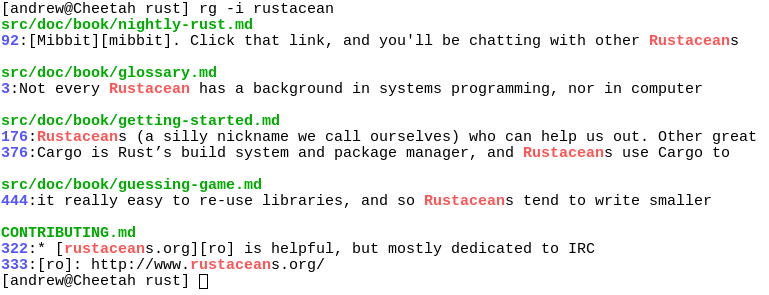
Quick examples comparing tools
This example searches the entire Linux kernel source tree (after runningmake defconfig && make -j8) for [A-Z]+_SUSPEND, where all matches must be
- Timings were collected on a system with an Intel i7-6900K 3.2 GHz, and
- was compiled with SIMD enabled.
Please remember that a single benchmark is never enough! See my
blog post on ripgrep
for a very detailed comparison with more benchmarks and analysis.
| Tool | Command | Line count | Time |
|---|---|---|---|
| ripgrep (Unicode) | rg -n -w '[A-Z]+_SUSPEND' | 450 | 0.106s |
| git grep | LC_ALL=C git grep -E -n -w '[A-Z]+_SUSPEND' | 450 | 0.553s |
| The Silver Searcher | ag -w '[A-Z]+_SUSPEND' | 450 | 0.589s |
| git grep (Unicode) | LC_ALL=en_US.UTF-8 git grep -E -n -w '[A-Z]+_SUSPEND' | 450 | 2.266s |
| sift | sift --git -n -w '[A-Z]+_SUSPEND' | 450 | 3.505s |
| ack | ack -w '[A-Z]+_SUSPEND' | 1878 | 6.823s |
| The Platinum Searcher | pt -w -e '[A-Z]+_SUSPEND' | 450 | 14.208s |
Here's another benchmark that disregards gitignore files and searches with a
whitelist instead. The corpus is the same as in the previous benchmark, and the
flags passed to each command ensure that they are doing equivalent work:
| Tool | Command | Line count | Time |
|---|---|---|---|
| ripgrep | rg -L -u -tc -n -w '[A-Z]+_SUSPEND' | 404 | 0.079s |
| ucg | ucg --type=cc -w '[A-Z]+_SUSPEND' | 390 | 0.163s |
| GNU grep | egrep -R -n --include='*.c' --include='*.h' -w '[A-Z]+_SUSPEND' | 404 | 0.611s |
(ucg has slightly different behavior in the presence of symbolic links.)
And finally, a straight-up comparison between ripgrep and GNU grep on a single
large file (~9.3GB,OpenSubtitles2016.raw.en.gz):
| Tool | Command | Line count | Time |
|---|---|---|---|
| ripgrep | rg -w 'Sherlock [A-Z]\w+' | 5268 | 2.108s |
| GNU grep | LC_ALL=C egrep -w 'Sherlock [A-Z]\w+' | 5268 | 7.014s |
In the above benchmark, passing the -n flag (for showing line numbers)
increases the times to 2.640s for ripgrep and 10.277s for GNU grep.
Why should I use ripgrep?
- It can replace many use cases served by other search tools
because it contains most of their features and is generally faster. (See
the FAQ for more details on whether ripgrep can truly
replace grep.)
- Like other tools specialized to code search, ripgrep defaults to recursive
directory search and won't search files ignored by your
.gitignore/.ignore/.rgignore files. It also ignores hidden and binary
files by default. ripgrep also implements full support for .gitignore,
whereas there are many bugs related to that functionality in other code
search tools claiming to provide the same functionality.
- ripgrep can search specific types of files. For example,
rg -tpy foo
limits your search to Python files andrg -Tjs fooexcludes Javascript
files from your search. ripgrep can be taught about new file types with
custom matching rules.
- ripgrep supports many features found in
grep, such as showing the context
of search results, searching multiple patterns, highlighting matches with
color and full Unicode support. Unlike GNU grep, ripgrep stays fast while
supporting Unicode (which is always on).
- ripgrep has optional support for switching its regex engine to use PCRE2.
Among other things, this makes it possible to use look-around and
backreferences in your patterns, which are not supported in ripgrep's default
regex engine. PCRE2 support can be enabled with -P/--pcre2 (use PCRE2
always) or --auto-hybrid-regex (use PCRE2 only if needed).
- ripgrep supports searching files in text encodings other than UTF-8, such
as UTF-16, latin-1, GBK, EUC-JP, Shift_JIS and more. (Some support for
automatically detecting UTF-16 is provided. Other text encodings must be
specifically specified with the -E/--encoding flag.)
- ripgrep supports searching files compressed in a common format (brotli,
bzip2, gzip, lz4, lzma, xz, or zstandard) with the-z/--search-zipflag. - ripgrep supports arbitrary input preprocessing filters which could be PDF
text extraction, less supported decompression, decrypting, automatic encoding
detection and so on.
In other words, use ripgrep if you like speed, filtering by default, fewer
bugs and Unicode support.
Why shouldn't I use ripgrep?
Despite initially not wanting to add every feature under the sun to ripgrep,
over time, ripgrep has grown support for most features found in other file
searching tools. This includes searching for results spanning across multiple
lines, and opt-in support for PCRE2, which provides look-around and
backreference support.
At this point, the primary reasons not to use ripgrep probably consist of one
or more of the following:
- You need a portable and ubiquitous tool. While ripgrep works on Windows,
macOS and Linux, it is not ubiquitous and it does not conform to any
standard such as POSIX. The best tool for this job is good old grep.
- There still exists some other feature (or bug) not listed in this README that
you rely on that's in another tool that isn't in ripgrep. - There is a performance edge case where ripgrep doesn't do well where another
tool does do well. (Please file a bug report!) ripgrep isn't possible to install on your machine or isn't available for your
- (Please file a bug report!)
Is it really faster than everything else?
Generally, yes. A large number of benchmarks with detailed analysis for each is
available on my blog.
Summarizing, ripgrep is fast because:
- It is built on top of
Rust's regex engine.
Rust's regex engine uses finite automata, SIMD and aggressive literal
optimizations to make searching very fast. (PCRE2 support can be opted into
with the -P/--pcre2 flag.)
- Rust's regex library maintains performance with full Unicode support by
building UTF-8 decoding directly into its deterministic finite automaton
engine.
- It supports searching with either memory maps or by searching incrementally
with an intermediate buffer. The former is better for single files and the
latter is better for large directories. ripgrep chooses the best searching
strategy for you automatically.
- Applies your ignore patterns in
.gitignorefiles using a
RegexSet.
That means a single file path can be matched against multiple glob patterns
simultaneously.
- It uses a lock-free parallel recursive directory iterator, courtesy of
crossbeamand
Feature comparison
Andy Lester, author of ack, has published an
excellent table comparing the features of ack, ag, git-grep, GNU grep and
ripgrep: https://beyondgrep.com/feature-comparison/
Note that ripgrep has grown a few significant new features recently that
are not yet present in Andy's table. This includes, but is not limited to,
configuration files, passthru, support for searching compressed files,
multiline search and opt-in fancy regex support via PCRE2.
Installation
The binary name for ripgrep is rg.
**[Archives of precompiled binaries for ripgrep are available for Windows,
macOS and Linux.](https://github.com/BurntSushi/ripgrep/releases)** Users of
platforms not explicitly mentioned below are advised to download one of these
archives.
Linux binaries are static executables. Windows binaries are available either as
built with MinGW (GNU) or with Microsoft Visual C++ (MSVC). When possible,
prefer MSVC over GNU, but you'll need to have the [Microsoft VC++ 2015
redistributable](https://www.microsoft.com/en-us/download/details.aspx?id=48145)
installed.
If you're a macOS Homebrew or a Linuxbrew user, then you can install
ripgrep from homebrew-core:
$ brew install ripgrepIf you're a MacPorts user, then you can install ripgrep from the
official ports:
$ sudo port install ripgrepIf you're a Windows Chocolatey user, then you can install ripgrep from the
official repo:
$ choco install ripgrepIf you're a Windows Scoop user, then you can install ripgrep from the
official bucket:
$ scoop install ripgrepIf you're an Arch Linux user, then you can install ripgrep from the official repos:
$ pacman -S ripgrepIf you're a Gentoo user, you can install ripgrep from the
official repo:
$ emerge sys-apps/ripgrepIf you're a Fedora user, you can install ripgrep from official
repositories.
$ sudo dnf install ripgrepIf you're an openSUSE user, ripgrep is included in openSUSE Tumbleweed
and openSUSE Leap since 15.1.
$ sudo zypper install ripgrepIf you're a RHEL/CentOS 7/8 user, you can install ripgrep from
copr:
$ sudo yum-config-manager --add-repo=https://copr.fedorainfracloud.org/coprs/carlwgeorge/ripgrep/repo/epel-7/carlwgeorge-ripgrep-epel-7.repo
$ sudo yum install ripgrep
If you're a Nix user, you can install ripgrep from
nixpkgs:
$ nix-env --install ripgrep
$ # (Or using the attribute name, which is also ripgrep.)
If you're a Debian user (or a user of a Debian derivative like Ubuntu),
then ripgrep can be installed using a binary .deb file provided in each
ripgrep release.
$ curl -LO https://github.com/BurntSushi/ripgrep/releases/download/11.0.2/ripgrep_11.0.2_amd64.deb
$ sudo dpkg -i ripgrep_11.0.2_amd64.deb
If you run Debian Buster (currently Debian stable) or Debian sid, ripgrep is
officially maintained by Debian.
$ sudo apt-get install ripgrepIf you're an Ubuntu Cosmic (18.10) (or newer) user, ripgrep is
available using the same
packaging as Debian:
$ sudo apt-get install ripgrep(N.B. Various snaps for ripgrep on Ubuntu are also available, but none of them
seem to work right and generate a number of very strange bug reports that I
don't know how to fix and don't have the time to fix. Therefore, it is no
longer a recommended installation option.)
If you're a FreeBSD user, then you can install ripgrep from the
official ports:
# pkg install ripgrepIf you're an OpenBSD user, then you can install ripgrep from the
official ports:
$ doas pkg_add ripgrepIf you're a NetBSD user, then you can install ripgrep from
pkgsrc:
# pkgin install ripgrepIf you're a Haiku x86_64 user, then you can install ripgrep from the
official ports:
$ pkgman install ripgrepIf you're a Haiku x86_gcc2 user, then you can install ripgrep from the
same port as Haiku x86_64 using the x86 secondary architecture build:
$ pkgman install ripgrep_x86If you're a Rust programmer, ripgrep can be installed with cargo.
- Note that the minimum supported version of Rust for ripgrep is 1.34.0,
although ripgrep may work with older versions. Note that the binary may be bigger than expected because it contains debug
- This is intentional. To remove debug symbols and therefore reduce
- file size, run
stripon the binary.
$ cargo install ripgrepBuilding
ripgrep is written in Rust, so you'll need to grab a
Rust installation in order to compile it.
ripgrep compiles with Rust 1.34.0 (stable) or newer. In general, ripgrep tracks
the latest stable release of the Rust compiler.
To build ripgrep:
$ git clone https://github.com/BurntSushi/ripgrep
$ cd ripgrep
$ cargo build --release
$ ./target/release/rg --version
0.1.3
If you have a Rust nightly compiler and a recent Intel CPU, then you can enable
additional optional SIMD acceleration like so:
RUSTFLAGS="-C target-cpu=native" cargo build --release --features 'simd-accel'The simd-accel feature enables SIMD support in certain ripgrep dependencies
(responsible for transcoding). They are not necessary to get SIMD optimizations
for search; those are enabled automatically. Hopefully, some day, thesimd-accel feature will similarly become unnecessary. WARNING: Currently,
enabling this option can increase compilation times dramatically.
Finally, optional PCRE2 support can be built with ripgrep by enabling thepcre2 feature:
$ cargo build --release --features 'pcre2'(Tip: use --features 'pcre2 simd-accel' to also include compile time SIMD
optimizations, which will only work with a nightly compiler.)
Enabling the PCRE2 feature works with a stable Rust compiler and will
attempt to automatically find and link with your system's PCRE2 library viapkg-config. If one doesn't exist, then ripgrep will build PCRE2 from source
using your system's C compiler and then statically link it into the final
- Static linking can be forced even when there is an available PCRE2
- library by either building ripgrep with the MUSL target or by setting
PCRE2_SYS_STATIC=1.
ripgrep can be built with the MUSL target on Linux by first installing the MUSL
library on your system (consult your friendly neighborhood package manager).
Then you just need to add MUSL support to your Rust toolchain and rebuild
ripgrep, which yields a fully static executable:
$ rustup target add x86_64-unknown-linux-musl
$ cargo build --release --target x86_64-unknown-linux-musl
Applying the --features flag from above works as expected. If you want to
build a static executable with MUSL and with PCRE2, then you will need to havemusl-gcc installed, which might be in a separate package from the actual
MUSL library, depending on your Linux distribution.
Running tests
ripgrep is relatively well-tested, including both unit tests and integration
- To run the full test suite, use:
$ cargo test --allfrom the repository root.
Translations
The following is a list of known translations of ripgrep's documentation. These
are unofficially maintained and may not be up to date.