Ⅰ. 插件描述
Lovely rspec runner for vimⅡ. 基本信息
|
Ⅲ. 安装方法
使用Vundle管理器安装
在你的.vimrc下添加:Plugin 'itmammoth/run-rspec-vim':source %
:PluginInstall对于Vundle版本 < 0.10.2,请用上面的Bundle替换Plugin。
使用NeoBundle管理器安装
在你的.vimrc下添加:NeoBundle 'itmammoth/run-rspec-vim':source %
:NeoBundleInstall使用VimPlug管理器安装
在你的.vimrc下添加:Plug 'itmammoth/run-rspec-vim':source %
:PlugInstall使用Pathogen管理器安装
在终端中运行以下命令:cd ~/.vim/bundle
git clone https://github.com/itmammoth/run-rspec.vimⅣ. 文档说明
# run-rspec.vim
run-rspec.vim is a lovely rspec runner for Vim & MacVim.
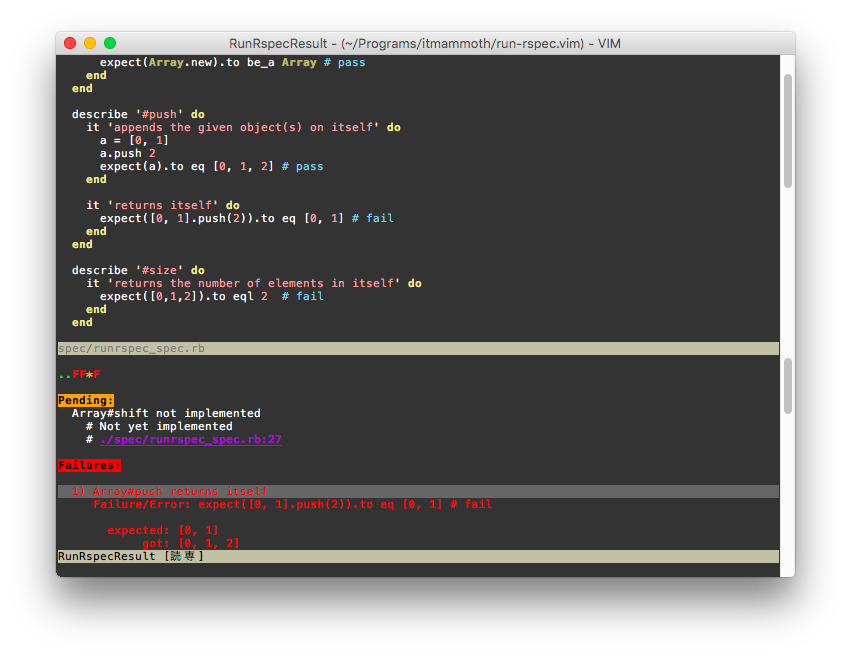
Inspired by https://github.com/skwp/vim-rspec (Sounds like it's no longer maintained)
Features
Never makes a mess in your workspace
- Rspec result will be outputted on the same modest window every run
Enhanced result window
- Quick jump to line where spec failed
- Quick find next/previous failure.
- Auto detecting the location of the spec file
- Work well with rspec 3.x
Installation
vim-plug
Add this to your .vimrc file.
Plug 'itmammoth/run-rspec.vim'
Then, :PlugInstall
dein.vim
Add this to your .vimrc file.
call dein#add('itmammoth/run-rspec.vim')
Then, :call dein#install()
Vundle
Plugin 'itmammoth/run-rspec.vim'
... and many other plugin managers.
Usage
Hit the commands to run rspec.
:RunSpec --- for running the current rspec file (or auto detecting the rspec file for the current file)
:RunSpecLine --- for running the spec under the cursor
:RunSpecLastRun --- for re-running the last rspec
:RunSpecCloseResult --- for closing the result window (from other window)
Highly recommendation
Add preferred key mappings to your .vimrc file like below for your comfortable rspec life.
nnoremap <leader>r :RunSpec<CR>
nnoremap <leader>l :RunSpecLine<CR>
nnoremap <leader>e :RunSpecLastRun<CR>
nnoremap <leader>cr :RunSpecCloseResult<CR>
Result window
Some useful key mappings will be bound in the result buffer.
Enter... Jump to the line in the rspec where the failure under the cursor occurrede... Jump to the line (the same as hittingEnter) and close the result window.n... Go to the next failurep... Go to the previous failureq... Close the result window
Configuration
g:run_rspec_bin
Set path to rspec binary. default: "rspec"
Ex)
let g:run_rspec_bin = 'bin/rspec'
let g:run_rspec_bin = 'bundle exec rspec'
let g:run_rspec_bin = 'spring rspec'
g:run_rspec_command_option
Set additional rspec options if you want. default: ''
Ex)
let g:run_rspec_command_option = '--only-failure'
NOTICE:-c, --colour, -f and --format options will be ignored.
g:run_rspec_src_dir
Set the directory where src files are for auto detecting. default: 'app'
Ex)
let g:run_rspec_src_dir = 'extra_src'
g:run_rspec_spec_dir
Set the directory where spec files are for auto detecting. default: 'spec'
Ex)
let g:run_rspec_spec_dir = 'extra_spec'
g:run_rspec_result_lines
Set number of the result buffer lines. default: 15
Ex)
let g:run_rspec_result_lines = 20
Contribution
Fork it, then run command bundle install to install rspec. blankslate.g?vimrc are essential vim script files for testing.
$ vim -u blankslate.vimrc spec/runrspec_spec.rb
$ gvim -u blankslate.vimrc -U blankslate.gvimrc spec/runrspec_spec.rb
And try running rspec.
License
MIT License.