Ⅰ. 插件描述
A universal quickfix toolkit and his protocol.Ⅱ. 基本信息
|
Ⅲ. 安装方法
使用Vundle管理器安装
在你的.vimrc下添加:Plugin 'aloiscochard/sarsi':source %
:PluginInstall对于Vundle版本 < 0.10.2,请用上面的Bundle替换Plugin。
使用NeoBundle管理器安装
在你的.vimrc下添加:NeoBundle 'aloiscochard/sarsi':source %
:NeoBundleInstall使用VimPlug管理器安装
在你的.vimrc下添加:Plug 'aloiscochard/sarsi':source %
:PlugInstall使用Pathogen管理器安装
在终端中运行以下命令:cd ~/.vim/bundle
git clone https://github.com/aloiscochard/sarsiⅣ. 文档说明
Sarsi


A universal quickfix toolkit and his protocol.
Quick fixing
It's basically fixing inside your text editor/IDE the warnings or errors returned by the compiler.
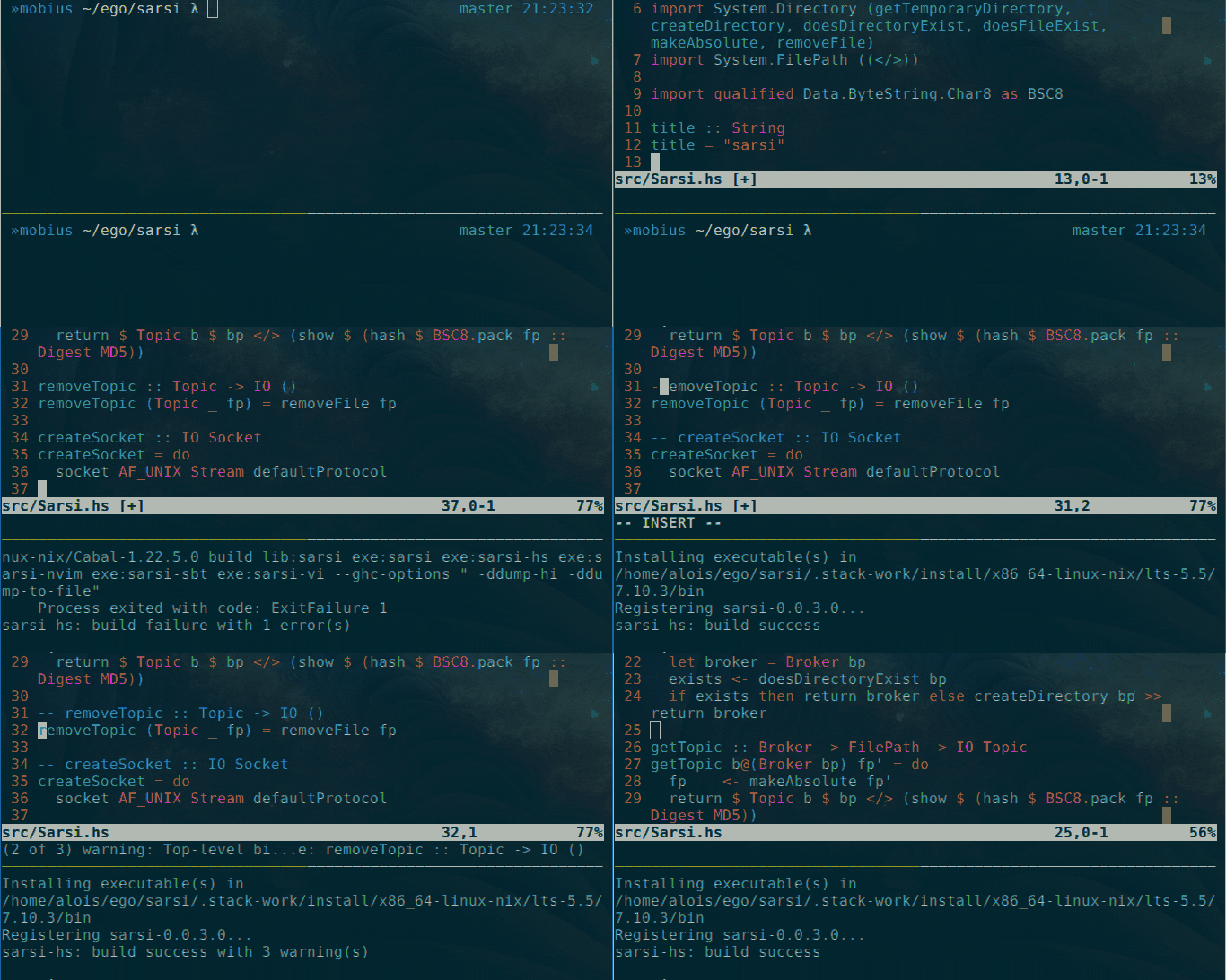
A sample session using sarsi-hs and sarsi-nvim.
Philosophy
Sarsi is at it's core a binary protocol to exchange quickfix messages, it approach the operating system as an integrated development environment, it's design follow the holy Unix philosophy principles.
On one side we produce messages from our favorite build tools, on the other we want them to be consumed as soon as possible by our favorite text editors.
That's basically what sarsi is doing, and will always do, any other integration with build tools/text editors should be designed separately.
Modules
Producers
sarsi-hs- Command line wrapper for Haskell tools (GHC/Cabal/Stack/...)sarsi-sbt- SBT specific wrapper for the Scala programming language
Consumers
sarsi-nvim- Neovim RPC client for realtime feedbacksarsi-vi- Quickfix file generator which use a vi compatible format
Install
Hackage
Sarsi is published on Hackage and can be installed using cabal.
cabal install sarsi
This will install all the modules as well.
Source
Alternatively, it can be installed from source using stack.
git clone git@github.com:aloiscochard/sarsi.git
cd sarsi
stack install
Usage
By default, when a consumer/producer start it will use a Unix pipe with a name generated according the directory in which it was launched.
It basically means you have to start consumers/producers from the same directory for them to be connected.
Producers
Generic
It does allow you to run an arbitrary command and get it's output transparently feeded into all active consumers.
Tailored
It is specialized for an interactive command and will forward the arguments you pass to that specific program.
Haskell
The sarsi-hs command line wrapper is generic and can be used with ghc/cabal/stack.
sarsi-hs cabal build
It works nicely with entr, inotifywait, or any other hook mechanism you would like to use.
while sleep 1; do
  find . ! -path "./.stack-work/*" | grep '.hs\|.cabal\|stack.yaml' | entr -cdr sarsi-hs stack build;
done;
Rust
The sarsi-rs command line wrapper is generic and can be used with rustc/cargo.
sarsi-rs rustc foo.rs
It works nicely with entr, inotifywait, or any other hook mechanism you would like to use.
while sleep 1; do
  find . ! -path "./target/*" | grep '.rs\|.toml' | entr -cdr sarsi-rs cargo build;
done;
Scala
You can simply use this tailored wrapper in place of your sbt command, interactively or not (you should surely prefer the former for performance reasons).
sarsi-sbt
It will behind the scene call the sbt program available in the path and transparently forward the quick fixes produced to the available consumers.
Consumers
Neovim
Once sarsi installed, simply add the following line in your init.vim.
call rpcstart('sarsi-nvim')
You'll see build updates directly in the editor and the default quickfix list will be updated asynchronously.
Just use the usual :cwindow if you want to see the complete list of fixes or use :cfirst, :cnext and :cprevious to directly navigate between them.
Vi/Vim
Due to the synchronous nature of vi you'll have to start the consumer in a dedicated terminal using the sarsi-vi command.
The process will continuously maintain a quickfix file located at $(sarsi).vi which you can open in the editor using :cfile `sarsi`.vi.
You could then even keep sarsi-vi running in a one-line terminal, sitting at the bottom of your synchronous editor while pretending your are using nvim as similar status update are printed in real-time.
sarsi-vi: starting haskell build
sarsi-vi: build success
sarsi-vi: starting haskell build
sarsi-vi: /../sarsi-vi/Main.hs@40:3 Error
sarsi-vi: build failure with 1 error(s)
sarsi-vi: starting haskell build
sarsi-vi: build success
Error fomat
The output format used by sarsi-vi to generate the $(sarsi).vi file is backward compatible with the default one used by vi/vim.
The missing part is the level (warning/error), in order to have it taken into account you should add the following in your initialization script.
set efm=%f:%l:%c:%t\ %m