Ⅰ. 插件描述
Simulate a split shell, using gnu screen or tmux, that you can send commands to.Ⅱ. 基本信息
|
Ⅲ. 安装方法
使用Vundle管理器安装
在你的.vimrc下添加:Plugin '/screen-vim-gnu-screentmux':source %
:PluginInstall对于Vundle版本 < 0.10.2,请用上面的Bundle替换Plugin。
使用NeoBundle管理器安装
在你的.vimrc下添加:NeoBundle '/screen-vim-gnu-screentmux':source %
:NeoBundleInstall使用VimPlug管理器安装
在你的.vimrc下添加:Plug '/screen-vim-gnu-screentmux':source %
:PlugInstall使用Pathogen管理器安装
在终端中运行以下命令:cd ~/.vim/bundle
git clone https://github.com/vim-scripts/Screen-vim---gnu-screentmuxⅣ. 文档说明
Screenshot:
http://eclim.org/_images/screenshots/vim/screen_shell.png
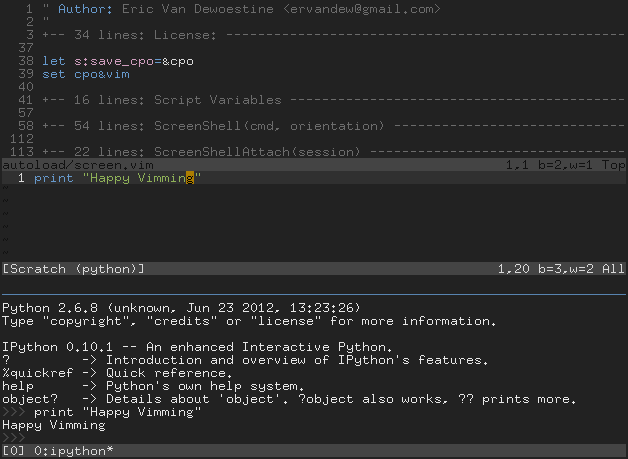
This plugin aims to simulate an embedded shell in vim by allowing you to easily
convert your current vim session into one running in gnu screen (or tmux) with
a split gnu screen window containing a shell, and to quickly send statements /
code to whatever program is running in that shell (bash, python, irb, etc.).
Spawning the shell in your favorite terminal emulator is also supported for
gvim users or anyone else that just prefers an external shell.
Currently tested on Linux and Windows (win32 gvim and cygwin vim), but
should also work on any unix based platform where screen is supported
(OSX, BSD, Solaris, etc.).
Windows Users: Whether you are using gvim or not, you will need cygwin
installed with cygwin's bin directory in your windows PATH.
Commands:
:ScreenShell [cmd] - Starts a screen hosted shell performing the
following steps depending on your environment.
When running a console vim on a unix based OS (Linux, BSD, OSX):
1. save a session file from your currently running vim instance
(current tab only)
2. start gnu screen with vim running in it
3. load your saved session file
4. create a lower gnu screen split window and start a shell, or if
g:ScreenShellExternal is set, start an external terminal with
screen running.
5. if a command was supplied to :ScreenShell, run it in the new
shell.
Ex. :ScreenShell ipython
Note: If you are already in a gnu screen session, then only steps
4 and 5 above will be run.
When running gvim:
1. start an external terminal with screen running.
2. if a command was supplied to :ScreenShell, run it in the new
shell.
Ex. :ScreenShell ipython
:ScreenSend - Send the visual selection or the entire buffer contents to
the running gnu screen shell window.
An example workflow may be:
Open a python file to work on:
$ vim something.py
Decide you want to run all or pieces of the code in an interactive
python shell:
:ScreenShell python
Send code from a vim buffer to the shell:
:ScreenSend
Quit the screen session and return to your original vim session:
:ScreenQuit
or
:qa