Ⅰ. 插件描述
Simulate a split shell in vim using gnu screen or tmuxⅡ. 基本信息
|
Ⅲ. 安装方法
使用Vundle管理器安装
在你的.vimrc下添加:Plugin 'ervandew/screen-vim':source %
:PluginInstall对于Vundle版本 < 0.10.2,请用上面的Bundle替换Plugin。
使用NeoBundle管理器安装
在你的.vimrc下添加:NeoBundle 'ervandew/screen-vim':source %
:NeoBundleInstall使用VimPlug管理器安装
在你的.vimrc下添加:Plug 'ervandew/screen-vim':source %
:PlugInstall使用Pathogen管理器安装
在终端中运行以下命令:cd ~/.vim/bundle
git clone https://github.com/ervandew/screenⅣ. 文档说明
.. Copyright (c) 2013, Eric Van Dewoestine
All rights reserved.
Redistribution and use of this software in source and binary forms, with
or without modification, are permitted provided that the following
conditions are met:
- Redistributions of source code must retain the above
copyright notice, this list of conditions and the
following disclaimer. - Redistributions in binary form must reproduce the above
copyright notice, this list of conditions and the
following disclaimer in the documentation and/or other
materials provided with the distribution. - Neither the name of Eric Van Dewoestine nor the names of its
contributors may be used to endorse or promote products derived from
this software without specific prior written permission of
Eric Van Dewoestine.
THIS SOFTWARE IS PROVIDED BY THE COPYRIGHT HOLDERS AND CONTRIBUTORS "AS
IS" AND ANY EXPRESS OR IMPLIED WARRANTIES, INCLUDING, BUT NOT LIMITED TO,
THE IMPLIED WARRANTIES OF MERCHANTABILITY AND FITNESS FOR A PARTICULAR
PURPOSE ARE DISCLAIMED. IN NO EVENT SHALL THE COPYRIGHT OWNER OR
CONTRIBUTORS BE LIABLE FOR ANY DIRECT, INDIRECT, INCIDENTAL, SPECIAL,
EXEMPLARY, OR CONSEQUENTIAL DAMAGES (INCLUDING, BUT NOT LIMITED TO,
PROCUREMENT OF SUBSTITUTE GOODS OR SERVICES; LOSS OF USE, DATA, OR
PROFITS; OR BUSINESS INTERRUPTION) HOWEVER CAUSED AND ON ANY THEORY OF
LIABILITY, WHETHER IN CONTRACT, STRICT LIABILITY, OR TORT (INCLUDING
NEGLIGENCE OR OTHERWISE) ARISING IN ANY WAY OUT OF THE USE OF THIS
SOFTWARE, EVEN IF ADVISED OF THE POSSIBILITY OF SUCH DAMAGE.
==================
Overview
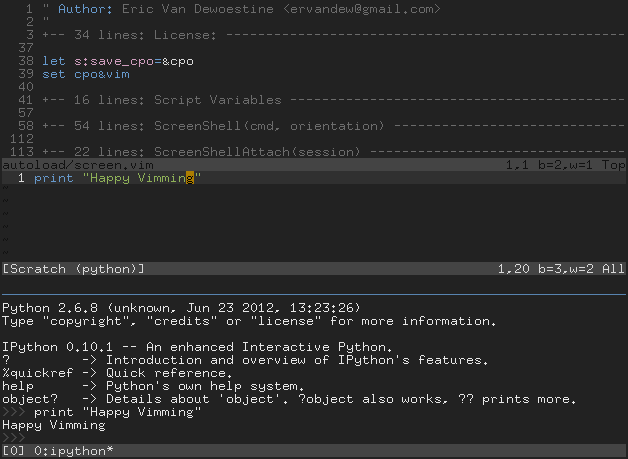
screen.vim is a vim plugin which allows you to simulate a split shell in vim
using either gnu screen_ or tmux_, and to send selections to be evaluated by
the program running in that shell:
.. image:: http://eclim.org/_images/screenshots/vim/screen_shell.png
Usage
After installing screen.vim and the terminal multiplexer of your choice, you can
then run vim in a shell and execute :ScreenShell to start a new session where
a shell will be opened in a bottom split of your multiplexer.
For gvim users, since you are not running vim in a console, :ScreenShell will
instead attempt to open a terminal and start the multiplexer in there.
Once you have the shell open, you can then send visual selections to it using
the command :ScreenSend.
Additional usage and configuration information can be found in the screen.vimhelp file <https://raw.github.com/ervandew/screen/master/doc/screen.txt>_.
.. _gnu screen: http://www.gnu.org/software/screen/
.. _tmux: http://tmux.sourceforge.net/