Ⅰ. 插件描述
vim colorschemeⅡ. 基本信息
|
Ⅲ. 安装方法
使用Vundle管理器安装
在你的.vimrc下添加:Plugin 'xero/sourcerer-vim':source %
:PluginInstall对于Vundle版本 < 0.10.2,请用上面的Bundle替换Plugin。
使用NeoBundle管理器安装
在你的.vimrc下添加:NeoBundle 'xero/sourcerer-vim':source %
:NeoBundleInstall使用VimPlug管理器安装
在你的.vimrc下添加:Plug 'xero/sourcerer-vim':source %
:PlugInstall使用Pathogen管理器安装
在终端中运行以下命令:cd ~/.vim/bundle
git clone https://github.com/xero/sourcerer.vimⅣ. 文档说明
  ██████  ██████  ██   ██ ██████  █████   █████  ██████  █████  ██████
 ██░░░░  ██░░░░██░██  ░██░░██░░████░░░██ ██░░░██░░██░░████░░░██░░██░░██
░░█████ ░██   ░██░██  ░██ ░██ ░░░██  ░░ ░███████ ░██ ░░░███████ ░██ ░░
 ░░░░░██░██   ░██░██  ░██ ░██   ░██   ██░██░░░░  ░██   ░██░░░░  ░██
 ██████ ░░██████ ░░██████░███   ░░█████ ░░██████░███   ░░██████░███
░░░░░░   ░░░░░░   ░░░░░░ ░░░     ░░░░░   ░░░░░░ ░░░     ░░░░░░ ░░░
 r  e  a  d     c  o  d  e     l  i  k  e     a     w  i  z  a  r  d

sourcerer by xero harrison (http://sourcerer.xero.nu)
 ├─ based on sorcerer by Jeet Sukumaran (http://jeetworks.org)
 └─ based on mustang by Henrique C. Alves (hcarvalhoalves@gmail.com)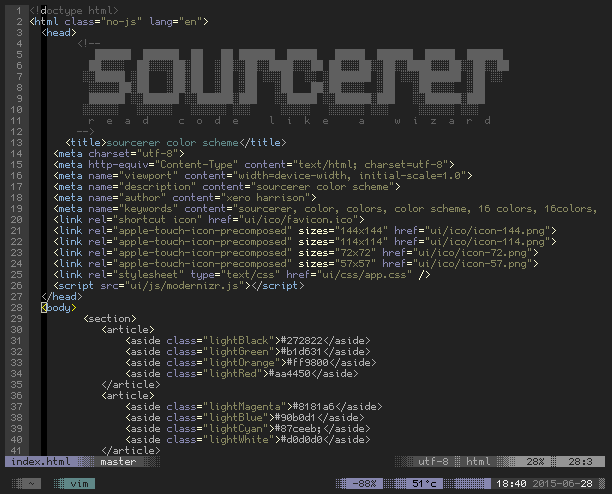
install
package manager
add the repo url via your favorite vim package manager. e.g for vundle: Plugin 'xero/sourcerer.vim'
manually
copy the colors folder in this repo to your ~/.vim or ~/.config/nvim directory
use
then in your ~/.vimrc or ~/.config/nvim/init.vim add colorscheme sourcerer and turn :syntax on
note: if installing via plugin, you must set the colorscheme variable after including the plugin in your config file.
sourcerer is also available as a color scheme for Xresources aware terminals, iterm, and the framebuffer at sourcerer.xero.nu