Ⅰ. 插件描述
Change statusline color depending on buffer state.Ⅱ. 基本信息
|
Ⅲ. 安装方法
使用Vundle管理器安装
在你的.vimrc下添加:Plugin 'inkarkat/statuslinehighlight':source %
:PluginInstall对于Vundle版本 < 0.10.2,请用上面的Bundle替换Plugin。
使用NeoBundle管理器安装
在你的.vimrc下添加:NeoBundle 'inkarkat/statuslinehighlight':source %
:NeoBundleInstall使用VimPlug管理器安装
在你的.vimrc下添加:Plug 'inkarkat/statuslinehighlight':source %
:PlugInstall使用Pathogen管理器安装
在终端中运行以下命令:cd ~/.vim/bundle
git clone https://github.com/vim-scripts/StatusLineHighlightⅣ. 文档说明
STATUS LINE HIGHLIGHT
by Ingo Karkat
DESCRIPTION
This plugin indicates the state of the buffer (modified, readonly,
unmodifiable, special non-file "scratch") / window (is preview window) by
changing the highlighting of the window's status line. It defines additional
StatusLine... / StatusLine...NC highlight groups that are customizable and by
default use different colors to differentiate the buffer states.
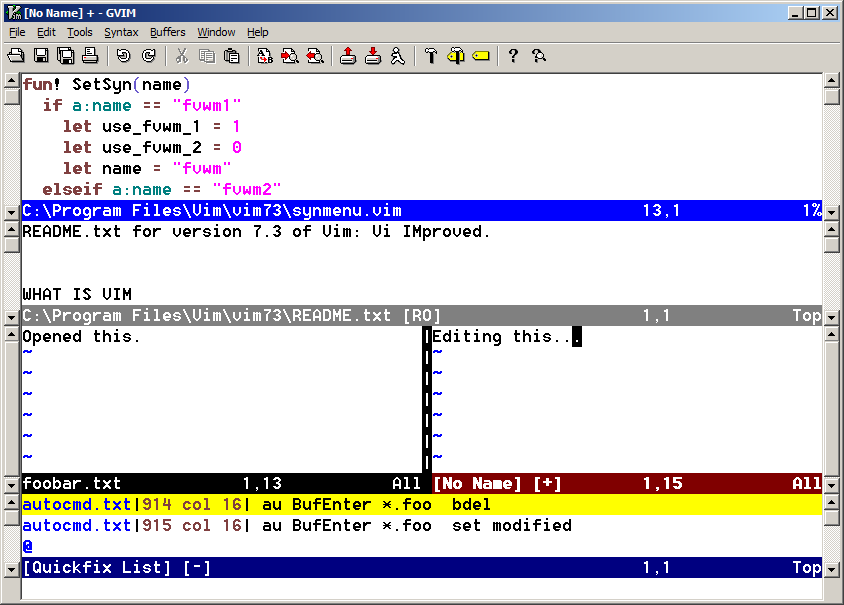
This screenshot shows the plugin in action:
HOW IT WORKS
Using different colors for the status line is trickier than it seems: Though
the 'statusline' setting supports inline expressions via %{expr}, the returned
text is taken as-is; highlight items %#hlgroup# and #* are not evaluated, only
printed as text. Evaluation does happen when one %!expr is used, but the
expression seems to be evaluated only once for a complete screen redraw cycle,
not for each individual status line, so one cannot use it to set different
highlightings for different status lines.
Therefore, this plugin sets up autocmds that continually adapt buffer-local
'statusline' settings (which prepend the highlight group to the (mostly)
global setting (though local 'statusline' settings set by ftplugins are kept,
too)).
USAGE
This plugin does not introduce any commands or mappings. Just observe the
changed status line colors, e.g. when using :view, :pedit, :help, etc.

You immediately see that a buffer is read-only because its status line is
gray, not black; unmodifiable buffers are even "more" gray. Unsaved, modified
buffers are indicated via a dark-red status line. Special windows like the
command and quickfix windows, as well as many "scratch" buffers used by
plugins are shown in dark blue. The preview window is now also easy to find,
because it has a blue status line.
INSTALLATION
The code is hosted in a Git repo at
https://github.com/inkarkat/vim-StatusLineHighlightYou can use your favorite plugin manager, or "git clone" into a directory used
for Vim packages. Releases are on the "stable" branch, the latest unstable
development snapshot on "master".
This script is also packaged as a vimball. If you have the "gunzip"
decompressor in your PATH, simply edit the *.vmb.gz package in Vim; otherwise,
decompress the archive first, e.g. using WinZip. Inside Vim, install by
sourcing the vimball or via the :UseVimball command.
vim StatusLineHighlight*.vmb.gz
:so %
To uninstall, use the :RmVimball command.
DEPENDENCIES
- Requires Vim 7.0 or higher.
CONFIGURATION
For a permanent configuration, put the following commands into your vimrc:
You may override the default highlightings and define your own colors in the
following form (after any :colorscheme command). As with the built-in status
line highlighting, there is a hl-StatusLine group for the current window and
a hl-StatusLineNC for all non-current windows.
highlight StatusLineModified           term=bold,reverse cterm=bold,reverse ctermfg=DarkRed  gui=bold,reverse guifg=DarkRed
highlight StatusLineModifiedNC         term=reverse      cterm=reverse      ctermfg=DarkRed  gui=reverse      guifg=DarkRed
highlight StatusLinePreview            term=bold,reverse cterm=bold,reverse ctermfg=Blue     gui=bold,reverse guifg=Blue
highlight StatusLinePreviewNC          term=reverse      cterm=reverse      ctermfg=Blue     gui=reverse      guifg=Blue
highlight StatusLinePrompt             term=bold,reverse cterm=bold,reverse ctermfg=Green    gui=bold,reverse guifg=SeaGreen
highlight StatusLinePromptNC           term=reverse      cterm=reverse      ctermfg=Green    gui=reverse      guifg=SeaGreen
highlight StatusLineReadonly           term=bold,reverse cterm=bold,reverse ctermfg=Grey     gui=bold,reverse guifg=DarkGrey
highlight StatusLineReadonlyNC         term=reverse      cterm=reverse      ctermfg=Grey     gui=reverse      guifg=DarkGrey
highlight StatusLineSpecial            term=bold,reverse cterm=bold,reverse ctermfg=DarkBlue gui=bold,reverse guifg=DarkBlue
highlight StatusLineSpecialNC          term=reverse      cterm=reverse      ctermfg=DarkBlue gui=reverse      guifg=DarkBlue
highlight StatusLineUnmodifiable       term=bold,reverse cterm=bold,reverse ctermfg=Grey     gui=bold,reverse guifg=Grey
highlight StatusLineUnmodifiableNC     term=reverse      cterm=reverse      ctermfg=Grey     gui=reverse      guifg=Grey
If you want to avoid losing the highlightings on :colorscheme commands, you
need to re-apply your highlights on the ColorScheme event, similar to how
this plugin does.
LIMITATIONS
- Due to the use of autocmds and to avoid dragging down Vim's performance with
excessive updates, the status line highlighting does not always properly
reflect the actual buffer state, especially for non-active windows.
- Existing windows will not reflect changes in the (global) 'statusline' and
'ruler' settings, only new ones. - The set of buffer states and their precedence is hard-coded and cannot be
customized.
IDEAS
- Use get/setwinvar() to update the 'statusline' setting for all visible
windows on autocmd.
CONTRIBUTING
Report any bugs, send patches, or suggest features via the issue tracker at
https://github.com/inkarkat/vim-StatusLineHighlight/issues or email (address
below).
HISTORY
1.20 RELEASEME
- ENH: Add support for terminal windows (for which Vim already provides a
special hl-StatusLineTerm highlight group, so the plugin just needs to
ensure that other attributes (like 'modified') do not apply) and
|prompt-buffer|s.
- ENH: Use OptionSet event to immediately update the current window's
statusline if 'previewwindow', 'modified', 'modifiable', or 'readonly'
change.
1.10 04-Nov-2018
- ENH: Handle hl-User1..9 highlighting by replacing %* and %0* with the custom
statusline highlighting. Previously, the custom statusline highlighting
provided by this plugin stopped after the end of a User highlighting.
- Minor: Make substitute() robust against 'ignorecase'.
1.01 01-Jul-2011
- Avoid losing the statusline highlightings on colorscheme commands.
1.00 27-Dec-2010
- First published version.
0.01 15-Dec-2010
- Started development.
Copyright: (C) 2010-2019 Ingo Karkat -
The VIM LICENSE applies to this plugin.
Maintainer: Ingo Karkat <ingo@karkat.de>