Ⅰ. 插件描述
Vim plugin for insert mode completion of words in adjacent tmux panesⅡ. 基本信息
|
Ⅲ. 安装方法
使用Vundle管理器安装
在你的.vimrc下添加:Plugin 'junegunn/tmux-complete-vim-or-are-not':source %
:PluginInstall对于Vundle版本 < 0.10.2,请用上面的Bundle替换Plugin。
使用NeoBundle管理器安装
在你的.vimrc下添加:NeoBundle 'junegunn/tmux-complete-vim-or-are-not':source %
:NeoBundleInstall使用VimPlug管理器安装
在你的.vimrc下添加:Plug 'junegunn/tmux-complete-vim-or-are-not':source %
:PlugInstall使用Pathogen管理器安装
在终端中运行以下命令:cd ~/.vim/bundle
git clone https://github.com/junegunn/tmux-complete.vimⅣ. 文档说明
# tmux-complete.vim
Vim plugin for insert mode completion of words in adjacent tmux panes
Motivation
If you're using Vim in tandem with Tmux you might be familiar with this pesky
situation:
You're happily editing your lovely files in Vim, when you notice you need to
type a word that you can see in a different Tmux pane right next to Vim. This
might be some secret key found in your REPL or the name of a failing test.
Usually the interesting text is too short to warrant switching panes and going
into Tmux' copy mode, so you end typing it out again.
But fear no longer!
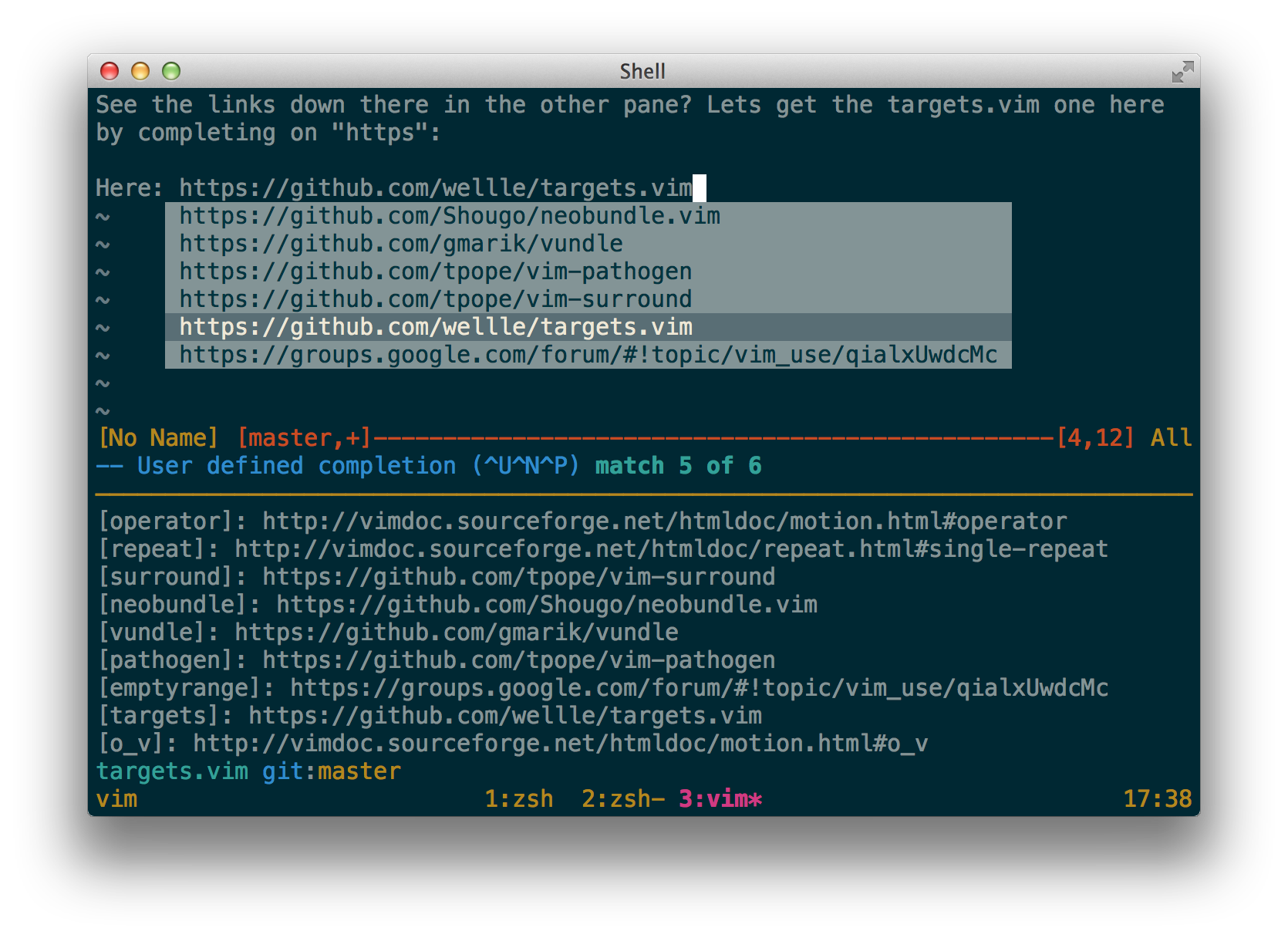
This plugin adds a completion function that puts all words visible in your Tmux
panes right under your fingertips. Just enter insert mode, start typing any
word you see and press <C-X><C-U> to the trigger user defined insert mode
completion.
Third party integration
Tmux complete is automatically integrated with the following plugins:
- neocomplete: You can see tmux
completions right in your neocomplete pop-up. unite: You can use tmux complete
as a unite source:Unite tmuxcomplete
Installation
Use your favorite plugin manager.
NeoBundle 'wellle/tmux-complete.vim'Bundle 'wellle/tmux-complete.vim'git clone git://github.com/wellle/tmux-complete.vim.git ~/.vim/bundle/tmux-complete.vim
Settings
Use the #trigger option to tune the way you interact with
tmux-complete by putting one of these lines into your .vimrc:
By default, tmux-complete sets Vim's
completefunc, that can be invoked with<C-X><C-U>.let g:tmuxcomplete#trigger = 'completefunc'Alternatively, you can use Vim's
omnifunc, that can be invoked with<C-X><C-O>.let g:tmuxcomplete#trigger = 'omnifunc'If you're using the neocomplete
integration, you probably don't need the additional trigger.let g:tmuxcomplete#trigger = ''