Ⅰ. 插件描述
todo-vim is plugin for manage your todo notesⅡ. 基本信息
|
Ⅲ. 安装方法
使用Vundle管理器安装
在你的.vimrc下添加:Plugin 'dimercel/todo-vim-all-too-well':source %
:PluginInstall对于Vundle版本 < 0.10.2,请用上面的Bundle替换Plugin。
使用NeoBundle管理器安装
在你的.vimrc下添加:NeoBundle 'dimercel/todo-vim-all-too-well':source %
:NeoBundleInstall使用VimPlug管理器安装
在你的.vimrc下添加:Plug 'dimercel/todo-vim-all-too-well':source %
:PlugInstall使用Pathogen管理器安装
在终端中运行以下命令:cd ~/.vim/bundle
git clone https://github.com/vim-scripts/todo-vimⅣ. 文档说明
# todo-vim: Simple todo plugin for Vim
What is it?
todo-vim is plugin for manage your todo notes. He will help you to navigate and manage
your todo labels in code.
Installation
Extract the archive or clone the repository into a directory in your 'runtimepath',
or use a plugin manager of your choice like NeoBundle.
Example for NeoBundle(add in your .vimrc):
NeoBundle 'Dimercel/todo-vim'Quickstart
Put something like the following into your ~/.vimrc:
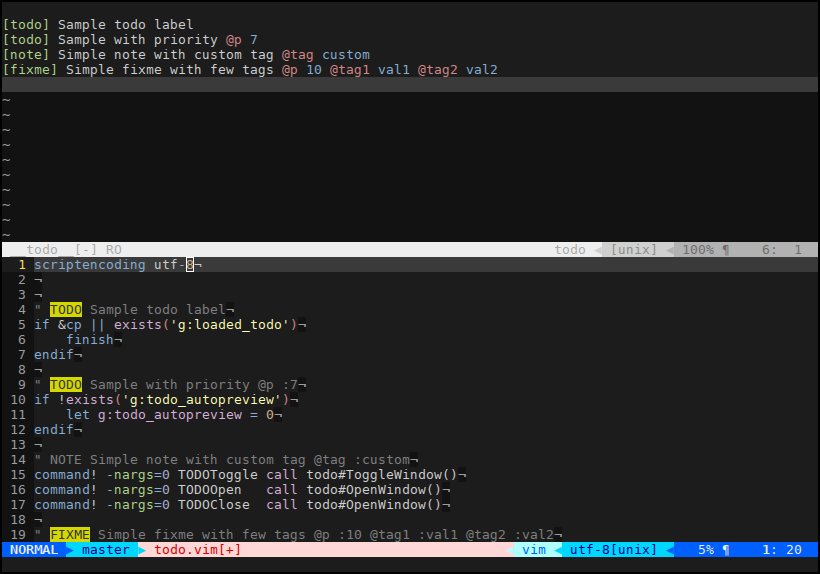
nmap <F5> :TODOToggle<CR>If you do this the F5 key will toggle the ToDo window and you can see navigate by todo labels.
Screenshots
Maintainer
Dimercel <xolcman@gmail.com>