Ⅰ. 插件描述
Vim plugin - Transpose matrices of text (swap lines with columns).Ⅱ. 基本信息
|
Ⅲ. 安装方法
使用Vundle管理器安装
在你的.vimrc下添加:Plugin 'salsifis/transpose':source %
:PluginInstall对于Vundle版本 < 0.10.2,请用上面的Bundle替换Plugin。
使用NeoBundle管理器安装
在你的.vimrc下添加:NeoBundle 'salsifis/transpose':source %
:NeoBundleInstall使用VimPlug管理器安装
在你的.vimrc下添加:Plug 'salsifis/transpose':source %
:PlugInstall使用Pathogen管理器安装
在终端中运行以下命令:cd ~/.vim/bundle
git clone https://github.com/salsifis/vim-transposeⅣ. 文档说明
This is a vim plugin that helps you transpose (in the sense of matrix
transposition) blocks of text, words, delimited text, or lines that you can
tokenize with a custom pattern.
vim-transpose is written in pure VimL (no need for Python nor Perl).
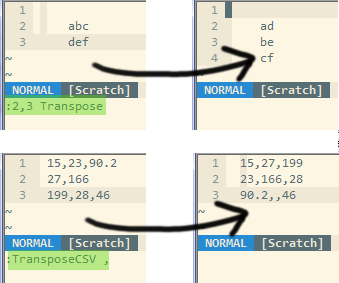
Commands
Five commands are provided:
:Transpose(for character array transposition),:TransposeWords(for word array transposition),:TransposeTab(for tab-separated table transposition),:TransposeCSV(for general delimited text transposition), and:TransposeInteractive(for custom transposition).
An additional variable, g:transpose_keepindent controls whether the plugin
should detect indentation of the range. The :TransposeIndentToggle command
will toggle this variable.
Installation
If you have the Pathogen plugin installed or any other plugin manager, then
just copy this filetree into a subfolder of your Bundle folder.
Otherwise, copy the contents of the doc/, plugin/ and autoload/ folders
to resp. ~/.vim/doc, ~/.vim/plugin and ~/.vim/autoload respectively.
Getting started
After having built help tags (run :Helptags if you have pathogen installed)
run :help transpose-tutorial, and follow the instructions. If you don't have
pathogen installed and don't know how to build the help tags, just opendoc/transpose.txt inside vim.
Example use cases
This plugin can be useful:
- When you have tabular data (for example, pasted from a spreadsheet
application) and you need to remove or swap columns: using regular
expressions should be more difficult than using :TransposeTab, perform the
operations on lines instead of columns, and :TransposeTab again.
- When you need to ensure that tabular data has a consistent number of
columns: since transposition will create missing fields such that it
operates on a rectangular matrix, running twice a :Transpose… command will
create the missing fields.
Development
The main git repository for this plugin is athttp://github.com/salsifis/vim-transpose
License
zlib/libpng license.
Copyright (c) 2012 Benoit Mortgat
This software is provided 'as-is', without any express or implied warranty. In
no event will the authors be held liable for any damages arising from the use
of this software.
Permission is granted to anyone to use this software for any purpose, including
commercial applications, and to alter it and redistribute it freely, subject to
the following restrictions:
- The origin of this software must not be misrepresented; you must not claim
that you wrote the original software. If you use this software in a product,
an acknowledgment in the product documentation would be appreciated but is not
required.
- Altered source versions must be plainly marked as such, and must not be
misrepresented as being the original software. - This notice may not be removed or altered from any source distribution.