Ⅰ. 插件描述
Operating Kubernetes Cluster from Vim, in VimⅡ. 基本信息
|
Ⅲ. 安装方法
使用Vundle管理器安装
在你的.vimrc下添加:Plugin 'c9s/vikube-vim':source %
:PluginInstall对于Vundle版本 < 0.10.2,请用上面的Bundle替换Plugin。
使用NeoBundle管理器安装
在你的.vimrc下添加:NeoBundle 'c9s/vikube-vim':source %
:NeoBundleInstall使用VimPlug管理器安装
在你的.vimrc下添加:Plug 'c9s/vikube-vim':source %
:PlugInstall使用Pathogen管理器安装
在终端中运行以下命令:cd ~/.vim/bundle
git clone https://github.com/c9s/vikube.vimⅣ. 文档说明
Vikube - Operating Kubernetes Cluster from Vim, in Vim
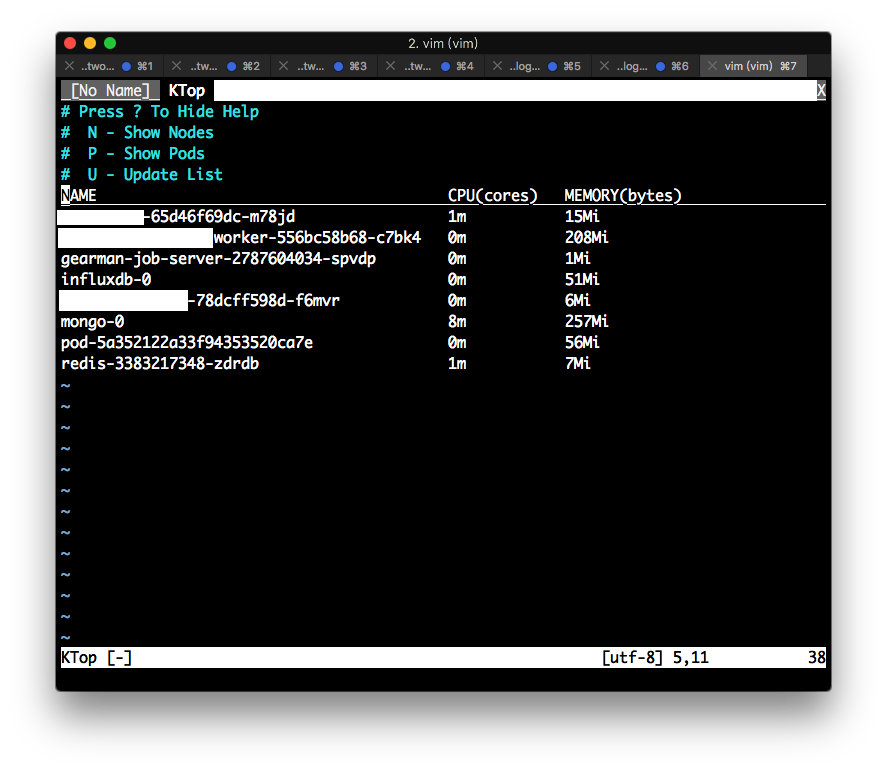
Screenshots


Install
If you use vundle:
call vundle#begin()
    Plugin 'c9s/helper.vim'
    Plugin 'c9s/treemenu.vim'
    Plugin 'c9s/vikube.vim'
call vundle#end()
And run:
:PluginInstallSee Vundle for more details.
Commands
:VikubeContextList- Open the context list buffer.:Vikube [ResourceType]- Open the vikube explorer with a specific resource type.:VikubeNodeList- Open the node list buffer.:VikubePodList- Open the pod list buffer.:VikubeServiceList- Open the service list buffer.:VikubePVCList- Open the persistent volume list buffer.:VikubeTop- Open the top buffer.
VikubeContextList
S- Switch to the selected context.R- Rename the selected context.D- Delete the selected context.
VikubeExplorer
]]- Navigate to the next resource type.[[- Navigate to the previous resource type.a- Show all resources.e- Explain the current resource type.s- Describe the selected resource.n- Switch namespace.r- Switch resource type.N- Toggle "all namespaces" option.u- Update the current list.w- Toggle wide option.l- Show logs of the pod.fl- Open a terminal to follow the logs.o- Get the resource YAML.x- Execute a command in the container.cx- Switch context (buffer scope).L- Label the selected resource. (Input form:Label=Value Label2=Value2).D- Delete the selected resource..E- Edit the current resource.
VikubeTop
n- switch to nodes top.p- switch to pods top.s- describe the selected pod or node.
Configuration
To turn on automatic list update:
let g:vikube_autoupdate = 1
To change the default tail lines for logs:
g:vikube_default_logs_tail = 100
To use current namespace instead of "default":
g:vikube_use_current_namespace = 1
To disable the default highlight for CursorLine:
g:vikube_disable_custom_highlight = 1
Default Mapping
<leader>kc- Open the (k)ubernetes (c)ontext list buffer.<leader>kno- Open the (k)ubernetes (no)de list buffer.<leader>kpo- Open the (k)ubernetes (po)d list buffer.<leader>ksv- Open the (k)ubernetes (s)er(v)ice list buffer.<leader>kt- Open the (k)ubernetes (t)op buffer.<leader>kpvc- Open the (k)ubernetes persistent volume claim buffer.
Changelogs
Fri Jun 29 11:26:32 2018
- Fixed resource type handling.
- Added log follow support.
- Added resource edit support.
- Added resource dump support.
- Added ability to switch buffer-scope kubernetes context.
Sun Dec 17 17:04:01 2017
- Changed all action keys to lower case but keep the deletion in uppercase.
License
MIT License