Ⅰ. 插件描述
VIM diff plugin to review your changesⅡ. 基本信息
|
Ⅲ. 安装方法
使用Vundle管理器安装
在你的.vimrc下添加:Plugin 'dvid/vim-changeling':source %
:PluginInstall对于Vundle版本 < 0.10.2,请用上面的Bundle替换Plugin。
使用NeoBundle管理器安装
在你的.vimrc下添加:NeoBundle 'dvid/vim-changeling':source %
:NeoBundleInstall使用VimPlug管理器安装
在你的.vimrc下添加:Plug 'dvid/vim-changeling':source %
:PlugInstall使用Pathogen管理器安装
在终端中运行以下命令:cd ~/.vim/bundle
git clone https://github.com/dvid/vim-changelingⅣ. 文档说明
##Changeling
This is a VIM plugin to help you review your changes while continuing editing
in VIM.
Before saving a file, check your edits. If file has already been saved run a
git diff in a split window.
When I started using VIM I wanted to have the possibity to review my
changes before saving the file. Without noticing I could have typed some command
that deleted a line, or having a typo ... Not so long ago I heard "If you want
to contribute to open source, write something you would like to have.", that
eventually led me to write this plugin.
<Leader> d          Diff the changes you made on a file since you last saved it.
                    To run before saving a file allowing to review the edits.

<Leader> D          Execute a git diff on actual file in a vertical split.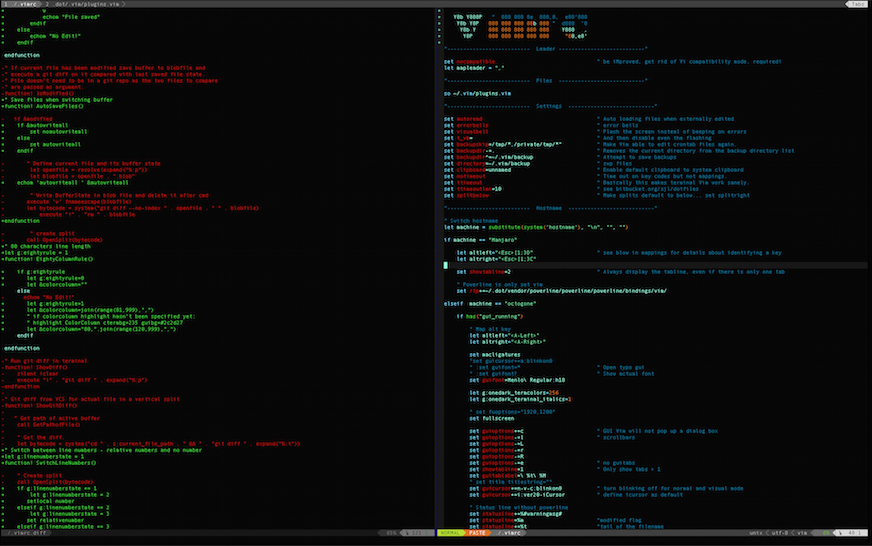
Install
If you use Vundle or a plugin manager add this line in your .vimrc:
Plugin 'dvid/changeling'Otherwhise clone this repo in your bundle folder.
cd ~/.vim/bundle
git clone git://github.com/dvid/vim-changeling.git
Also add this line in your ~/.vimrc
set runtimepath^=~/.vim/bundle/vim-changeling/plugin/changeling.vimConfigure
Again add those lines in your .vimrc to define your mappings:
" Show diff if file is modified
nmap <leader>d :call IsModified()<cr><cr>

" Show git diff
nmap <leader>D :call ShowGitDiff()<cr><cr>
You also could add those two lines to easily close your buffers:
" close buffers
nmap <leader>x :bd<cr>