Ⅰ. 插件描述
Vim global plugin to cryptographically checksum filesⅡ. 基本信息
|
Ⅲ. 安装方法
使用Vundle管理器安装
在你的.vimrc下添加:Plugin 'chilicuil/vim-checksum-the-story-of-us':source %
:PluginInstall对于Vundle版本 < 0.10.2,请用上面的Bundle替换Plugin。
使用NeoBundle管理器安装
在你的.vimrc下添加:NeoBundle 'chilicuil/vim-checksum-the-story-of-us':source %
:NeoBundleInstall使用VimPlug管理器安装
在你的.vimrc下添加:Plug 'chilicuil/vim-checksum-the-story-of-us':source %
:PlugInstall使用Pathogen管理器安装
在终端中运行以下命令:cd ~/.vim/bundle
git clone https://github.com/chilicuil/vim-checksumⅣ. 文档说明
About

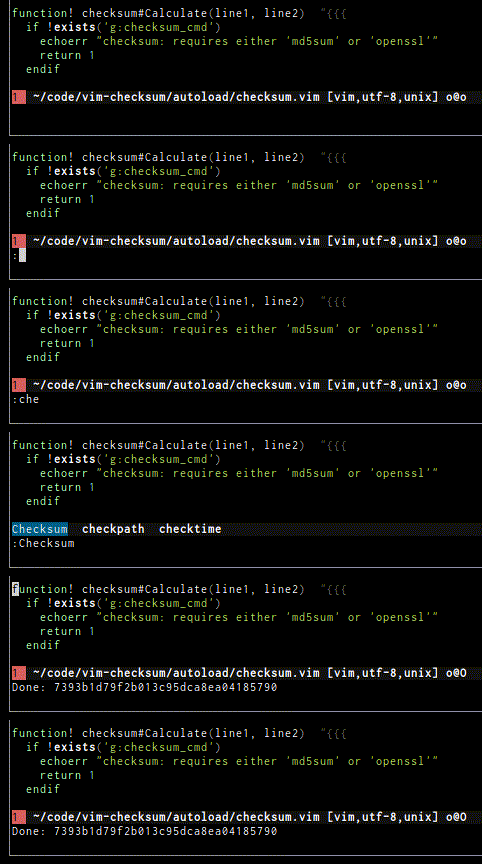
Checksum.vim is a global plugin to cryptographically hash files or strings.
<p align="center">
</p>
Requirements
- Vim 7.0+
- md5sum or openssl
Installation
Vundle way (recommended), add the following to your
$HOME/.vimrcfile:Bundle 'javier-lopez/checksum.vim' And run inside of vim: :BundleInstallNeoBundle way:
    NeoBundle 'javier-lopez/checksum.vim'

And run inside of vim:

    :NeoBundleInstall
Pathogen way:
$ git clone https://github.com/javier-lopez/checksum.vim.git ~/.vim/bundle/checksum.vimManual (simplest if you've never heard of vim plugin managers), download the zip file generated from github and extract it to
$HOME/.vim$ mv checksum.vim*.zip $HOME/.vim $ cd $HOME/.vim && unzip checksum.vim*.zip Update the help tags from vim: :helpt ~/.vim/doc/
Usage
:Checksum (or <Leader>c) to calculate the checksum of the current file, you may use it in visual mode to checksum only the selection.
By default checksum.vim uses md5sum to calculate a md5 checksum, however it can customized to use any hash algorithm
let g:checksum_cmd = 'sha1sum'
let g:checksum_cmd = 'openssl sha512 | awk "{print \$NF}"
See :h checksum.txt for more help.