Ⅰ. 插件描述
For easy cloning Atelier Schemes for Vim colorschemes, with plugin manager Pathogen or VundleⅡ. 基本信息
|
Ⅲ. 安装方法
使用Vundle管理器安装
在你的.vimrc下添加:Plugin 'atelierbram/vim-colors-atelier-schemes':source %
:PluginInstall对于Vundle版本 < 0.10.2,请用上面的Bundle替换Plugin。
使用NeoBundle管理器安装
在你的.vimrc下添加:NeoBundle 'atelierbram/vim-colors-atelier-schemes':source %
:NeoBundleInstall使用VimPlug管理器安装
在你的.vimrc下添加:Plug 'atelierbram/vim-colors-atelier-schemes':source %
:PlugInstall使用Pathogen管理器安装
在终端中运行以下命令:cd ~/.vim/bundle
git clone https://github.com/atelierbram/vim-colors_atelier-schemesⅣ. 文档说明
# Atelier Schemes for Vim
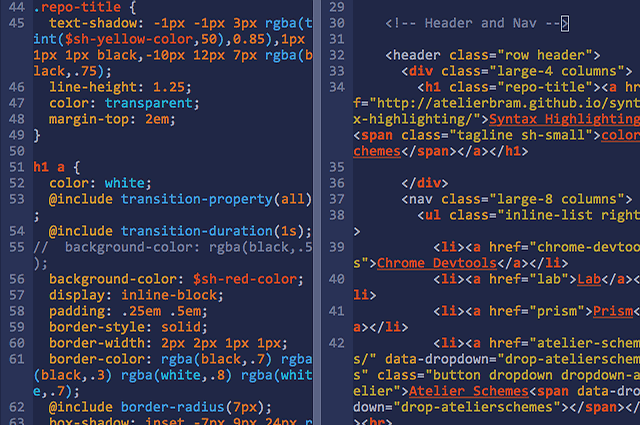
screenshot of Sulphurpool (dark version) in Vim
NOTE: These color schemes are optimized and have been tested in the GUI version of Vim, and will work in terminal versions as well. For terminals which don’t support truecolor the colors will now use converted colors which are as close as possible in the 8-bit 256 colorspace. It works fine and looks good in Neovim, for the Gui colors for Neovim are now also specifically defined.
For Terminal Vim 8+ and/or Neovim, in your (sourced) .vimrc or default .config/nvim/init.vim, have something like this:
set termguicolors
 if has('nvim')
" https://github.com/neovim/neovim/wiki/FAQ
set guicursor=n-v-c:block-Cursor/lCursor-blinkon0,i-ci:ver25-Cursor/lCursor,r-cr:hor20-Cursor/lCursor
endif
For the most seamless experience: these same color schemes have also been ported to iTerm2, and for Hyper there is one: AtelierSulphurpool-Dark for Hyper.
Atelier Schemes


Easy clone Atelier Schemes for Vim colorschemes, with plugin manager [Pathogen].
Installation
Option 1: Manual installation
- Move
base16-atelier*.vimto your.vim/colorsdirectory. After downloading the - script or package:
$ cd vim-colors_atelier-schemes/colors
$ mv *.vim ~/.vim/colors/
Option 2: for Vim 8+ installation in default pack/start folder of build-in package manager
$ cd ~/.vim/pack/bundle/start
$ git clone https://github.com/atelierbram/vim-colors_atelier-schemes.git
Option 3: for Vim 8+ and Neovim installation with minpac recommended
- Install minpac plugin
- in
.vimrc:
call minpac#add('k-takata/minpac', {'type': 'opt'})
call minpac#add('atelierbram/vim-colors_atelier-schemes')
Option 3: Pathogen installation
- Download and install Tim Pope's [Pathogen].
- Next, move or clone the
vim-colors_atelier-schemesdirectory so that it is - subdirectory of the
.vim/bundledirectory. - Clone:
$ cd ~/.vim/bundle
$ git clone https://github.com/atelierbram/vim-colors_atelier-schemes.git- Move:
In the parent directory of vim-colors_atelier-schemes:
$ mv vim-colors_atelier-schemes ~/.vim/bundle/Modify .vimrc
After either Option 1 or Option 2 above, put the following two lines in your.vimrc:
syntax enable
set background=dark
" or, for the light background mode:
" set background=light

" dark
colorscheme Atelier_ForestDark
" or any of the other schemes:
" colorscheme Atelier_HeathDark
" colorscheme Atelier_CaveDark
" colorscheme Atelier_SulphurpoolDark
" colorscheme Atelier_LakesideDark
" colorscheme Atelier_SavannaDark
" colorscheme Atelier_SeasideDark
" colorscheme Atelier_EstuaryDark
" colorscheme Atelier_DuneDark

" light
" colorscheme Atelier_ForestLight
" colorscheme Atelier_HeathLight
" colorscheme Atelier_CaveLight
" colorscheme Atelier_SulphurpoolLight
" colorscheme Atelier_LakesideLight
" colorscheme Atelier_SavannaLight
" colorscheme Atelier_SeasideLight
" colorscheme Atelier_EstuaryLight
" colorscheme Atelier_DuneLight
Airline Support with AtelierSchemes
" Airline for AtelierSchemes
" dark
let g:airline_theme='Atelier_ForestDark'
" or any of the other themes:
" let g:airline_theme='Atelier_HeathDark'
" let g:airline_theme='Atelier_CaveDark'
" let g:airline_theme='Atelier_SulphurpoolDark'
" let g:airline_theme='Atelier_LakesideDark'
" let g:airline_theme='Atelier_SavannaDark'
" let g:airline_theme='Atelier_SeasideDark'
" let g:airline_theme='Atelier_EstuaryDark'
" let g:airline_theme='Atelier_DuneDark'

" light
" let g:airline_theme='Atelier_ForestLight'
" let g:airline_theme='Atelier_HeathLight'
" let g:airline_theme='Atelier_CaveLight'
" let g:airline_theme='Atelier_SulphurpoolLight'
" let g:airline_theme='Atelier_LakesideLight'
" let g:airline_theme='Atelier_SavannaLight'
" let g:airline_theme='Atelier_SeasideLight'
" let g:airline_theme='Atelier_EstuaryLight'
" let g:airline_theme='Atelier_DuneLight'
Lightline Support with AtelierSchemes
" lightline {{{
" -- INSERT -- is redundant because the mode information is displayed in the statusline:
set noshowmode
let g:lightline = {
      \ 'colorscheme': 'Atelier_Estuary',
      \ }
" or any of the other colorschemes
" template is smart and detects light or dark colorscheme being used
" }}}
Credits
Credits to Ethan Schoonover whose Solarized was a model for these colorschemes
- Chis Kempson for creating Base16 Builder
- Alois and Alex Booker for rejuvenating the best colorscheme builder tool on the internet: Base16 Builder
License
Copyright (c) 2013 - 2017 Bram de Haan
Released under MIT Licence