Ⅰ. 插件描述
A Vim colorscheme based on Github's syntax highlighting as of 2018.Ⅱ. 基本信息
|
Ⅲ. 安装方法
使用Vundle管理器安装
在你的.vimrc下添加:Plugin 'cormacrelf/vim-colors-github-without-it':source %
:PluginInstall对于Vundle版本 < 0.10.2,请用上面的Bundle替换Plugin。
使用NeoBundle管理器安装
在你的.vimrc下添加:NeoBundle 'cormacrelf/vim-colors-github-without-it':source %
:NeoBundleInstall使用VimPlug管理器安装
在你的.vimrc下添加:Plug 'cormacrelf/vim-colors-github-without-it':source %
:PlugInstall使用Pathogen管理器安装
在终端中运行以下命令:cd ~/.vim/bundle
git clone https://github.com/cormacrelf/vim-colors-githubⅣ. 文档说明
# vim-colors-github
A Vim colorscheme based on Github's syntax highlighting as of 2018.
I wasn't happy with endel/vim-github-colorscheme, as it was out of date.
It degrades gracefully in non-gui mode (ie ctermbg/ctermfg/256colors).
It supports the following plugins:
airline,
lightline,
fzf,
GitGutter,
NERDTree,
Startify,
sneak,
and :terminal.
Extra tuning has been done for the following languages:
VimL, Markdown, Pandoc Markdown
(vim-pandoc-syntax)
Diff, C, Rust,
Go (fatih/vim-go),
Haskell
(neovimhaskell/haskell-vim),
Ruby, Python, HTML, XML, TOML, YAML, Clojure, Typescript,
(leafgarland/vim-typescript),
JSX/TSX
(MaxMEllon/vim-jsx-pretty),.
Install
Install with your favourite plugin manager. For vim-plug:
Plug 'cormacrelf/vim-colors-github'Then set your colorscheme to 'github':
" in your .vimrc or init.vim
colorscheme github

" if you use airline / lightline
let g:airline_theme = "github"
let g:lightline = { 'colorscheme': 'github' }
Options
Place before the colorscheme github:
" use a slightly darker background, like GitHub inline code blocks
let g:github_colors_soft = 1

" more blocky diff markers in signcolumn (e.g. GitGutter)
let g:github_colors_block_diffmark = 0

:help github_colors.txt
Rust

Soft mode (see above)
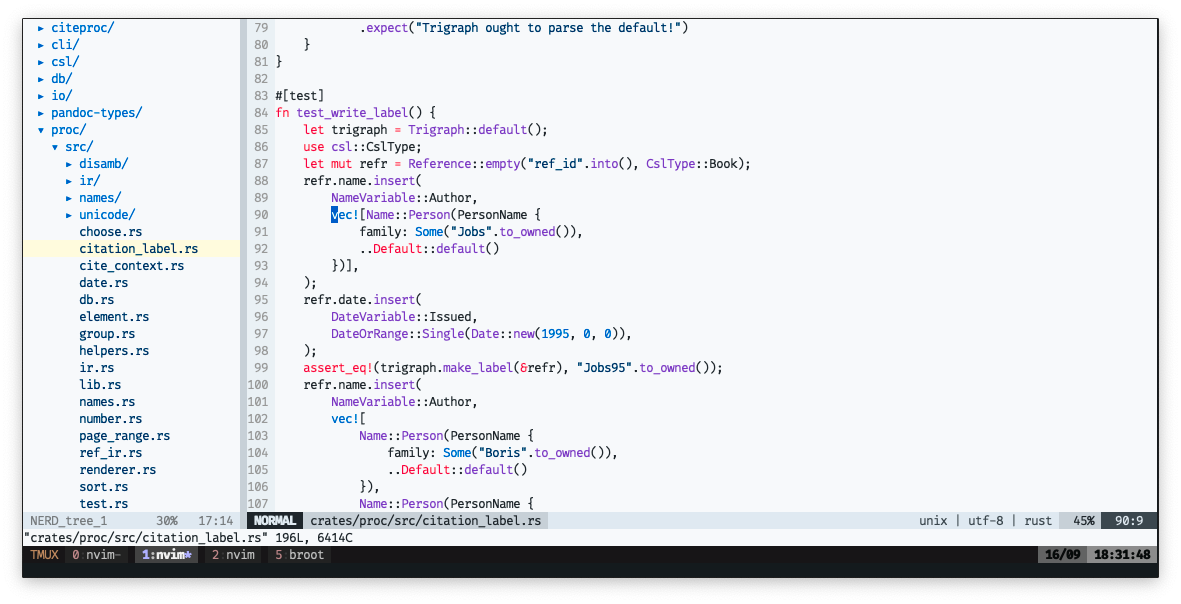
C

Diff

License
Distributed under the same terms as Vim itself. See :help license.