Ⅰ. 插件描述
:feet: Vim script debugger :bug:Ⅱ. 基本信息
|
Ⅲ. 安装方法
使用Vundle管理器安装
在你的.vimrc下添加:Plugin 'haya14busa/vim-debugger':source %
:PluginInstall对于Vundle版本 < 0.10.2,请用上面的Bundle替换Plugin。
使用NeoBundle管理器安装
在你的.vimrc下添加:NeoBundle 'haya14busa/vim-debugger':source %
:NeoBundleInstall使用VimPlug管理器安装
在你的.vimrc下添加:Plug 'haya14busa/vim-debugger':source %
:PlugInstall使用Pathogen管理器安装
在终端中运行以下命令:cd ~/.vim/bundle
git clone https://github.com/haya14busa/vim-debuggerⅣ. 文档说明
:bug: vim-debugger
vim-debugger is a Vim script debugger.
[The APIs might change]
:debug improved
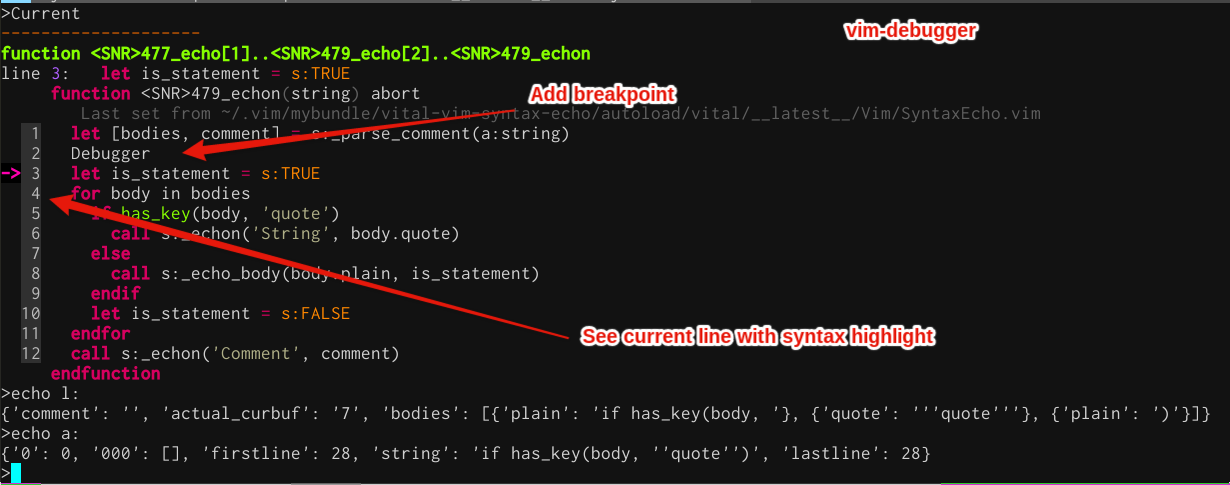
Commands
| command | description |
|---|---|
:DebugOn | turn on debugging commands |
:Debugger | add breakpoint |
>Current | show current line and function in debug-mode with syntax highlight |
>Break {lnum} | add break point to {lnum} in a current function |
>File | show current file in debug-mode |
>SID | show <SID> in debug-mode |
>DebugHelp | show help for debug-mode |
>Sfuncs | list script-local functions in debug-mode |
:feet: StackTrace
:StackTrace function vitalizer#command[37]..vitalizer#vitalize[69]..<SNR>210_search_dependence[20]..<SNR>211_import[11]..<SNR>211__import[20]..<SNR>211__build_module[18]..<SNR>218__vital_loaded[2]..<SNR>211_import[11]..<SNR>211__import: line 6:
| command | description |
|---|---|
:StackTrace {throwpoint} | show stacktrace |
:CallStack {id} | get callstack and save it as {id} |
:CallStackReport {id} | report {id} callstack |