Ⅰ. 插件描述
Search for files fastⅡ. 基本信息
|
Ⅲ. 安装方法
使用Vundle管理器安装
在你的.vimrc下添加:Plugin 'rstacruz/vim-fastunite':source %
:PluginInstall对于Vundle版本 < 0.10.2,请用上面的Bundle替换Plugin。
使用NeoBundle管理器安装
在你的.vimrc下添加:NeoBundle 'rstacruz/vim-fastunite':source %
:NeoBundleInstall使用VimPlug管理器安装
在你的.vimrc下添加:Plug 'rstacruz/vim-fastunite':source %
:PlugInstall使用Pathogen管理器安装
在终端中运行以下命令:cd ~/.vim/bundle
git clone https://github.com/rstacruz/vim-fastuniteⅣ. 文档说明
# vim-fastunite
The fastest way to navigate your files powered by [unite.vim]. Just press Ctrl-P. No lags.
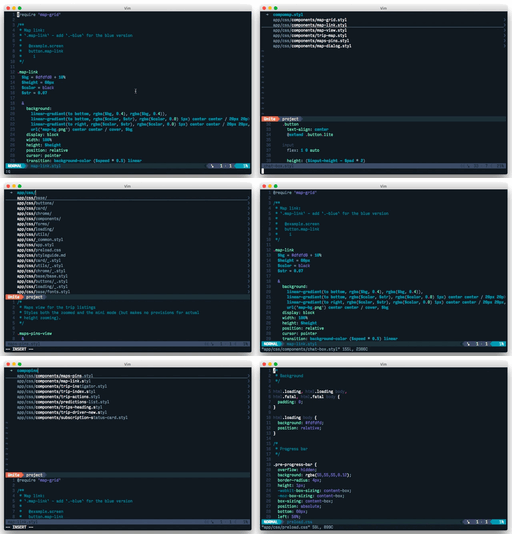
About
vim-fastunite is pre-configured to give you a pleasant out-of-the-box experience with [unite.vim], the best Vim file matcher.
Just install the vim plugins and ag — no need for complicated vimrc incantations.
- No lags when opening Unite (via resuming)
- Fast file indexing (via
ag) - Smart sorting and fuzzy matching
- ...and many more
Installation
Use your favorite Vim package manager to install vim-fastunite with its dependencies. With [vim-plug]:
" ~/.vimrc
Plug 'Shougo/vimproc.vim', { 'do': 'make' }
Plug 'Shougo/unite.vim'
Plug 'rstacruz/vim-fastunite'

Plug 'Shougo/neomru.vim'
Plug 'Shougo/unite-outline'
Plug 'tsukkee/unite-tag'

map <C-p> [unite]p
If you're not using vim-plug and it's the first time to install vimproc, be sure to run make.
Install [the_silver_searcher] for faster searches. (optional, but recommended)
brew install the_silver_searcher   # OSX
apt-get install silversearcher-ag  # Ubuntu
yum install the_silver_searcher    # Fedora
Now press <Ctrl-p> in your big project.
Only the first 3 vimrc lines are required; the other plugins are optional but recommended.
Usage
Press ,up to search for files in the project.
All keys are prefixed with <Leader>u by default (referred to as [unite]). Assuming your leader key is , that's:
| Key | Description |
|---|---|
,u p | Project: search for files in the project |
,u t | Tags: search for tags (requires [unite-tag]) |
,u r | Recent: show recent files (require ([neomru]) |
,u o | Outline: outline sidebar (requires [unite-outline]) |
For grepping:
| Key | Description |
|---|---|
,u g | Grep: search in files |
,u ] | search current word under cursor |
,u G | Show last grep window |
Features
So you've probably tried Unite before. You added a few lines to your vimrc to get Unite running. If you're like me, you probably used it a few times and forgot about it because it was slow.
This plugin is a bag of many tweaks to make the Unite experience more seamless. Here are a few:
- Unite resuming: invoking unite after the first time will resume the previous unite session, making it fast.
- Faster file search: If
agis available, it's used forfile_rec. - Mercurial support: by using
ag, .hgignore and .bzrignore are supported. - Use better sorting: If
+rubyis available in your Vim build, a better sorting method (selecta) will be selected for you. This gets you better top results, saving you keystrokes. - Kep mappings: all the useful key mappings are set up for you, set up conveniently with a configurable
<Leader> uprefix. - Sleeker airline: provides a more pleasant integration with airline.vim by omitting extraneous statusbar information.
- Faster grepping:
agwill be used for grepping if it's available. - Better unite-tag integration: if
unite-tagis installed, it will be used as the tag browser when pressing^]. - Preconfigured matchers: fuzzy matching and smart sorting is enabled by default.
- And many more.
Tips and tricks
- Refreshing files: the window is cached, so new files won't show up. Press
ctrl-lin Unite. - Fixing Unite glitches: press
ctrl-rto restart Unite. - Navigating: after opening
,up, you can navigate directories withctrl-e. pressctrl-gto leave a directory. eg:appctrl-eass
ctrl-e styl ctrl-e will navigate to app/assets/stylesheets, letting you
create a file in that directory.