Ⅰ. 插件描述
:star2: Play with the nvim/vim's built-in terminalⅡ. 基本信息
|
Ⅲ. 安装方法
使用Vundle管理器安装
在你的.vimrc下添加:Plugin 'voldikss/vim-floaterm':source %
:PluginInstall对于Vundle版本 < 0.10.2,请用上面的Bundle替换Plugin。
使用NeoBundle管理器安装
在你的.vimrc下添加:NeoBundle 'voldikss/vim-floaterm':source %
:NeoBundleInstall使用VimPlug管理器安装
在你的.vimrc下添加:Plug 'voldikss/vim-floaterm':source %
:PlugInstall使用Pathogen管理器安装
在终端中运行以下命令:cd ~/.vim/bundle
git clone https://github.com/voldikss/vim-floatermⅣ. 文档说明

【Introduction in Chinese|中文文档】
Use neovim terminal in the floating window.

Features
- Floating window support
- Open and toggle terminal window quickly
- Multiple terminal instances
- Customizable floating terminal style
- Switch/Preview floating terminal buffers using vim-clap
- Switch/Preview/Open floating terminal buffers using denite.nvim or coc.nvim
- Integrate with other external command-line tools(ranger, fzf, etc.)
Requirements
- Vim or NeoVim with
terminalfeature - NeoVim supporting
floating windowis better, but not necessary
Installation
- vim-plug
Plug 'voldikss/vim-floaterm'- dein.nvim
call dein#add('voldikss/vim-floaterm')Usage
Use :FloatermNew command to open a terminal window, :FloatermToggle to hide/reopen that. The filetype of the terminal buffer is set to floaterm.
Generally just one floaterm instance is enough. If you've opened more than one floaterm instances, they are attached to a double-circular-linkedlist. Then you can use :FloatermNext or :FloatermPrev to switch between them.
Commands
:FloatermNew [cmd]Open a floating terminal window, ifcmdexists, it will be executed after the shell startup:FloatermToggleOpen or hide the floaterm window:FloatermPrevSwitch to the previous floaterm window:FloatermNextSwitch to the next floaterm window:FloatermSendSend selected lines to a job in floaterm. Typically this command is executed with a range, i.e.,:'<,'>FloatermSend, if no ranges, send the current line. Also you may try:FloatermSend!and:'<,'>FloatermSend!, the former trims the whitespace in the begin of the line, and the latter removes the whitespace but still keeps the indent.
Global variables
g:floaterm_type
Type string. 'floating'(neovim only) by default. Set it to 'normal' if your vim/nvim doesn't support floatwin or you don't like floating window.
g:floaterm_width
Type int (number of columns) or float (between 0 and 1). If float, the width is relative to &columns. Default: 0.6
g:floaterm_height
Type int (number of lines) or float (between 0 and 1). If float, the height is relative to &lines. Default: 0.6
g:floaterm_winblend
Type int. The transparency of the floating terminal. Default: 0
g:floaterm_position
Type string. The position of the floating window. Available: 'center', 'topleft', 'topright', 'bottomleft', 'bottomright', 'auto'(at the cursor place). Default: 'center'
g:floaterm_borderchars
Type array of string. Characters of the floating window border. Default: ['─', '│', '─', '│', '┌', '┐', '┘', '└']
g:floaterm_open_in_root
Type bool. Open floaterm in project root directory. Default: v:false
g:floaterm_rootmarkers
Type array of string. Default: ['.project', '.git', '.hg', '.svn', '.root']
g:floaterm_autoinsert
Type bool. Enter terminal mode after opening a floaterm. Default: v:true
g:floaterm_open_command
Type string. Command used for opening a file from within :terminal. Available: 'edit', 'split', 'vsplit', 'tabe', 'drop'. Default: 'edit'
Keymaps
This plugin doesn't supply any default mappings. To use a recommended mappings, put the following code in your vimrc.
""" Configuration example
let g:floaterm_keymap_new    = '<F7>'
let g:floaterm_keymap_prev   = '<F8>'
let g:floaterm_keymap_next   = '<F9>'
let g:floaterm_keymap_toggle = '<F10>'
You can also use other keys as shown below:
let g:floaterm_keymap_new = '<Leader>fn'Note that this key mapping is installed from the plugin directory, so if you use on-demand loading provided by some plugin manager, the keymap won't take effect. Actually you don't need the on-demand loading for this plugin as it even doesn't slow your startup.
Change highlight
This plugin supplies two highlight-groups to specify the background/foreground color of floaterm (also the border color if g:floaterm_type is 'floating') window.
By default, they are both linked to NormalFloat. To customize, use hi command together with the colors you prefer.
" Configuration example

" Set floaterm window's background to black
hi FloatermNF guibg=black
" Set floating window border line color to cyan, and background to orange
hi FloatermBorderNF guibg=orange guifg=cyan
More use cases and demos
vim-floaterm is a nvim/vim terminal plugin, it can run all the command-line programs in the terminal even nvim/vim itself.
❗️Note: The following cases should work both in NeoVim and Vim, if some of them don't work on Vim, try startuping Vim with --servername argument, i.e., vim --servername /tmp/vimtmpfile
General
Requirements: pip3 install neovim-remote
Normally if you run vim/nvim somefile.txt within a builtin terminal, you will get another nvim/vim instance running in the subprocess. This plugin allows you to open files from within :terminal without starting a nested nvim process. To archive that, just replace vim/nvim with floaterm, i.e., floaterm somefile.txt

Use as an fzf plugin
This plugin has implemented a wrapper for fzf command. So it can be used as a tiny fzf plugin.
Try :FloatermNew fzf or even wrap this to a new command like this:
command! FZF FloatermNew fzf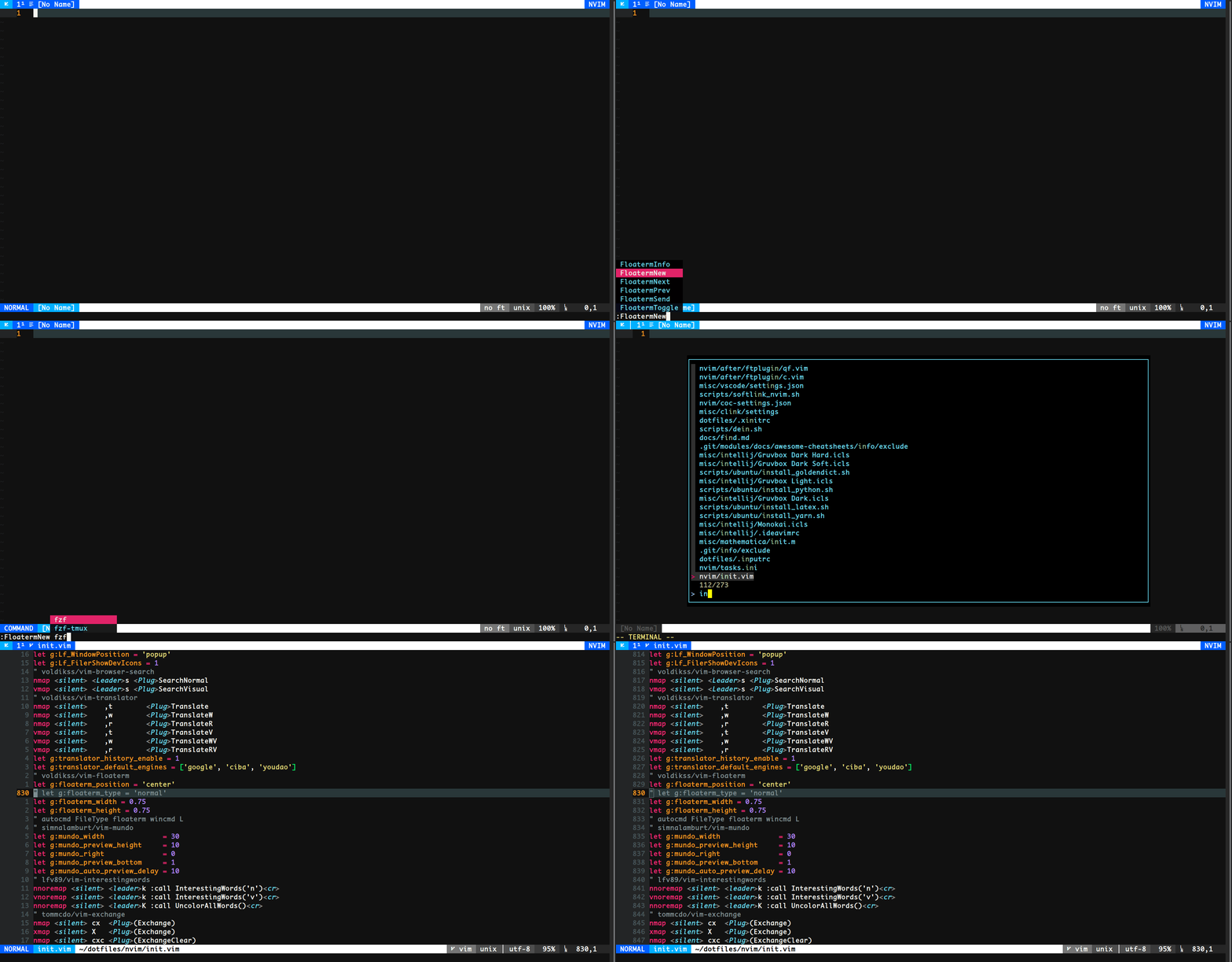
Use as an fff plugin
There is also an fff wrapper
Try :FloatermNew fff or define a new command:
command! FFF FloatermNew fff
Use as an nnn plugin
There is also an nnn wrapper
Try :FloatermNew nnn or define a new command:
command! NNN FloatermNew nnn
Use as a ranger plugin
This plugin can also be a handy ranger plugin since it also has a ranger wrapper
Try :FloatermNew ranger or define a new command:
command! Ranger FloatermNew ranger
Use as a Python REPL plugin
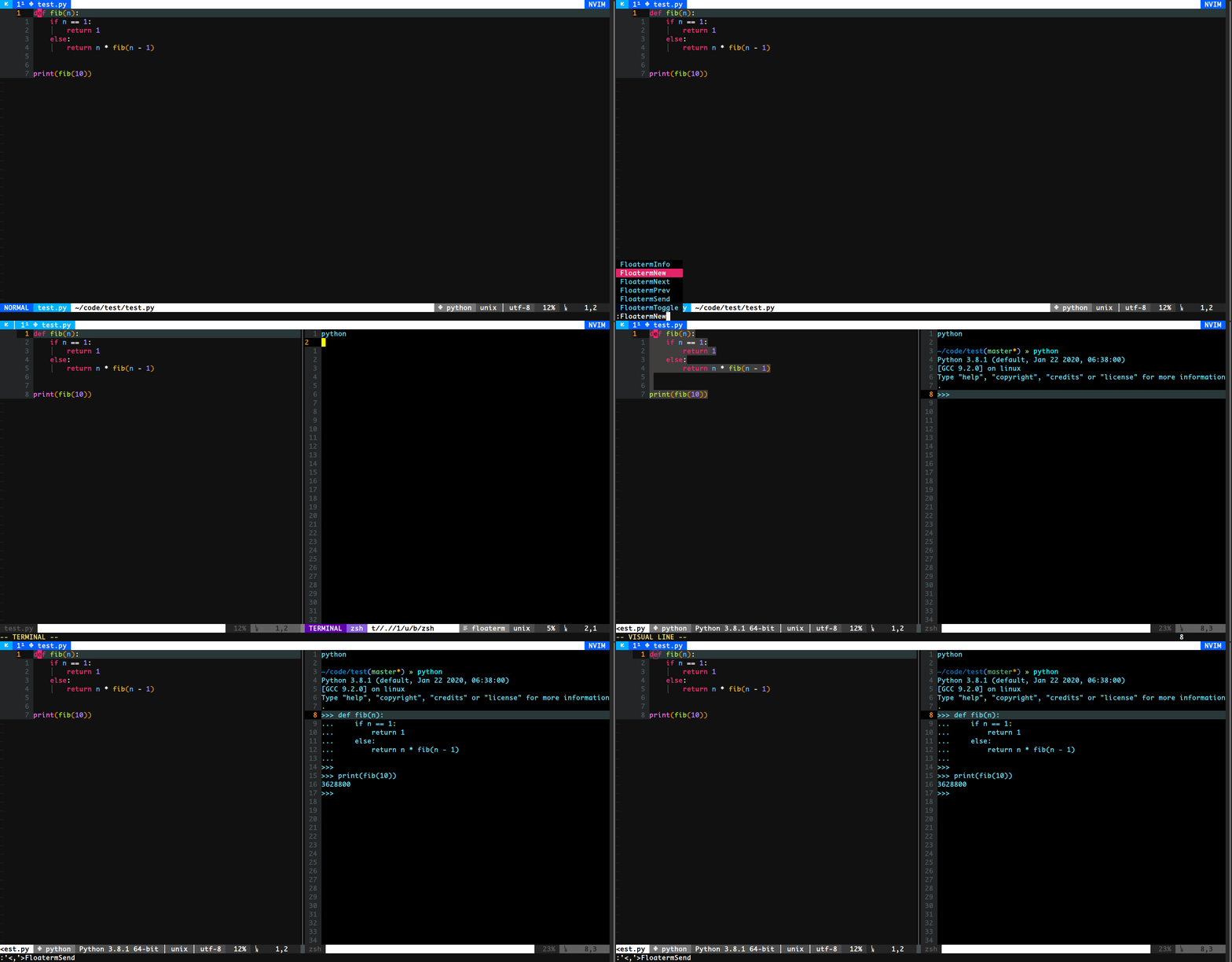
Use :FloatermNew python to open a python REPL. After that you can use :FloatermSend to send lines to the Python interactive shell.
This can also work for other languages which have interactive shells, such as lua, node, etc.
Use with other command line tools
Furthermore, you can also use other command-line programs, such as lazygit, htop, ncdu, etc.
Use lazygit for instance:

Integrate with vim-clap
Use vim-clap to switch/preview floating terminal buffers.
Try :Clap floaterm

Integrate with denite.nvim
Use denite to switch/preview/open floating terminal buffers.
Try :Denite floaterm

Integrate with coc.nvim
Use CocList to switch/preview/open floating terminal buffers.
Install coc-floaterm and try :CocList floaterm

How to define more wrappers
There are two ways for a command to be spawned:
To be executed after
&shellwas startup. see fzf wrapperfunction! floaterm#wrapper#fzf#() abort return ['floaterm $(fzf)', {}, v:true] endfunction
The code above returns an array. floaterm $(fzf) is the command to be executed. v:true means the command will be executed after the &shell startup.
To be executed through
termopen()/term_start()function, in this case, a callback function is allowed. See ranger wrapperfunction! floaterm#wrapper#ranger#() abort let s:ranger_tmpfile = tempname() let cmd = 'ranger --choosefiles=' . s:ranger_tmpfile return [cmd, {'on_exit': funcref('s:ranger_callback')}, v:false] endfunction function! s:ranger_callback(...) abort if filereadable(s:ranger_tmpfile) let filenames = readfile(s:ranger_tmpfile) if !empty(filenames) call floaterm#hide() for filename in filenames execute 'edit ' . fnameescape(filename) endfor endif endif endfunction
Here v:false means cmd will be passed through termopen()(neovim) or term_start()(vim). Function s:ranger_callback() will be invoked when the cmd exits.
F.A.Q
This plugin leaves an empty buffer on startify window
Put this code in your vimrc
autocmd User Startified setlocal buflistedI want to use another shell in the terminal. (e.g., Use fish instead of bash)
Set shell option in your vimrc:
set shell=/path/to/shellI would like to customize the style of the floating terminal window
Use autocmd. For example
function s:floatermSettings()
    setlocal number
    " more settings
endfunction

autocmd FileType floaterm call s:floatermSettings()
I want to open normal floaterm in the vsplit window.
Use :wincmd H or :wincmd L. If you want a persistent layout, register an autocmd:
autocmd FileType floaterm wincmd HCredits
- floaterm executable is modified from vim-terminal-help
- Some features require neovim-remote
License
MIT