Ⅰ. 插件描述
Ready to use, fully configured for Go development.Ⅱ. 基本信息
|
Ⅲ. 安装方法
使用Vundle管理器安装
在你的.vimrc下添加:Plugin 'farazdagi/vim-go-ide':source %
:PluginInstall对于Vundle版本 < 0.10.2,请用上面的Bundle替换Plugin。
使用NeoBundle管理器安装
在你的.vimrc下添加:NeoBundle 'farazdagi/vim-go-ide':source %
:NeoBundleInstall使用VimPlug管理器安装
在你的.vimrc下添加:Plug 'farazdagi/vim-go-ide':source %
:PlugInstall使用Pathogen管理器安装
在终端中运行以下命令:cd ~/.vim/bundle
git clone https://github.com/farazdagi/vim-go-ideⅣ. 文档说明
# vim-go-ide
Get started with Go development in minutes!
0. What is this?
Quite simply this is a vim configuration which will setup all the necessary Go development environment (and plugins), without overwriting your current Vim settings. Basically, you will be able to use amazing vim-go plugin (plus number of others), without affecting your system's Vim configuration.
1. Prerequisites:
1.1 Install Go:
1.1.1 Mac
Create Directories
mkdir $HOME/.go
mkdir -p $HOME/.go/src/github.com/<user>
Setup your paths
export GOPATH=$HOME/.go
export GOROOT=/usr/local/opt/go/libexec
export PATH=$PATH:$GOPATH/bin
export PATH=$PATH:$GOROOT/bin
Install Go
brew install go
"go get" the basics
go get golang.org/x/tools/cmd/godoc
1.2 Install pathogen:
mkdir -p ~/.vim/autoload ~/.vim/bundle
curl -LSso ~/.vim/autoload/pathogen.vim https://tpo.pe/pathogen.vim
1.3 Install python and update plugins (Optional)
brew install python3
pip3 install requests
~/.vim_go_runtime/bin/update_plugins
2. Install vim-go-ide runtime:
Fork the repo, and then clone it to ~/.vim_go_runtime. Once done, just run installation script:
    git clone git@github.com:farazdagi/vim-go-ide.git ~/.vim_go_runtime
    sh ~/.vim_go_runtime/bin/install
NOTE: You system's Vim configuration will NOT be changed i.e. it is safe to install.
3. Run your newly installed Vim configuration:
Remember that your system's Vim config files remain untouched? During installation .vimrc.go is created. Let's use it:
vim -u ~/.vimrc.go
And btw, nothing prevents you from creation of a handy alias in your .zshrc:
alias vimgo='vim -u ~/.vimrc.go'
4. Setup necessary go tools (godep, gocode, godoc etc):
In order for the amazing vim-go to be most useful, run :GoInstallBinaries from w/i the Vim.
5. Recommended minimum profile setup:
~/.profile
export GOPATH=$HOME/.go
export GOROOT=/usr/local/opt/go/libexec
export PATH=$PATH:$GOPATH/bin
export PATH=$PATH:$GOROOT/bin

alias vimgo='vim -u ~/.vimrc.go'
~/.bashrc
source ~/.profile~/.zshrc
[[ -e ~/.profile ]] && emulate sh -c 'source ~/.profile'~/.bash-profile
if [ -f ~/.bashrc ]; then
   source ~/.bashrc
fi
6. End-result:
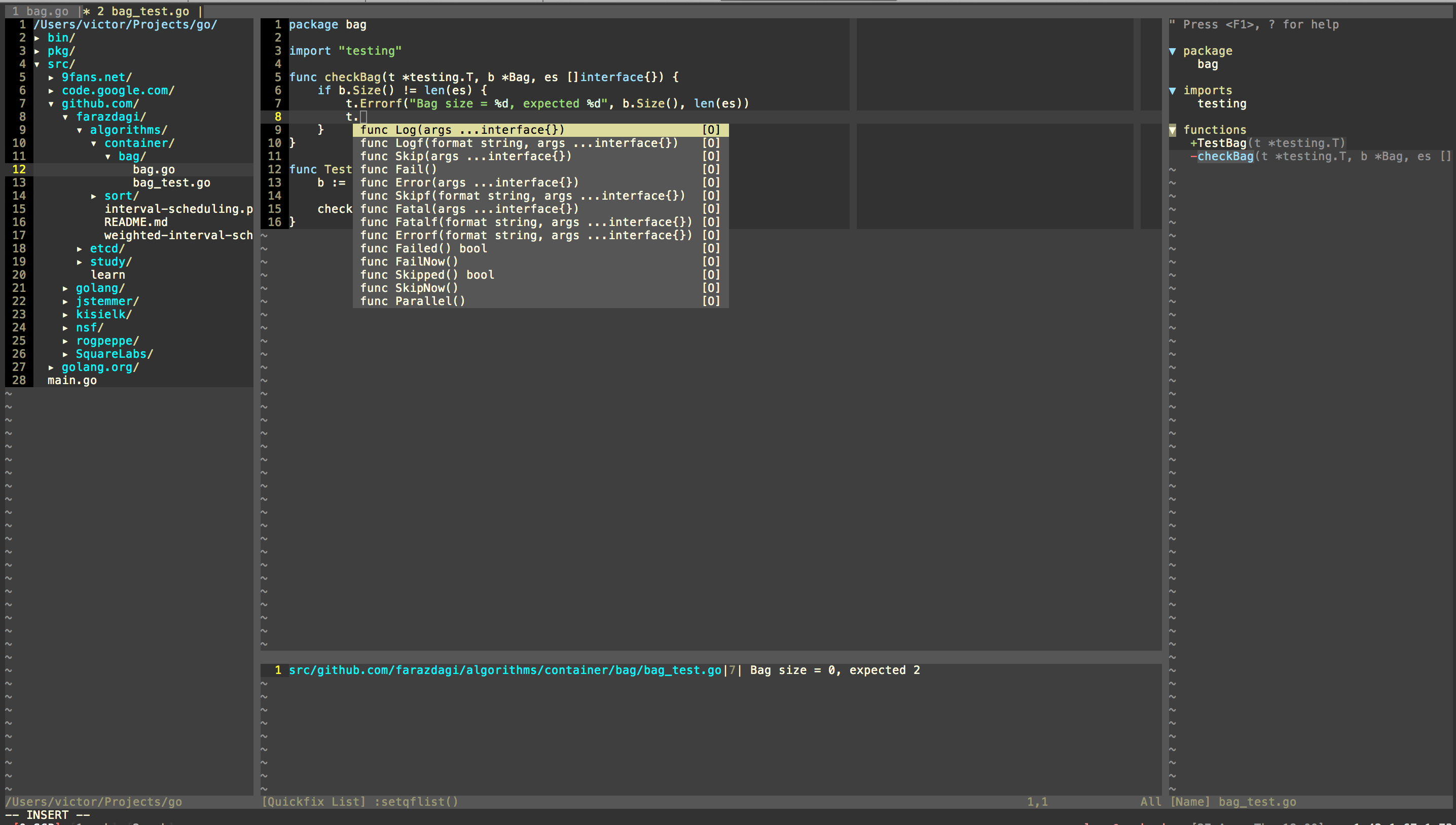
Yep, that's it!
7. Where to go from here?
- You can also read a corresponding blog post.
- You are highly advised to review vim-go docs (just typing
:help vim-gois also good enough). - Review list of plugins installed (see bin/update_plugins), and default configuration that comes with this setup (see vimrc folder).
- You can also define your custom settings in
~/.vim_go_runtime/custom_config.vimthe runtime will try to load this file - so feel free to remap keys as you see necessary!
If you know some plugin that will enhance this setup and thus should be included - submit a PR