Ⅰ. 插件描述
Git URL Sharing (GUS) vim pluginⅡ. 基本信息
|
Ⅲ. 安装方法
使用Vundle管理器安装
在你的.vimrc下添加:Plugin 'jfoote/vim-gus':source %
:PluginInstall对于Vundle版本 < 0.10.2,请用上面的Bundle替换Plugin。
使用NeoBundle管理器安装
在你的.vimrc下添加:NeoBundle 'jfoote/vim-gus':source %
:NeoBundleInstall使用VimPlug管理器安装
在你的.vimrc下添加:Plug 'jfoote/vim-gus':source %
:PlugInstall使用Pathogen管理器安装
在终端中运行以下命令:cd ~/.vim/bundle
git clone https://github.com/jfoote/vim-gusⅣ. 文档说明
# Git URL Sharing (GUS) vim plugin
GUS adds commands to vim that print the git HTTP URL for the code under the cursor and copy the URL to the clipboard if possible.
GUS is a simple tool that helps vim users share links to code for rapid collaborative analysis via IRC/Slack/chat, wikis, and so on.
Move your cursor to the line you want the URL for and run :GUS
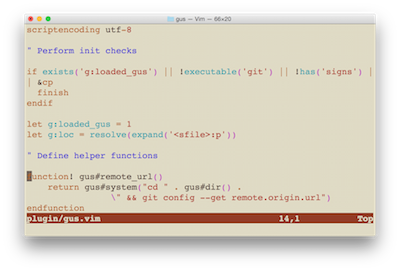
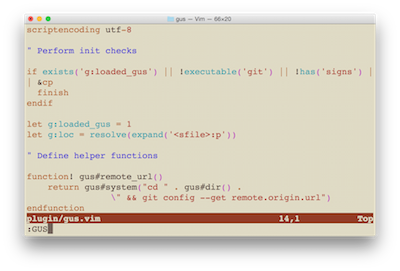
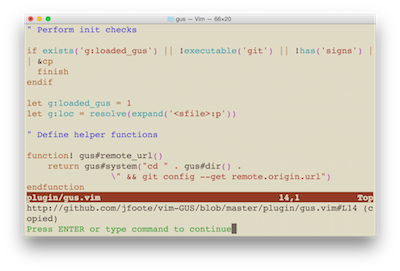
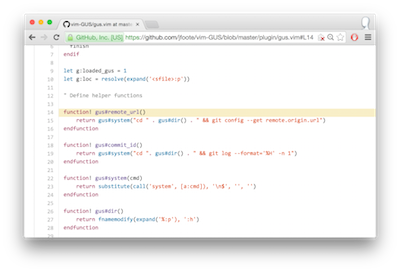
Then share the URL:

Installation
pathogen.vim is the recommended way to install GUS.
cd ~/.vim/bundle
git clone https://github.com/jfoote/vim-GUS.git
Then reload vim and try one of the GUS commands.
Commands
:GUS
This command prints the URL for the current line number and copies it to the clipboard if possible.
:GUM
This command prints a markdown-formatted link for the current line number's URL and copies it to the clipboard if possible.
:GUR
This command prints a redmine-formatted link for the current line number's URL and copies it to the clipboard if possible.
:GUW
This command prints the location of the single-file GUS plugin implementation (gus.vim) on your local filesystem to encourage hacking on it.
How it works
URLs
Well-known git commands are used to determine the current git repo's remote and relative file path. A simple string substitution is used to replace any ssh:// URL schemes with http://.
The URL creation logic is located in a single function, gus#link_url. If this hack won't work for you feel free to edit the code to suit your needs. The plugin is implemented in a single file (gus.vim). You can use the :GUW command in vim to locate the plugin file on your local filesystem if you forgot where you put it.
Copying to clipboard
GUS uses common command line utilities, such as pbcopy on OSX, to copy respective URL text to the clipboard. If no supported command is found, the text is printed to the vim status bar so you can copy it manually.
The clipboard logic is located in gus#copy in gus.vim. As mentioned above, you can use the :GUW command in vim to locate the plugin file on your local filesystem and modify this logic to suit your needs.
TODO
- [x] Add support for
xselandxclip - [ ] Add support for Windows
Alternatives
vim-fugitive includes the :GBrowse command that will open your browser (rather than copying the URL) to the highlighted lines in the corresponding repo on GitHub.com. Thanks to welle on reddit for pointing me to this-- I'd definitely recommend it if you are exclusively working on GitHub projects, you don't need to hack the URL generation logic, the markdown/redmine commands aren't helpful, etc. Especially if you already have fugitive installed :)
Contributions
Please log issues in the GitHub project issue tracker and feel free to contact me at jmfoote@loyola.edu if you have any questions. If you happen to add any useful features, such as better URL scheme logic or support for additional clipboard utilities, please consider contributing your code back via pull request.
Other notes
If you know of a plugin that encompasses GUS's functionality or is just way better than it please let me know and I'll point any readers of this file to it.
Jonathan Foote
jmfoote@loyola.edu
2014 Dec 21