Ⅰ. 插件描述
htmldjango filetype omnicomplete - completes template tags/filters/variablesⅡ. 基本信息
|
Ⅲ. 安装方法
使用Vundle管理器安装
在你的.vimrc下添加:Plugin 'mjbrownie/vim-htmldjango-omnicomplete':source %
:PluginInstall对于Vundle版本 < 0.10.2,请用上面的Bundle替换Plugin。
使用NeoBundle管理器安装
在你的.vimrc下添加:NeoBundle 'mjbrownie/vim-htmldjango-omnicomplete':source %
:NeoBundleInstall使用VimPlug管理器安装
在你的.vimrc下添加:Plug 'mjbrownie/vim-htmldjango-omnicomplete':source %
:PlugInstall使用Pathogen管理器安装
在终端中运行以下命令:cd ~/.vim/bundle
git clone https://github.com/mjbrownie/vim-htmldjango_omnicompleteⅣ. 文档说明
# Vim htmldjango autocomplete
NOTES
I have a YCM version of this plugin that is still seeing some updates.
https://github.com/mjbrownie/django_completeme

An omnicomplete tailored to django templates "tags/variables/filters/templates"
Repo: git://github.com/mjbrownie/vim-htmldjango_omnicomplete.git
Screenshots:
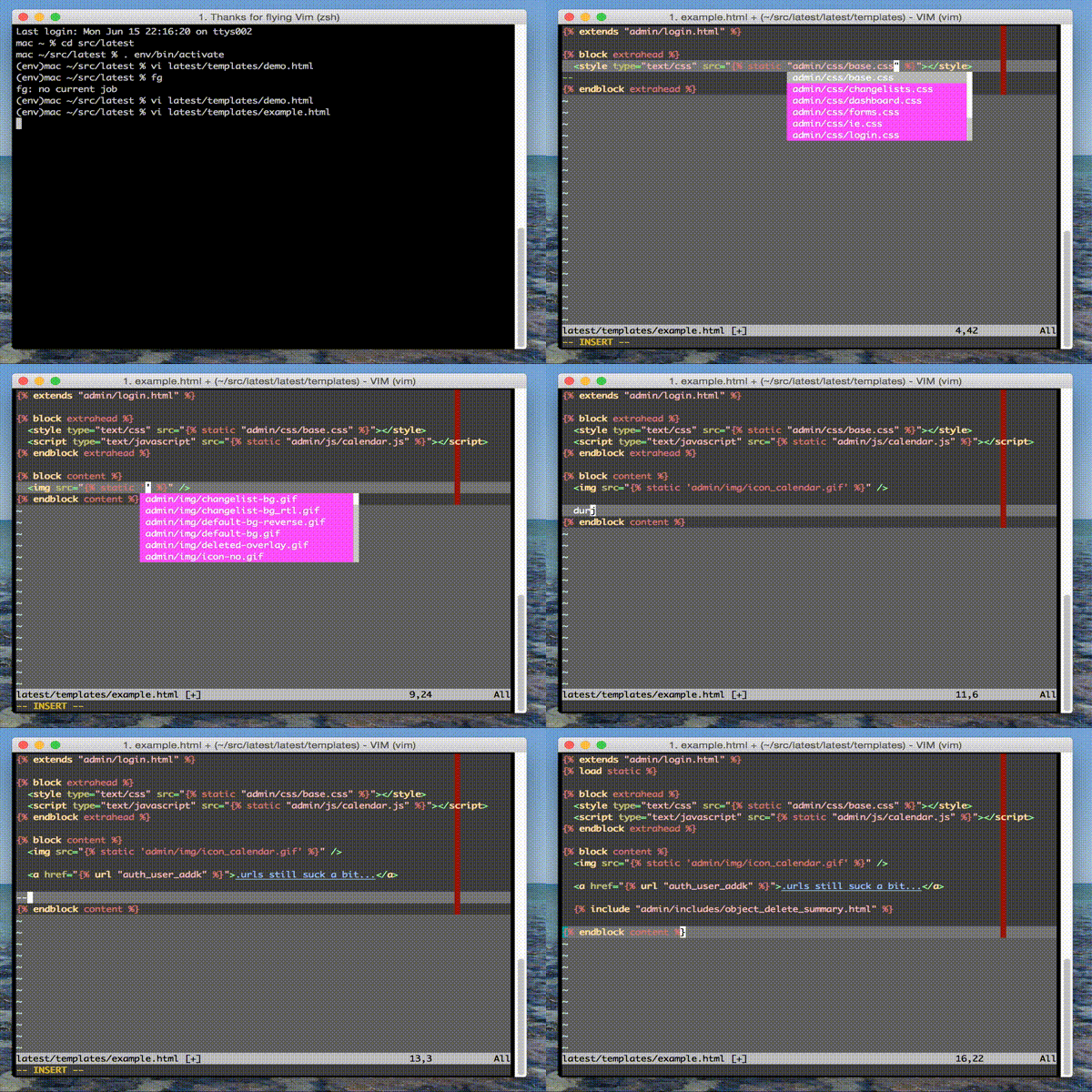
( Note the screenshot is from the youcompleteme rewrite found here https://github.com/mjbrownie/django_completeme).
Eg.
1. Filters

    {{ somevar|a<c-x><c-o>}} should complete 'add' , 'addslashes'

2. Tags

    {% cy<c-x><x-o> %} should complete 'cycle'

3. Load statements

    It also should grab any libs you have {% load tag_lib %} in the file.
    Although it needs them in INSTALLED_APPS.

    {% load <c-x><c-o> %} will complete libraries (eg. 'cache', 'humanize')

4. template filenames

    {% extends '<c-x><c-o>' %} will list base.html ... etc

5. url complete

    {% url <c-x><c-o> %} should complete views and named urls

6. super block complete

    eg {% block c<c-x><c-o> %} to complete 'content' or something defined
    in an extended template.

7. static files complete

    eg {% static "r<c-x><c-o>" %}

    <script src="{% static "<c-x><c-o>" %}" /> - completes js files in static
    <style src="{% static "<c-x><c-o>" %}" /> - completes css files in static
    <img src="{% static "<c-x><c-o>" %}" /> - completes img files in static

8. optional variable name completion (placeholder)

    {{ s<c-x><x-o> }}

    will complete any maps defined in the python htmldjango_opts['variable']
    dict list. See below for info.
Where possible info panels show the functions __doc__. Most of the
internal ones are decent.
Requires:
+python
SETUP
1. I like pathogen/Vundle clone into ~/.vim/bundle directory.

    Alternately just stick the vim file in your ~/.vim/autoload/ dir.

2. in .vimrc set the omnifunc Eg.

    au FileType htmldjango set omnifunc=htmldjangocomplete#CompleteDjango

3. Optional: At the moment you need to force a html flavour for htmlcompletion

    in .vimrc

    let g:htmldjangocomplete_html_flavour = 'html401s'

    :verbose function htmlcomplete#CheckDoctype for DocType details

    Choices:
        'html401t' 'xhtml10s' 'html32' 'html40t' 'html40f' 'html40s'
        'html401t' 'html401f' 'html401s' 'xhtml10t' 'xhtml10f' 'xhtml10s'
        'xhtml11'

        'html5' if you have html5.vim

4. matchpair notes

    This plugin uses matchpair and needs to be inside a closed django tag.
    This is fine if you are using snipmate. Also you might want auto
    closing maps such as follows.

    au FileType htmldjango inoremap {% {% %}<left><left><left>
    au FileType htmldjango inoremap {{ {{ }}<left><left><left>
TESTING
django needs to be in sys.path along with DJANGO_SETTINGS_MODULE in your
environment.

To test...

:python import django

should not result in an error

:python from django.conf import settings; print settings.INSTALLED_APPS
:python from django.conf import settings; print settings.TEMPLATE_DIRS

should show the apps template dirs you need

I've only tested this on a mac with vim 7.3 and django 1.4