Ⅰ. 插件描述
Write CSS fasterⅡ. 基本信息
|
Ⅲ. 安装方法
使用Vundle管理器安装
在你的.vimrc下添加:Plugin 'rstacruz/vim-hyperstyle':source %
:PluginInstall对于Vundle版本 < 0.10.2,请用上面的Bundle替换Plugin。
使用NeoBundle管理器安装
在你的.vimrc下添加:NeoBundle 'rstacruz/vim-hyperstyle':source %
:NeoBundleInstall使用VimPlug管理器安装
在你的.vimrc下添加:Plug 'rstacruz/vim-hyperstyle':source %
:PlugInstall使用Pathogen管理器安装
在终端中运行以下命令:cd ~/.vim/bundle
git clone https://github.com/rstacruz/vim-hyperstyleⅣ. 文档说明
# vim-hyperstyle
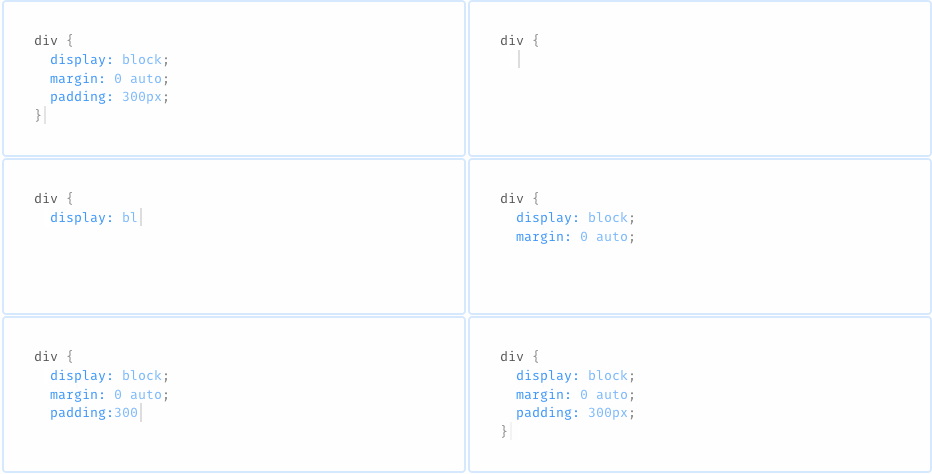
Type faster by shorthand that will auto-expand as you type. Supports less, sass, scss, stylus, and plain CSS.

Expansions
Expansions intelligently happen as you type. Unlike [emmet], there are no hotkeys required—expansion will happen as you type whenever they make sense.
- Properties will be auto-completed:
m:→margin: - You can put numeric next to property shortcuts:
z1⏎→z-index: 1; - Values will be auto-completed:
float:l→float: left - Default units will be added:
border-radius: 4⏎→border-radius: 4px; - Shortcuts for common statements are available:
fl⏎→float: left; - Semicolons are inserted automatically so you can write CSS in one go:
dib⏎m0a⏎ - Semicolons are omitted for
.styland.sass - ...and lots more goodies
Examples
| Shortcut | Expansion |
|---|---|
dib | display: inline-block; |
m0 | margin: 0; |
m0a | margin: 0 auto; |
m-15 | margin: -15px; |
m:auto | margin: auto; |
fle 1 auto | flex: 1 auto; |
float left | float: left; |
Installation
Using [vim-plug]:
Plug 'rstacruz/vim-hyperstyle'Python support is required. For Neovim:
:help nvim-python
For OSX/Homebrew: (info)
brew install macvim --with-cscope --with-lua --override-system-vim \
  --with-luajit --with-python3 --with-python
Options
- To generate statements with no colons in Stylus, set
let g:hyperstyle_use_colon=0.
Caveats
- Stylus is assumed to be in indented syntax (no braces).
Thanks
vim-hyperstyle © 2015+, Rico Sta. Cruz. Released under the [MIT] License.
Authored and maintained by Rico Sta. Cruz with help from contributors (list).
ricostacruz.com ·
GitHub @rstacruz ·
Twitter @rstacruz