Ⅰ. 插件描述
illuminate.vim - Vim plugin for automatically highlighting other uses of the word under the cursorⅡ. 基本信息
|
Ⅲ. 安装方法
使用Vundle管理器安装
在你的.vimrc下添加:Plugin 'rrethy/vim-illuminate':source %
:PluginInstall对于Vundle版本 < 0.10.2,请用上面的Bundle替换Plugin。
使用NeoBundle管理器安装
在你的.vimrc下添加:NeoBundle 'rrethy/vim-illuminate':source %
:NeoBundleInstall使用VimPlug管理器安装
在你的.vimrc下添加:Plug 'rrethy/vim-illuminate':source %
:PlugInstall使用Pathogen管理器安装
在终端中运行以下命令:cd ~/.vim/bundle
git clone https://github.com/rrethy/vim-illuminateⅣ. 文档说明
# vim-illuminate
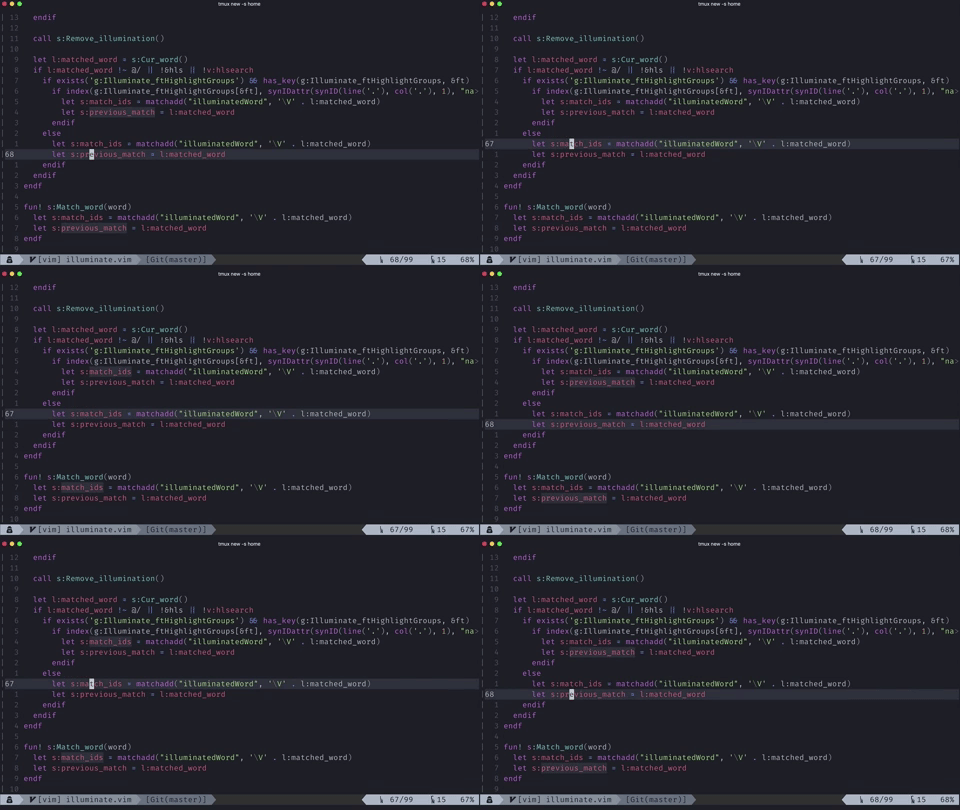
Vim plugin for automatically highlighting other uses of the current word under the cursor
Rationale
All modern IDEs and editors will highlight the word under the cursor which is a great way to see other uses of the current variable without having to look for it.
About
This plugin is a tool for illuminating the other uses of the current word under the cursor.
Illuminate will by default highlight all uses of the word under the cursor, but with a little bit of configuration it can easily only highlight what you want it to highlight based on the filetype and highlight-groups.
Illuminate will also do a few other niceties such as delaying the highlight for a user-defined amount of time based on g:Illuminate_delay (by default 250), it will interact nicely with search highlighting, jumping around between buffers, jumping around between windows, and won't illuminate while in insert mode.
Configuration
Illuminate will delay before highlighting, this is not lag, it is to avoid the jarring experience of things illuminating too fast. This can be controlled with g:Illuminate_delay (which is default to 250 milliseconds):
Note: Delay only works for Vim8 and Neovim.
" Time in milliseconds (default 250)
let g:Illuminate_delay = 250
Illuminate will by default highlight the word under the cursor to match the behaviour seen in Intellij and VSCode. However, to make it not highlight the word under the cursor, use the following:
" Don't highlight word under cursor (default: 1)
let g:Illuminate_highlightUnderCursor = 0
By default illuminate will highlight all words the cursor passes over, but for many languages, you will only want to highlight certain highlight-groups (you can determine the highlight-group of a symbol under your cursor with :echo synIDattr(synID(line("."), col("."), 1), "name")).
You can define which highlight groups you want the illuminating to apply to. This can be done with a dict mapping a filetype to a list of highlight-groups in your vimrc such as:
let g:Illuminate_ftHighlightGroups = {
      \ 'vim': ['vimVar', 'vimString', 'vimLineComment',
      \         'vimFuncName', 'vimFunction', 'vimUserFunc', 'vimFunc']
      \ }
A blacklist of highlight groups can also be setup by adding the suffix :blacklist to the filetype. However, if the whitelist for that filetype already exists, it will override the blacklist.
let g:Illuminate_ftHighlightGroups = {
      \ 'vim:blacklist': ['vimVar', 'vimString', 'vimLineComment',
      \         'vimFuncName', 'vimFunction', 'vimUserFunc', 'vimFunc']
      \ }
illuminate can also be disabled for various filetypes using the following:
let g:Illuminate_ftblacklist = ['nerdtree']Or you can enable it only for certain filetypes with:
let g:Illuminate_ftwhitelist = ['vim', 'sh', 'python']Lastly, by default the highlighting will be done with the hl-group CursorLine since that is in my opinion the nicest. It can however be overridden using the following or something similar:
hi illuminatedWord cterm=underline gui=underlineInstallation
This assumes you have the packages feature. If not, any plugin manager will suffice.
Neovim
mkdir -p ~/.config/nvim/pack/plugins/start
cd ~/.config/nvim/pack/plugins/start
git clone https://github.com/RRethy/vim-illuminate.git
Vim
mkdir -p ~/.vim/pack/plugins/start
cd ~/.vim/pack/plugins/start
git clone https://github.com/RRethy/vim-illuminate.git
FAQs
I am seeing by default an underline for the matched words
Try this: hi link illuminatedWord Visual. The reason for the underline is that the highlighting is done with CursorLine by default, which defaults to an underline.