Ⅰ. 插件描述
SLIME-like support for running Vim with iTerm2Ⅱ. 基本信息
|
Ⅲ. 安装方法
使用Vundle管理器安装
在你的.vimrc下添加:Plugin 'matschaffer/vim-islime2':source %
:PluginInstall对于Vundle版本 < 0.10.2,请用上面的Bundle替换Plugin。
使用NeoBundle管理器安装
在你的.vimrc下添加:NeoBundle 'matschaffer/vim-islime2':source %
:NeoBundleInstall使用VimPlug管理器安装
在你的.vimrc下添加:Plug 'matschaffer/vim-islime2':source %
:PlugInstall使用Pathogen管理器安装
在终端中运行以下命令:cd ~/.vim/bundle
git clone https://github.com/matschaffer/vim-islime2Ⅳ. 文档说明
# iSlime2.vim
SLIME-like support for running vim with iTerm2
What is it?
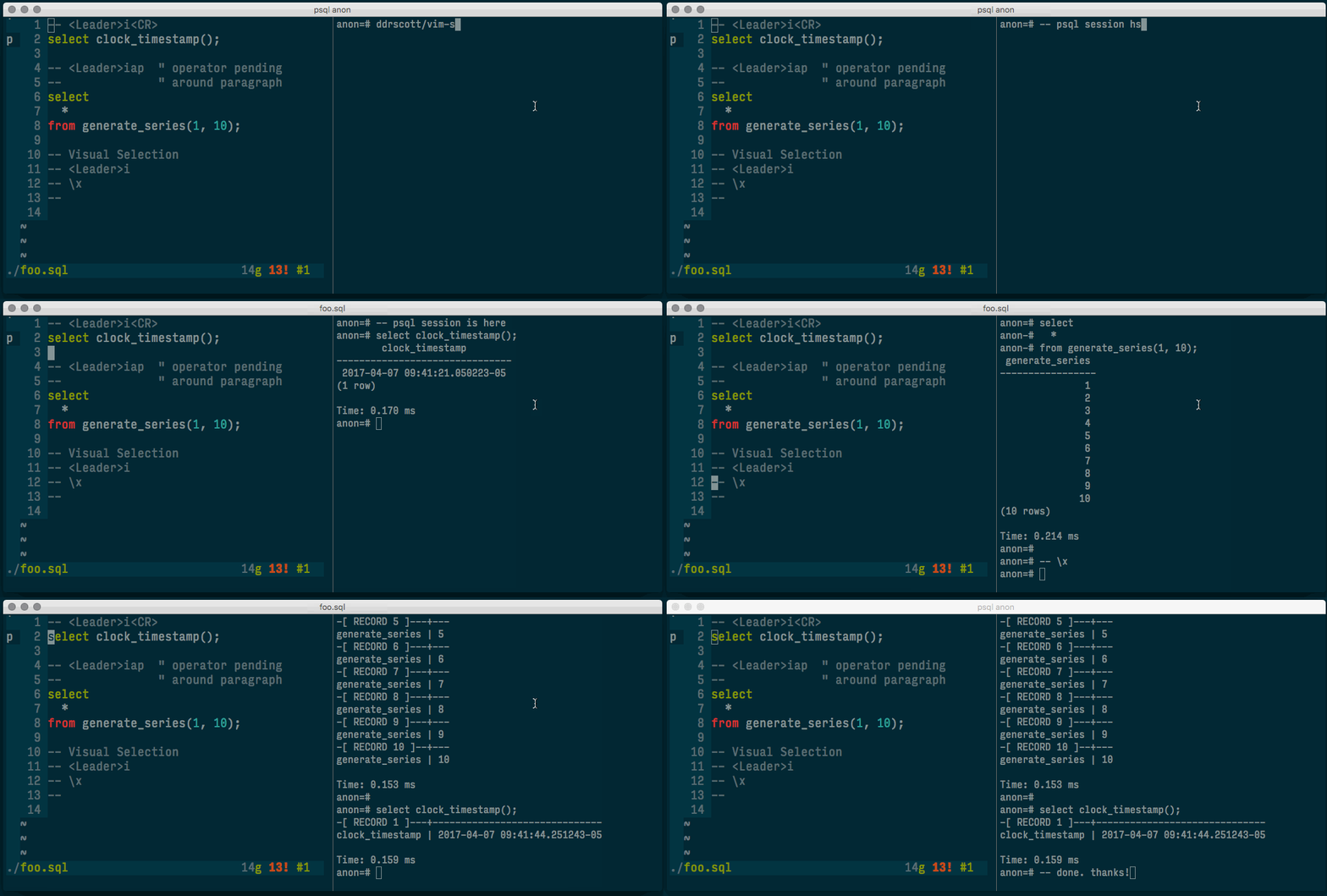
It lets you send commands from Vim to an iTerm2 session. This is handy if you need to run a command repeatedly (like a test) and want to see the output. This is especially nice in text-mode Vim, but it works fine from MacVim's GUI too.
It works by using AppleScript to switch to the next iTerm2 Pane (using Cmd+]), writing the appropriate text then switching back (using Cmd+[).
Installation
Include with Vundle, Pathogen or drop the project files into your ~/.vim directory. I use and test this with Vundle.
If you're using this on iTerm 2.9 or above (nightly as of 2015/09/17), you'll also want to set "29" mode since the AppleScript interface has changed a bit. Use a command like so in your vimrc:
let g:islime2_29_mode=1Usage
For any commands
ISlime2 echo hi mom- runs "echo hi mom"
Recommended Mappings
let g:islime2_29_mode=1

" Send current line
nnoremap <silent> <Leader>i<CR> :ISlime2CurrentLine<CR>

" Move to next line then send it
nnoremap <silent> <Leader>ij :ISlime2NextLine<CR>

" Move to previous line then send it
nnoremap <silent> <Leader>ik :ISlime2PreviousLine<CR>

" Send in/around text object - operation pending
nnoremap <silent> <Leader>i :set opfunc=islime2#iTermSendOperator<CR>g@

" Send visual selection
vnoremap <silent> <Leader>i :<C-u>call islime2#iTermSendOperator(visualmode(), 1)<CR>
More Example Mappings
" Send the whole file
nnoremap <leader>cf :%y r<cr>:call islime2#iTermSendNext(@r)<CR>

" Send current section similar to a typical slime C-c, C-c
inoremap <leader>cc <Esc>vip:<C-u>call islime2#iTermSendOperator(visualmode(), 1)<CR>
vnoremap <leader>cc :<C-u>call islime2#iTermSendOperator(visualmode(), 1)<CR>
nnoremap <leader>cc vip:<C-u>call islime2#iTermSendOperator(visualmode(), 1)<CR>

" Rerun the previous iSlime2 command
nnoremap <leader>ff :call islime2#iTermRerun()<CR>

" Send up and enter to re-run the previous command from shell history
nnoremap <leader>fp :call islime2#iTermSendUpEnter()<CR>

" Run rake
nnoremap <leader>fr :call islime2#iTermSendNext("rake")<CR>

" Run a test script on the current file (assumes ./script/test)
nnoremap <leader>ft :call islime2#iTermRunTest(expand("%"))<CR>
remap <leader>ft :call islime2#iTermRunTest(expand("%"))<CR>")

" Run a test script on the current file and line
nnoremap <leader>fT :call islime2#iTermRunTest(expand("%") . ":" . line("."))<CR>
Contributions
Are welcome! Pull request to your heart's content. I'd love to turn this into a general purpose development tool.
License
Copyright © Mat Schaffer. Distributed under the same terms as Vim itself. See :help license.
Thanks
- Tim Pope, for vim-fugitive which was a nice reference for how to run stuff from Vim script.
- Jonathan Palardy, for vim-slime, the original inspiration for this plugin.
- Troy Bollinger and Patrick Bacon for writing the AppleScript that helped me write my own.
- George Nachman for writing iTerm2, easily the most bad-ass terminal emulator I know of.
- Lar Van Der Jagt, Shay Arnett, Josh Davey and Robert Pitts for the tweets that got me going on this