Ⅰ. 插件描述
Vim plugin for highlighting SQL inside JavaScript template literalsⅡ. 基本信息
|
Ⅲ. 安装方法
使用Vundle管理器安装
在你的.vimrc下添加:Plugin 'statico/vim-javascript-sql':source %
:PluginInstall对于Vundle版本 < 0.10.2,请用上面的Bundle替换Plugin。
使用NeoBundle管理器安装
在你的.vimrc下添加:NeoBundle 'statico/vim-javascript-sql':source %
:NeoBundleInstall使用VimPlug管理器安装
在你的.vimrc下添加:Plug 'statico/vim-javascript-sql':source %
:PlugInstall使用Pathogen管理器安装
在终端中运行以下命令:cd ~/.vim/bundle
git clone https://github.com/statico/vim-javascript-sqlⅣ. 文档说明
# Template Literal SQL Highlighting for Vim
This is a Vim plugin that provides highlighting inside SQL template literals when using a module like sql-template-strings. It kind of works.
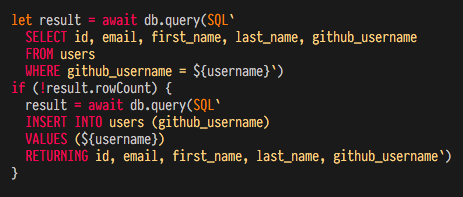
This module is experimental and strongly inspired by vim-graphql.
Installation
Using Plug
- Add
Plug 'statico/vim-javascript-sql'to~/.vimrc vim +PluginInstall +qall
Using Vundle
- Add
Plugin 'statico/vim-javascript-sql'to~/.vimrc vim +PluginInstall +qall
Using Pathogen
cd ~/.vim/bundlegit clone https://github.com/statico/vim-javascript-sql.git
Configuration
This plugin uses the generic SQL syntax by default. If you want to use a different dialect, like PostgreSQL, put something like this in your .vimrc:
let g:javascript_sql_dialect = 'pgsql'