Ⅰ. 插件描述
Vim syntax highlighting for Lightscript.Ⅱ. 基本信息
|
Ⅲ. 安装方法
使用Vundle管理器安装
在你的.vimrc下添加:Plugin 'jguddas/vim-lightscript':source %
:PluginInstall对于Vundle版本 < 0.10.2,请用上面的Bundle替换Plugin。
使用NeoBundle管理器安装
在你的.vimrc下添加:NeoBundle 'jguddas/vim-lightscript':source %
:NeoBundleInstall使用VimPlug管理器安装
在你的.vimrc下添加:Plug 'jguddas/vim-lightscript':source %
:PlugInstall使用Pathogen管理器安装
在终端中运行以下命令:cd ~/.vim/bundle
git clone https://github.com/jguddas/vim-lightscriptⅣ. 文档说明
vim-lightscript
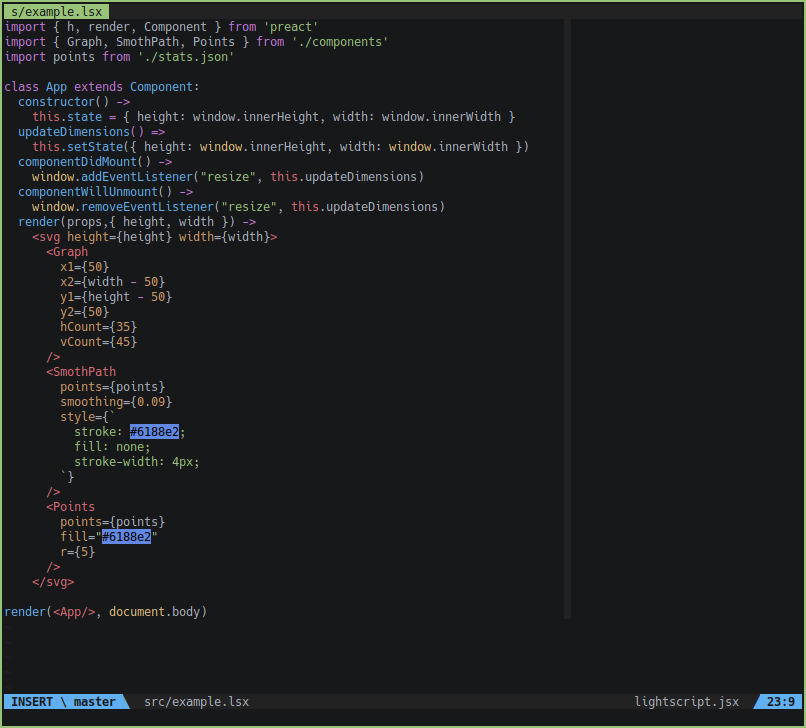
Syntax highlighting for Lightscript.
Usage
By default, JSX will be enabled for files with .lsc and .lsx extensions.
If you would like to enable JSX only for .lsx files, add
let g:lsx_ext_required = 1Installation
VimPlug
Place this in your .vimrc:
Plug 'jguddas/vim-lightscript'
Plug 'pangloss/vim-javascript'
Plug 'mxw/vim-jsx'… then run the following in Vim:
:source % | PlugInstallVundle
Place this in your .vimrc:
Plugin 'jguddas/vim-lightscript'
Plugin 'pangloss/vim-javascript'
Plugin 'mxw/vim-jsx'… then run the following in Vim:
:source % | PluginInstallFor Vundle version < 0.10.2, replace Plugin with Bundle above.
Pathogen
Run the following in a terminal:
cd ~/.vim/bundle
git clone https://github.com/jguddas/vim-lightscript
git clone https://github.com/pangloss/vim-javascript
git clone https://github.com/mxw/vim-jsx