Ⅰ. 插件描述
Edit Vim macros with ease!Ⅱ. 基本信息
|
Ⅲ. 安装方法
使用Vundle管理器安装
在你的.vimrc下添加:Plugin 'dohsimpson/vim-macroeditor':source %
:PluginInstall对于Vundle版本 < 0.10.2,请用上面的Bundle替换Plugin。
使用NeoBundle管理器安装
在你的.vimrc下添加:NeoBundle 'dohsimpson/vim-macroeditor':source %
:NeoBundleInstall使用VimPlug管理器安装
在你的.vimrc下添加:Plug 'dohsimpson/vim-macroeditor':source %
:PlugInstall使用Pathogen管理器安装
在终端中运行以下命令:cd ~/.vim/bundle
git clone https://github.com/dohsimpson/vim-macroeditorⅣ. 文档说明
MacroEditor
Vim Macros are awesome. But it's hard to get it right on the first try.
MacroEditor is a simple vim plugin that allow you to edit your macros
in a split window. And save it back easily when you are done.
MacroEditor only defines one command: MacroEdit
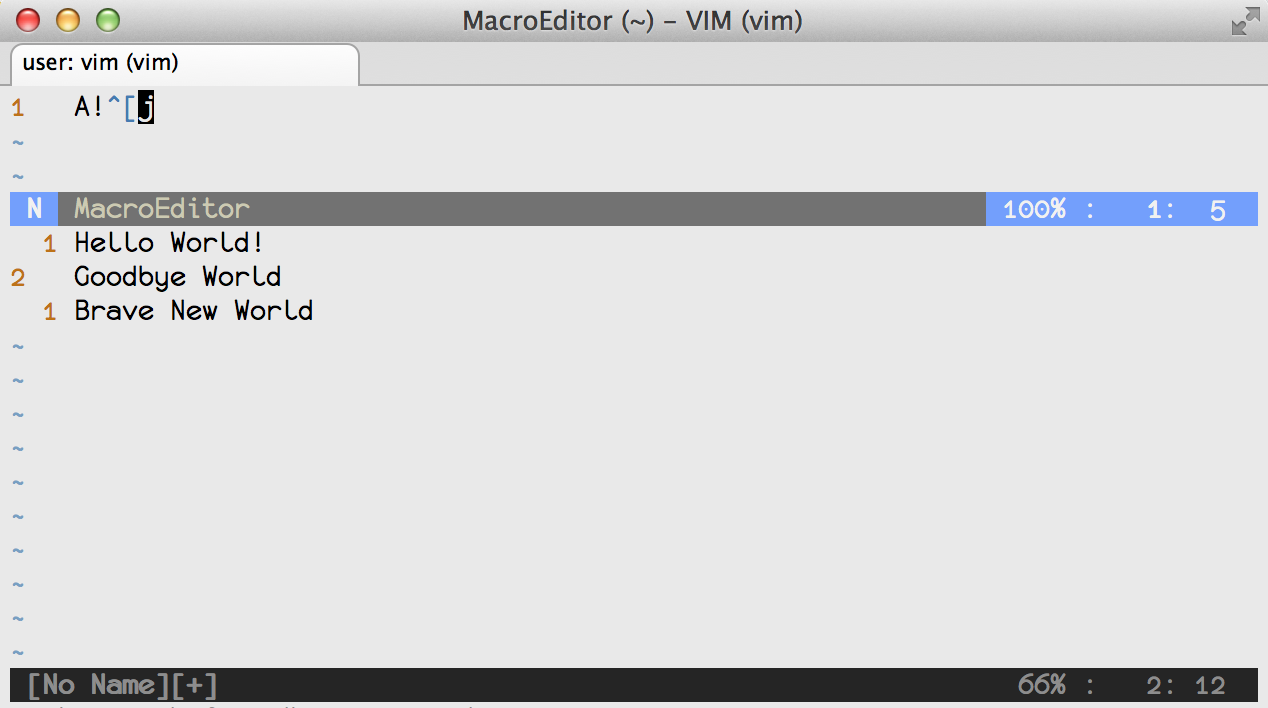
Quick Start
Say if you want to edit your macro in register q, you can call:
:MacroEdit q
A split window will open at the top for editing. When you are done editing,
save and close the window by calling:
:wq
If you want to discard this edit, simply call:
:q!
Enjoy vimming!
Installation
To install with pathogen.vim:
cd ~/.vim/bundle
git clone https://github.com/dohsimpson/vim-macroeditor
License
MIT license