Ⅰ. 插件描述
super lightweight snippet managerⅡ. 基本信息
|
Ⅲ. 安装方法
使用Vundle管理器安装
在你的.vimrc下添加:Plugin 'keyboardfire/vim-minisnip':source %
:PluginInstall对于Vundle版本 < 0.10.2,请用上面的Bundle替换Plugin。
使用NeoBundle管理器安装
在你的.vimrc下添加:NeoBundle 'keyboardfire/vim-minisnip':source %
:NeoBundleInstall使用VimPlug管理器安装
在你的.vimrc下添加:Plug 'keyboardfire/vim-minisnip':source %
:PlugInstall使用Pathogen管理器安装
在终端中运行以下命令:cd ~/.vim/bundle
git clone https://github.com/keyboardfire/vim-minisnipⅣ. 文档说明
_
 _ __ ___ (_)_ __ (_)___ _ __ (_)_ __
| '_ ` _ \| | '_ \| / __| '_ \| | '_ \
| | | | | | | | | | \__ \ | | | | |_) |
|_| |_| |_|_|_| |_|_|___/_| |_|_| .__/
                                |_|
Minisnip is a tiny plugin that allows you to quickly insert "templates" into
- Among all the other snippet plugins out there, the primary goal of
- is to be as minimal and lightweight as possible.
To get started with minisnip, create a directory called ~/.vim/minisnip.
Then placing a file called foo inside of it will create the foo snippet,
which you can access by typing foo<Tab> in insert mode.
Filetype-aware snippets are also available. For example, a file called_java_main will create a main snippet only when filetype=java, allowing
you to add ex. a _c_main snippet and so on.
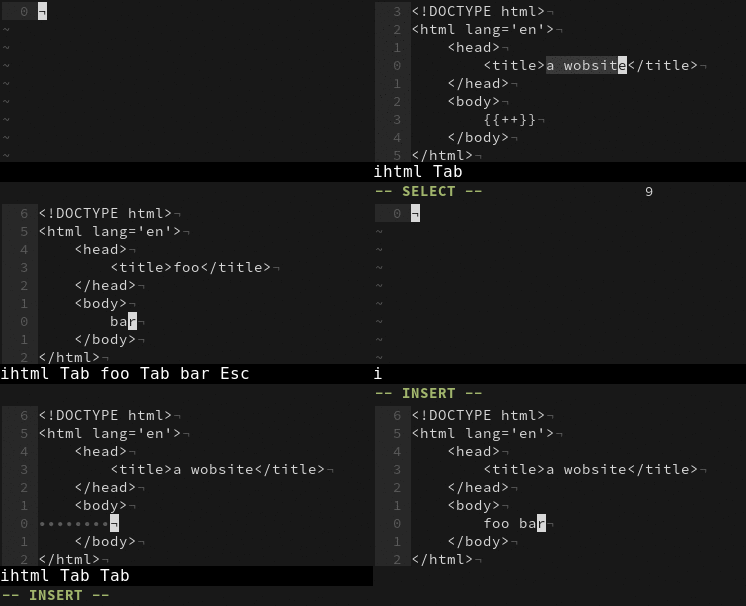
Here is a demo of the basic features of minisnip:
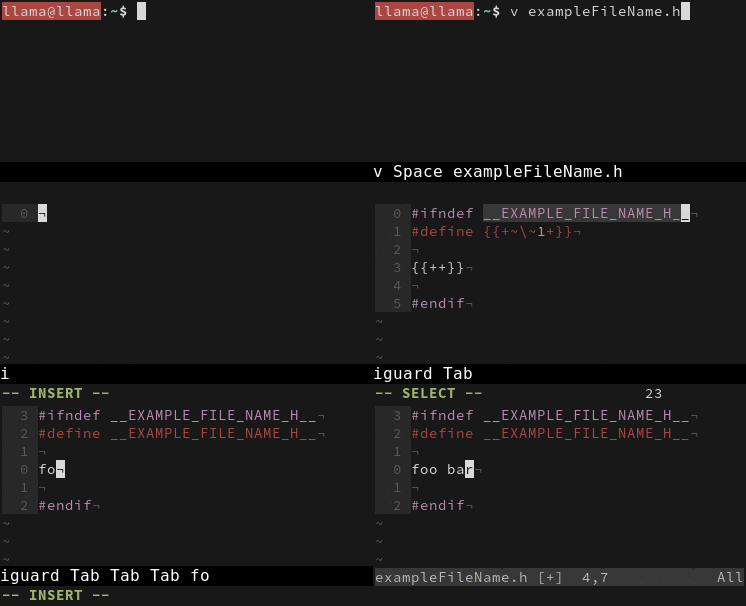
Here is another example that shows how arbitrary code can be executed from
within a snippet, allowing dynamic snippets based on the file name or other
conditions:
Minisnip is licensed under MIT.