Ⅰ. 插件描述
Phix color scheme for VimⅡ. 基本信息
|
Ⅲ. 安装方法
使用Vundle管理器安装
在你的.vimrc下添加:Plugin 'stuartherbert/vim-phix-colors':source %
:PluginInstall对于Vundle版本 < 0.10.2,请用上面的Bundle替换Plugin。
使用NeoBundle管理器安装
在你的.vimrc下添加:NeoBundle 'stuartherbert/vim-phix-colors':source %
:NeoBundleInstall使用VimPlug管理器安装
在你的.vimrc下添加:Plug 'stuartherbert/vim-phix-colors':source %
:PlugInstall使用Pathogen管理器安装
在终端中运行以下命令:cd ~/.vim/bundle
git clone https://github.com/stuartherbert/vim-phix-colorsⅣ. 文档说明
# Phix Color Scheme for Vim
This is a port of my Phix Color Scheme for Sublime Text 2. It supports both console terminals and GUI.
It isn't a 100% perfect port, due to the differences in syntax highlighting between Sublime Text 2 and Vim, but it's close enough.
Example Screenshots
Inside vim from the console:
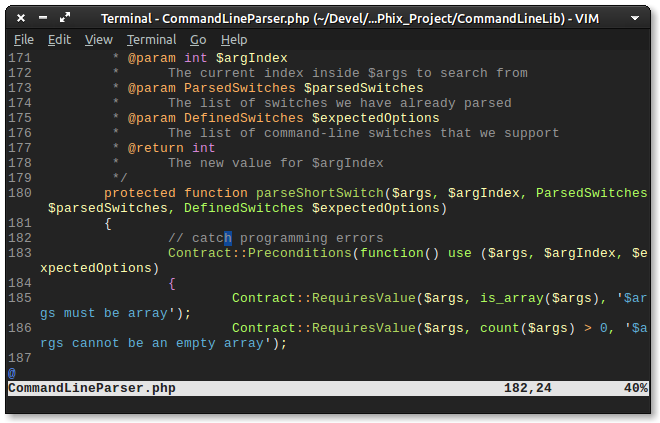
and inside GVim on Ubuntu 12.10:

How To Install
If you already use Pathogen, simply add this colour scheme to your bundles folder:
cd .vim/bundles
git submodule add git@github.com:stuartherbert/vim-phix-colors.git
Or, download the phix.vim file, save it as _~/.vim/colors/phix.vim_.
Finally, in your .vimrc file, add the line
colorscheme phix
to tell Vim to load the Phix colour scheme when it starts up.
Pull Requests Welcome
Right now, this colour scheme works best with PHP files, as that's the programming language I spend most of my time working with. Pull requests for other languages are most welcome!