Ⅰ. 插件描述
One Vimscript to run them allⅡ. 基本信息
|
Ⅲ. 安装方法
使用Vundle管理器安装
在你的.vimrc下添加:Plugin 'notalex/vim-run-live':source %
:PluginInstall对于Vundle版本 < 0.10.2,请用上面的Bundle替换Plugin。
使用NeoBundle管理器安装
在你的.vimrc下添加:NeoBundle 'notalex/vim-run-live':source %
:NeoBundleInstall使用VimPlug管理器安装
在你的.vimrc下添加:Plug 'notalex/vim-run-live':source %
:PlugInstall使用Pathogen管理器安装
在终端中运行以下命令:cd ~/.vim/bundle
git clone https://github.com/notalex/vim-run-liveⅣ. 文档说明
# Vim Run Live
This plugin can...
- Run a specified shell command on an entire buffer.
- Run a specified shell command for a selection.
- Watch for changes in the buffer and run a shell command automatically.
One needs to specify the shell command needed to run the buffer. The plugin will prompt for a shell command when its missing and can also save the shell command for future use.
There are primarily two modes. Run and Live.
Run Mode
The default run mode mapping is <Leader>r (<Leader> is backslash by default.)

The results window height adjusts according to its content.
Live Mode
Live mode runs a specified shell command for the contents of the current buffer when certain events are triggered. The default events are leaving Insert mode and writing the current buffer.
Live mode is triggered by the plugin command :WatchBuffer

Configuration
Other than the installation steps, this plugin requires no additional configuration to get started. In the above example when <Leader>r or :WatchBuffer is run, the plugin will ask for the shell command to associate with the current buffer

Each buffer can have its own results window and its own separate shell command.
For a more permanent usage, one may use the ftplugin folder or an autocommand.
Ftplugin
Vim detects the file type and reads the appropriate command from the ftplugin directory. For example, coffeescript will work with the following line:
" ~/.vim/ftplugin/coffee.vim
let b:run_live_command = 'coffee'
Autocommand
It simpler to just add an autocommand for the mapping:
" ~/.vimrc
autocmd! FileType coffee let b:run_live_command = 'coffee'
The Awesome Parts
Automatically saving autocommand
This plugin also provides a way to automatically save user entered shell command for future use.
" ~/.vimrc
let g:run_live_remember_shell_command = 1
The next time, run_live asks for a shell command for a coffeescript file, it will append the shell command to an appropriate ftplugin file.
" ~/.vim/ftplugin/coffee.vim
let b:run_live_command = 'coffee'
Skipping results window
This plugin includes a setting to control skipping results window during window navigation.
" ~/.vimrc
let g:run_live_results_window_skip_threshold = 2
When the number of windows in the current tab exceeds the threshold number, the results window will be skipped during window navigation.
Running separate commands for run and live modes
There are individual commands for run and live modes in addition to the common
b:run_live_command.
This can be helpful for languages like coffeescript.
" ~/.vimrc
let b:run_mode_command = 'coffee'
let b:live_mode_command = 'coffee -cp'
How It Works
This plugin writes the content to a temporary file and serves the file path as an argument to the shell command that you provide. So any shell command that has the following pattern will work:
<command> <file_name_without_extension>Language Support
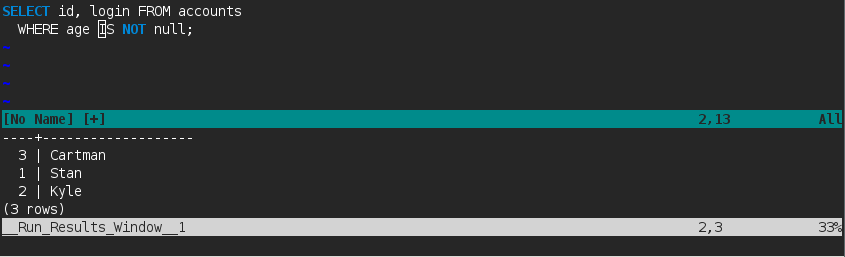
SQL
Any database that can execute commands from a file will work with this plugin.
For example, postgres uses the -f argument to read any sql script files.
Thus one can use a psql command like PGPASSWORD=something psql -d database_name -f to make it work with this plugin.
Interpreted Languages
Most interpreted languages will work with this plugin. The following have been tested to work:
| Language | Command |
|---|---|
| Python | python |
| Elixir | elixir |
| Ruby | ruby |
| Coffeescript | coffee |
| Clisp | clisp |
| Racket | racket -f |
| Guile | guile -s |
| Node.js | node |
Compiled Languages
Since compiled languages follow a two step process to execute the program, they will not work directly with run_live.
One will have to wrap the compiler command in a shell script which takes a filename, compiles the file and returns the output.
For example, one may use the following script to make this plugin work with c++ files:
rm /tmp/a.out 2> /dev/null

# Run-live provides a file name without an extension while g++ expects a valid extension.
cp $1 /tmp/temp-cpp-file.cpp

g++ /tmp/temp-cpp-file.cpp -o /tmp/a.out

[ -s /tmp/a.out ] && /tmp/a.out
One will have to mark the script as executable and ensure that it is in the load path.
If the above script is named compile-and-run, a cpp file can be executed with the command compile-and-run <file_name>. Thus run_live can use the shell command compile-and-run to run c++ files.
If run_live does not work for a specific language, feel free to raise a ticket. I will work out a solution for you.
Help
:help run-liveAdditional Notes
- This plugin is sourced using Vim's autoload feature and hence it takes no toll on Vim's start up time(which is minimal anyways).
- Run_live is a pure Vimscript plugin, however if one needs to contribute to the plugin, ruby will be required to run the specs.
Installation
If you don't have a preferred installation method, I recommend using Vundle
With Vundle, you may simply add Bundle 'notalex/vim-run-live' to your .vimrc and run
:BundleInstall