Ⅰ. 插件描述
A pomodoro timer that runs inside Vim. It can help you track your tasks in an simple (or stupid) way.Ⅱ. 基本信息
|
Ⅲ. 安装方法
使用Vundle管理器安装
在你的.vimrc下添加:Plugin 'l04m33/vim-skuld':source %
:PluginInstall对于Vundle版本 < 0.10.2,请用上面的Bundle替换Plugin。
使用NeoBundle管理器安装
在你的.vimrc下添加:NeoBundle 'l04m33/vim-skuld':source %
:NeoBundleInstall使用VimPlug管理器安装
在你的.vimrc下添加:Plug 'l04m33/vim-skuld':source %
:PlugInstall使用Pathogen管理器安装
在终端中运行以下命令:cd ~/.vim/bundle
git clone https://github.com/l04m33/vim-skuldⅣ. 文档说明
Introduction
Skuld is a pomodoro timer that runs inside Vim. It can help you track
your tasks in an simple (or stupid) way.
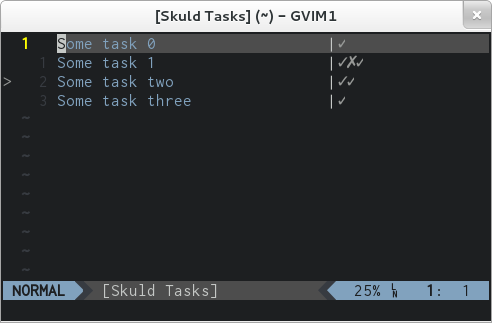
Please send pull requests to https://github.com/l04m33/vim-skuld
Dependencies
Skuld depends on +python or +python3, as well as +clientserver.
Nothing else is needed.
Installation
Vundle is recommended.
Usage
After a successful installation, these commands are available:
SkuldStartTimer <task_id>: Start the pomodoro timerSkuldStopTimer: Stop the pomodoro timerSkuldStartTask <task_id>: Switch current task. The timer will be started if it's stoppedSkuldSwitchTask <task_id>: Switch current taskSkuldGetState: Display current timer stateSkuldBufOpen: Open the buffer containing the task list ([Skuld Tasks])SkuldTaskUpdate: Update the internal task list according to[Skuld Tasks]buffer
SkuldBufOpen is mapped to <leader>sb by default. You can open a scratch
buffer called [Skuld Tasks] using this command, and then write down your
tasks in that buffer, one task per line. Whenever you leave insert mode,
or leave the [Skuld Tasks] buffer, your tasks will be set automatically.
Each task will be assigned an ID. The IDs start from zero.
Once the tasks are set, you can press <cr> on a task to start the timer.
You don't need to keep the [Skuld Tasks] buffer open while the timer is
running.
When the pomodoro timer times out, there will be a Vim message signifying
the change of timer state. You can start working or have a break
- Skuld will append a pomodoro completion symbol, which defaults
*, after the current task, when a working period ends.
If you invoked SkuldStopTimer during a working period, a squash symbol,
which defaults to x, will be appended instead.
You can edit [Skuld Tasks] buffer while the timer is running. Edited
tasks will be synchronized automatically once you leave insert mode or
leave the buffer.
Mappings
    nnoremap <leader>sb :SkuldBufOpen<cr>
    nnoremap <leader>ss :SkuldGetState<cr>
Settings
These variables can be set in you .vimrc to override the defaults:
    " Pomodoro completion symbol
    let g:skuld_progress_symbol = '*'

    " Pomodoro squashed symbol
    let g:skuld_squash_symbol = 'x'

    " Pomodoro working period (in minutes)
    let g:skuld_work_period = 25

    " Pomodoro resting period (in minutes)
    let g:skuld_rest_period = 5

    " Pomodoro long resting period (in minutes)
    let g:skuld_long_rest_period = 15

    " Max working streak before long resting
    let g:skuld_max_work_streak = 4

    " Notification command
    let g:skuld_notify_cmd = 'notify-send'

    " Mapping for opening the task buffer
    let g:skuld_buffer_map = '<leader>sb'

    " Mapping for displaying the current state
    let g:skuld_state_map = '<leader>ss'

    " Default line width for the task buffer
    let g:skuld_line_width = 29
License
This Vim plugin is licensed under the terms of the MIT license.