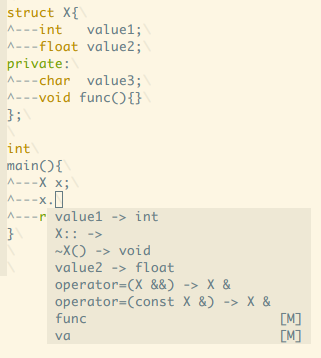
Ⅰ. 插件描述
libclang in VimⅡ. 基本信息
|
Ⅲ. 安装方法
使用Vundle管理器安装
在你的.vimrc下添加:Plugin 'osyo-manga/vim-snowdrop':source %
:PluginInstall对于Vundle版本 < 0.10.2,请用上面的Bundle替换Plugin。
使用NeoBundle管理器安装
在你的.vimrc下添加:NeoBundle 'osyo-manga/vim-snowdrop':source %
:NeoBundleInstall使用VimPlug管理器安装
在你的.vimrc下添加:Plug 'osyo-manga/vim-snowdrop':source %
:PlugInstall使用Pathogen管理器安装
在终端中运行以下命令:cd ~/.vim/bundle
git clone https://github.com/osyo-manga/vim-snowdropⅣ. 文档说明
#snowdrop.vim
snowdrop.vim is libclang wrapper.
Requirement
Vim supported
+python
- libclang dynamic link binary.
- Windows : libclang.dll
- Mac : libclang.dylib
- Other : libclang.so
Supported
Goto definition/declaration.
:SnowdropGotoDefinition
Type of.
:SnowdropEchoTypeof
- Typeof on balloon.
Function result type of.
:SnowdropEchoResultTypeof
Includes
:SnowdropEchoIncludes:Unite snowdrop/includes
Outline
:Unite snowdrop/outline
Install
neobundle.vim
NeoBundle "osyo-manga/vim-snowdrop"Setting
" set libclang directory path
let g:snowdrop#libclang_directory = "C:/llvm/bin"

" set include directory path.
let g:snowdrop#include_paths = {
\    "cpp" : [
\        "C:/cpp/boost",
\        "C:/cpp/sprout",
\    ]
\}

" set clang command options.
let g:snowdrop#command_options = {
\    "cpp" : "-std=c++1y",
\}
Example
Typeof.
" Type of cursor
:SnowdropEchoTypeof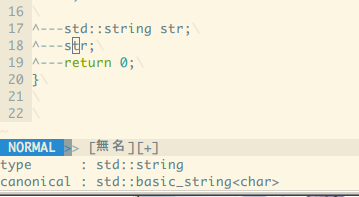
Typeof on balloon.
function! s:cpp()
    setlocal balloonexpr=snowdrop#ballonexpr_typeof()
    setlocal ballooneval
endfunction

augroup my-cpp
    autocmd!
    autocmd FileType cpp call s:cpp()
augroup END
Result typeof.
:SnowdropEchoResultTypeof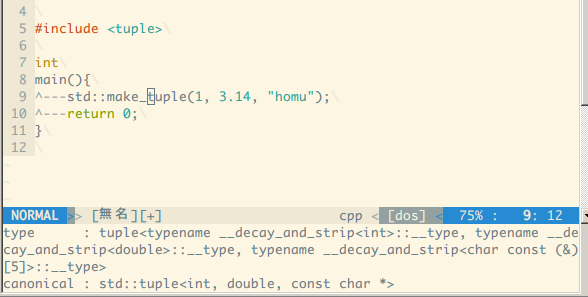
Include files.
:SnowdropEchoIncludes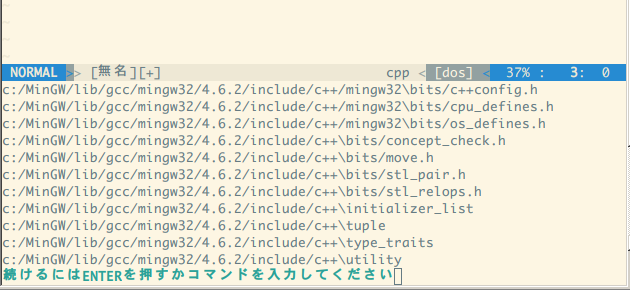
Include files on unite.vim.
:Unite snowdrop/includes
Outline on unite.vim.
:Unite snowdrop/outline
Code completion.
Use neocomplete.vim.
" Enable code completion in neocomplete.vim.
let g:neocomplete#sources#snowdrop#enable = 1

" Not skip
let g:neocomplete#skip_auto_completion_time = ""