Ⅰ. 插件描述
Looking up meaning of words inside Vim, Bash and Zsh using StarDict Command-Line Version (SDCV) dictionary program. If you find it useful, please Star it.Ⅱ. 基本信息
|
Ⅲ. 安装方法
使用Vundle管理器安装
在你的.vimrc下添加:Plugin 'phongvcao/vim-stardict':source %
:PluginInstall对于Vundle版本 < 0.10.2,请用上面的Bundle替换Plugin。
使用NeoBundle管理器安装
在你的.vimrc下添加:NeoBundle 'phongvcao/vim-stardict':source %
:NeoBundleInstall使用VimPlug管理器安装
在你的.vimrc下添加:Plug 'phongvcao/vim-stardict':source %
:PlugInstall使用Pathogen管理器安装
在终端中运行以下命令:cd ~/.vim/bundle
git clone https://github.com/phongvcao/vim-stardictⅣ. 文档说明
# vim-stardict
Project maintained by Phong V.
Cao
A Vim plugin for looking up meaning of words inside Vim, Bash and Zsh using the
StarDict Command-Line Version (SDCV) dictionary program.
In addition to opening a Vim split and populating it with the output of StarDict
Command-Line Version (SDCV), vim-stardict takes advantage of Vim syntax
highlighting and some basic regexes to present the words' definitions to the
users in an organized and user-friendly way.
The plugin was inspired by and originally a fork of
chusiang/vim-sdcv.
Screenshots
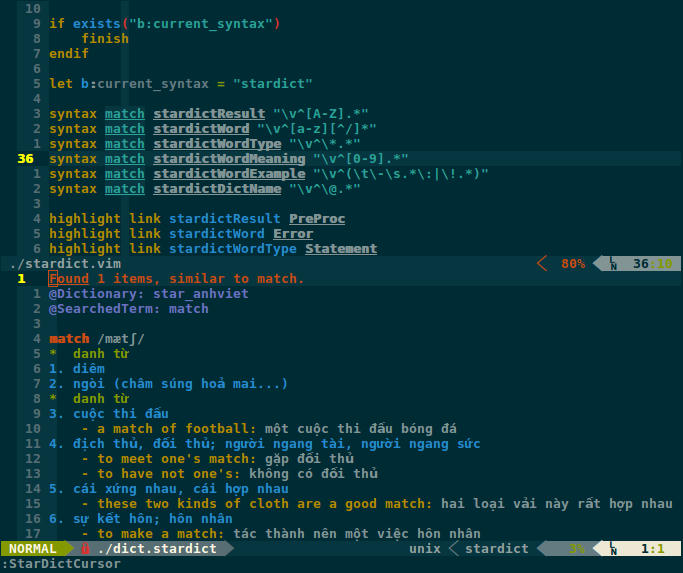
Lookup word under cursor in a :split (using :StarDictCursor command)
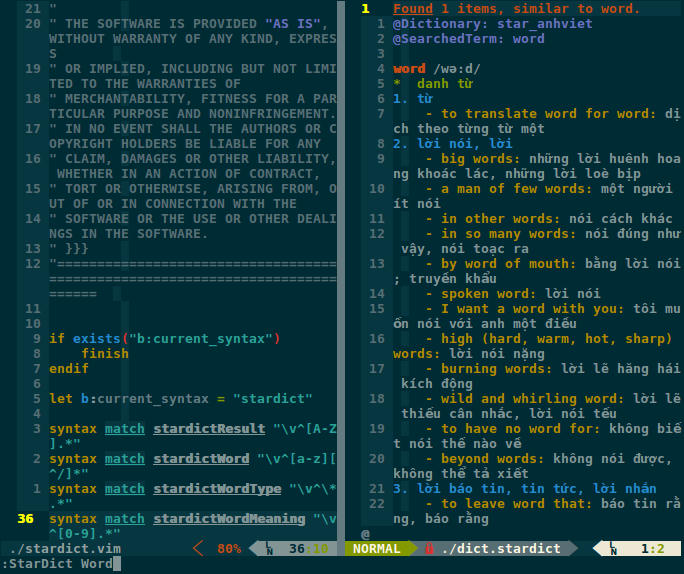
Lookup word in a :vsplit (using :StarDict command)
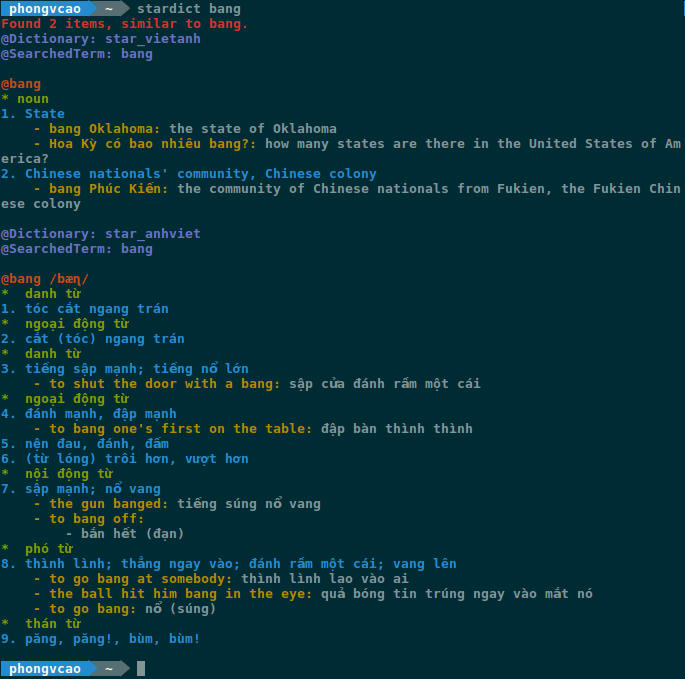
Lookup word in Bash (using 'stardict' command)
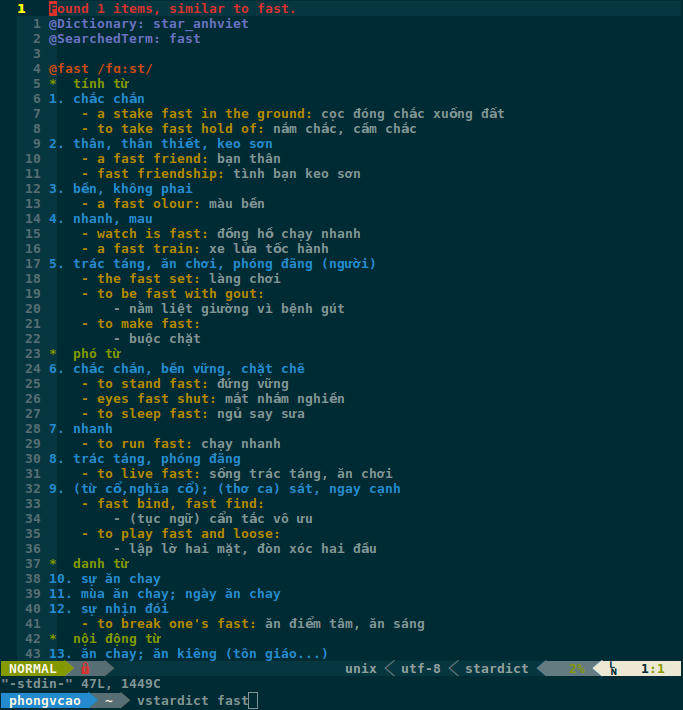
Redirect Bash output to Vim (using 'vstardict' command)
Installation
Before installing vim-stardict , the following applications need to be
already installed in your computer:
There are several ways to install vim-stardict:
git clone https://github.com/phongvcao/vim-stardict.git
NeoBundle 'phongvcao/vim-stardict'
Plugin 'phongvcao/vim-stardict'
Manual
- Copy all of the files into your
~/.vimdirectory
- Copy all of the files into your
Usage
1. Vim:
To lookup the meaning of a word with no-space-in-between:
:StarDict random_word_with_no_spaces
To lookup the meaning of a word with spaces-in-between, put it inside
quotation marks (both double and single quotes are acceptable):
:StarDict "random word with spaces"
:StarDict 'random word with spaces'
To look up the meaning of several words (either no-spaces-in-between or
spaces-in-between):
:StarDict first_word second_word "third word" 'fourth word'
:StarDict "first word" 'second word'
To lookup the meaning of a word under-the-cursor:
:StarDictCursor
You can pass arguments of command-line sdcv to :StarDict and :StarDictCursor
commands in Vim:
:StarDict first_word "second word" -u "my_dictionary" --data-dir /my/data/dir
:StarDictCursor -u "my_dictionary" --data-dir /my/data/dir
2. Bash and Zsh:
To lookup the meaning of a word with no-space-in-between:
stardict random_word_with_no_spaces
To lookup the meaning of a word with spaces-in-between, put it inside
quotation marks (both double and single quotes are acceptable):
stardict "random word with spaces"
stardict 'random word with spaces'
To look up the meaning of several words (either no-spaces-in-between or
spaces-in-between):
stardict first_word second_word "third word" 'fourth word'
stardict "first word" 'second word'
To view the meaning of word in Vim from Bash or Zsh:
vstardict first_word second_word "third word" 'fourth word'
You can pass arguments of command-line sdcv to stardict and vstardict
commands in Bash and Zsh:
stardict first_word "second word" -u "my_dictionary" --data-dir /my/data/dir
vstardict 'first word' -u "my_dictionary" --data-dir /my/data/dir
Configuration
1. Vim:
Sample configuration for your .vimrc (more in the official documentation)
    " Make vim-stardict split open in a :split (default value)
    let g:stardict_split_horizontal = 1

    " Set vim-stardict split width (or height) to 20 based on whether
    " vim-stardict split is a :vsplit (or :split)
    let g:stardict_split_size = 20

    " Map vim-stardict's commands
    " Ready for typing the word in
    nnoremap <leader>sw :StarDict<Space>
    " Lookup the word under cursor
    nnoremap <leader>sc :StarDictCursor<CR>

    " OPTIONAL: You can change the colors of output of vim-stardict inside
    " Vim as follow (see below for the comprehensive list of highlight
    " group):
    " highlight link stardictResult Special              " Default value
    " highlight link stardictWord PreProc                " Default value
    " highlight link stardictWordType Statement          " Default value
    " highlight link stardictWordMeaning Identifier      " Default value
    " highlight link stardictWordExample Type            " Default value
    " highlight link stardictDictName Underlined         " Default value
For the full list of highlight groups in Vim, you can consult :help group-name
2. Bash and Zsh:
Sample configuration for your .bashrc (.zshrc is similar - please consult
the documentation) (supposed you use Vundle to manage your plugins):
    # Export vim-stardict installation directory
    # NOTE: Only do this if your vim-stardict installation directory is other
    # than ${HOME}/.vim/bundle/vim-stardict. In other words, uncomment these
    # lines if you are not using Vundle, Pathogen or NeoBundle to manage your
    # Vim plugins:
    export STARDICT_DIR="{HOME}/.vim/bundle/vim-stardict"

    # For Bash: Source the stardict.sh file in the vim-stardict installation
    # directory.
    # For Zsh: The path to the stardict.zsh file is
    # "${HOME}"/.vim/bundle/vim-stardict/bindings/zsh/stardict.zsh
    if [[ -f "${HOME}"/.vim/bundle/vim-stardict/bindings/bash/stardict.sh ]]; then
        source "${HOME}"/.vim/bundle/vim-stardict/bindings/bash/stardict.sh
    fi

    # To avoid typing the long & daunting 'stardict' & 'vstardict'
    # commands, you can alias it to something else
    alias whatis="stardict"
    alias whatvim="vstardict"

    # OPTIONAL: You can change the colors of output of vim-stardict inside
    # Bash (see below for the comprehensive list of color codes in Bash):
    # export STARDICT_RESULT="\033[0;31m"               # Defaut value
    # export STARDICT_WORD="\033[0;91m"                 # Defaut value
    # export STARDICT_WORD_TYPE="\033[0;32m"            # Defaut value
    # export STARDICT_WORD_MEANING="\033[0;34m"         # Defaut value
    # export STARDICT_WORD_EXAMPLE="\033[0;33m"         # Defaut value
    # export STARDICT_DICT_NAME="\033[0;95m"            # Defaut value

    # OPTIONAL: You can change the path to the python executable that
    # vim-stardict uses for Bash/Zsh lookup (which is "/usr/bin/python"
    # by default).
    # export STARDICT_PYTHON_PATH="/usr/bin/python"     # Defaut value
For the full list of color codes in Bash and Zsh, you can consult this link
You can change whatis and whatvim above to whatever aliases you like.
Also, you can change the path to source the stardict.sh file above, if your
Vim plugin directory is different.
With the above configuration, you can issue these commands to find meaning of
words:
whatis first_word second_word "third word" 'fourth word'
whatvim first_word second_word "third word" 'fourth word'
Documentation
- See :help vim-stardict VimDoc for more information.
Contributors
- Please read CONTRIBUTING.md before making your Pull Requests
- See vim-stardict contributors for the list of contributors
Thank you to you all!
Report Bugs
- If you find a bug please do not hesitate to post it (along with a screenshot
- the bug, if applicable) on our Github issue tracker.
Credits
- Special thanks to chusiang from whom I got
- original idea from.
Todo
vim-stardict is currently under heavy development. Your contributions and
patches are highly appreciated.
- Add support for Windows
- Implement word lookup in Visual Mode (look up the selected text)
- Once opened under :StarDictCursor mode, whenever the mouse move to a new word,
vim-stardict automatically looks up for that word (let g:stardict_lookup_on_mousemove)