Ⅰ. 插件描述
Vim text object plugin to select conflictsⅡ. 基本信息
|
Ⅲ. 安装方法
使用Vundle管理器安装
在你的.vimrc下添加:Plugin 'rhysd/vim-textobj-conflict':source %
:PluginInstall对于Vundle版本 < 0.10.2,请用上面的Bundle替换Plugin。
使用NeoBundle管理器安装
在你的.vimrc下添加:NeoBundle 'rhysd/vim-textobj-conflict':source %
:NeoBundleInstall使用VimPlug管理器安装
在你的.vimrc下添加:Plug 'rhysd/vim-textobj-conflict':source %
:PlugInstall使用Pathogen管理器安装
在终端中运行以下命令:cd ~/.vim/bundle
git clone https://github.com/rhysd/vim-textobj-conflictⅣ. 文档说明
Text Object for Conflicts on Merge
Installation
Please use your favorite plugin manager and follow the instruction of it. Below is an example for neobundle.vim.
NeoBundle 'kana/vim-textobj-user'
NeoBundle 'rhysd/vim-textobj-conflict'
Dependency
This plugin depends on vim-textobj-user. Please install it in advance.
Usage
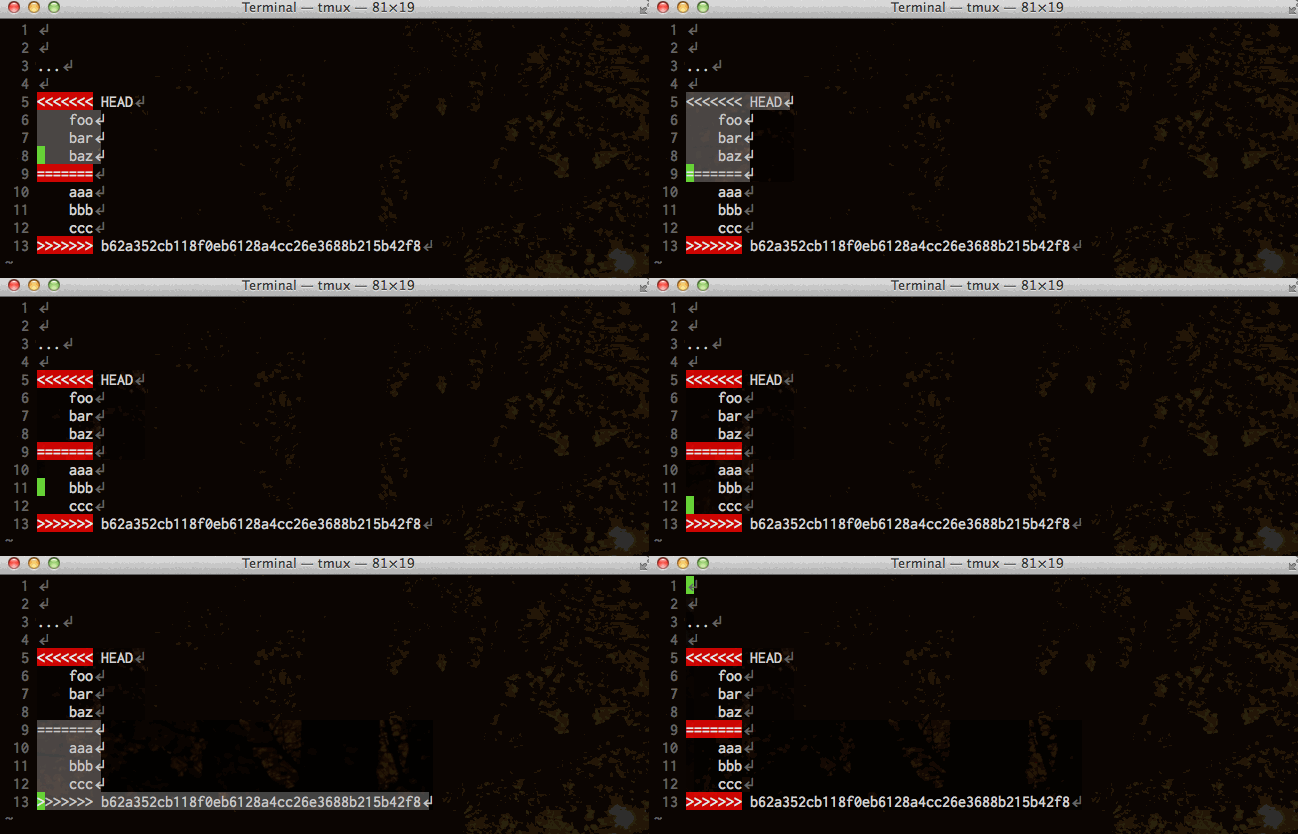
i= and a= operator-pending mappings are available. i= selects the inner lines of either ours or theirs of the conflict. a= selects the whole lines of either ours or theirs of the conflict (including markers).
If you use above mappings outside a conflict, it jumps the cursor to next conflict.
Try va=, vi=, da= and so on when the buffer includes some conflicts.
Customization
If you want to map operator-pending mappings, please use g:textobj_conflict_no_default_key_mappings as below:
let g:textobj_conflict_no_default_key_mappings = 1

omap ix <Plug>(textobj-conflict-i)
omap ax <Plug>(textobj-conflict-a)
TODO(s)
- Tests
- Documentation
License
This software is distributed under the MIT License.