Ⅰ. 插件描述
Vim plugin to provide text objects for numbersⅡ. 基本信息
|
Ⅲ. 安装方法
使用Vundle管理器安装
在你的.vimrc下添加:Plugin 'tkhren/vim-textobj-numeral':source %
:PluginInstall对于Vundle版本 < 0.10.2,请用上面的Bundle替换Plugin。
使用NeoBundle管理器安装
在你的.vimrc下添加:NeoBundle 'tkhren/vim-textobj-numeral':source %
:NeoBundleInstall使用VimPlug管理器安装
在你的.vimrc下添加:Plug 'tkhren/vim-textobj-numeral':source %
:PlugInstall使用Pathogen管理器安装
在终端中运行以下命令:cd ~/.vim/bundle
git clone https://github.com/tkhren/vim-textobj-numeralⅣ. 文档说明
## vim-textobj-numeral
Text objects for numbers
Installation
This plugin depends on kana/vim-textobj-user.
NeoBundle
NeoBundle 'kana/vim-textobj-user'
NeoBundle 'tkhren/vim-textobj-numeral'
Bundle
Bundle 'kana/vim-textobj-user'
Bundle 'tkhren/vim-textobj-numeral'
Usage
Text objects
| Textobj | General RegExp | Description | Example | |
|---|---|---|---|---|
an | [-+]?d+(\.d+)?(Ee?d+)? | Select the decimal number in various notation | 11, 3.14, -5, +6.02e23 | |
in | d+ | Select the decimal digits (integer) | 11, 43, 002 | |
ad | [-+]?d+ | Select the decimal digits with sign | 11, 43, +56, -81 | |
id | d+ | Select the decimal digits (integer) | 11, 43, 002 | |
af | [-+]?d+(\.d+)? | Select the floating number with sign | 11, 43, -3.14, +3.14 | |
if | d+(\.d+)? | Select the floating number | 11, 43, 3.14 | |
ax | (0x\ | #)?x+ | Select the hex number with prefix | 0x3fa4, #aabbcc |
ix | x+ | Select the hex number | 3fa4, aabbcc |
Motions
| Motion | Description |
|---|---|
gnn, gNn, gpn, gPn | Move to the nearest 'numeral' text object |
gnd, gNd, gpd, gPd | Move to the nearest 'digit' text object |
gnf, gNf, gpf, gPf | Move to the nearest 'float' text object |
gnx, gNx, gpx, gPx | Move to the nearest 'hex' text object |
Customization
See :help textobj-numeral
Change matching patterns
The pattern for the each text objects is defined by some variables.
You can modify the regular expressions to suit your specific needs.
For example, changing id behavior, please add the following code.
let g:textobj_numeral_digit_i_pattern = '[1-9]\d*' " Default:'\d\+'Disable default key mappings
If you need to change or disable the default keymappings,
please define g:textobj_numeral_no_default_key_mappings, and redefine vmap and omap.
let g:textobj_numeral_no_default_key_mappings = 1

vmap an    <Plug>(textobj-numeral-a)
omap an    <Plug>(textobj-numeral-a)
vmap in    <Plug>(textobj-numeral-i)
omap in    <Plug>(textobj-numeral-i)

vmap ad    <Plug>(textobj-numeral-digit-a)
omap ad    <Plug>(textobj-numeral-digit-a)
vmap id    <Plug>(textobj-numeral-digit-i)
omap id    <Plug>(textobj-numeral-digit-i)
Application
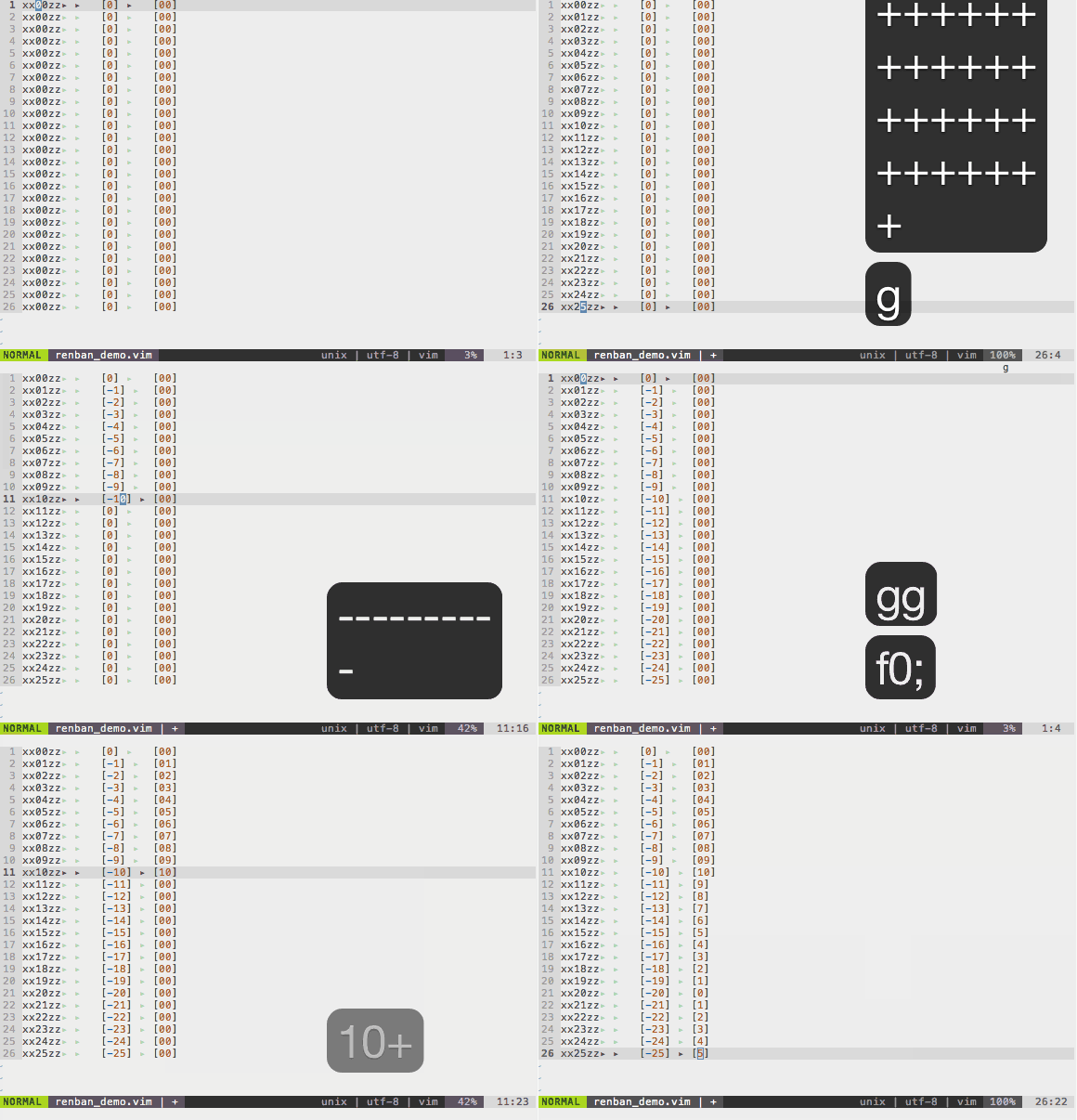
There is a useful application to input sequential numbers.
Write the following code in your .vimrc
set nrformats-=octal

function! Increment(motion, step)
    let inc_key = a:step > 0 ? "\<C-a>" : "\<C-x>"
    let @z = '"zyad' . a:motion . 'vad"zp'. abs(a:step) . inc_key
    return '@z'
endfunction

nmap <expr> + Increment('j', 1)
nmap <expr> - Increment('j', -1)
nmap <expr> ) Increment('gNd', 1)
nmap <expr> ( Increment('gNd', -1)
Move cursor to the top of '00', and type ++++++++++ or 10+
    aaa00ccc    ->    aaa00ccc
    aaa00ccc    ->    aaa01ccc
    aaa00ccc    ->    aaa02ccc
    aaa00ccc    ->    aaa03ccc
    aaa00ccc    ->    aaa04ccc
    aaa00ccc    ->    aaa05ccc
    aaa00ccc    ->    aaa06ccc
    aaa00ccc    ->    aaa07ccc
    aaa00ccc    ->    aaa08ccc
    aaa00ccc    ->    aaa09ccc
    aaa00ccc    ->    aaa10ccc
Move cursor to the first '0', and type ) or 10)
[0,0,0,0,0,0,0,0,0,0,0] -> [0,1,2,3,4,5,6,7,8,9,10]