Ⅰ. 插件描述
Transform syntax!!Ⅱ. 基本信息
|
Ⅲ. 安装方法
使用Vundle管理器安装
在你的.vimrc下添加:Plugin 't9md/vim-transform':source %
:PluginInstall对于Vundle版本 < 0.10.2,请用上面的Bundle替换Plugin。
使用NeoBundle管理器安装
在你的.vimrc下添加:NeoBundle 't9md/vim-transform':source %
:NeoBundleInstall使用VimPlug管理器安装
在你的.vimrc下添加:Plug 't9md/vim-transform':source %
:PlugInstall使用Pathogen管理器安装
在终端中运行以下命令:cd ~/.vim/bundle
git clone https://github.com/t9md/vim-transformⅣ. 文档说明
<!-- # Dev Status -->
<!-- alpher release, gathering feedback from users. -->
<!-- Give me feedback if you tried. -->
<!-- 誰か試して、フィードバックちょうだい。 -->
<!-- * Twitter ID -->
<!-- VERY Experimental for my personal use. -->
STDIN > transform > STDOUT
Thats' filter command.
Filter command in other word => transformer.
You can transform shorthand syntax within buffer on the fly.
You can write transformer whichever language you like.
This have great possibility to reduce typing!
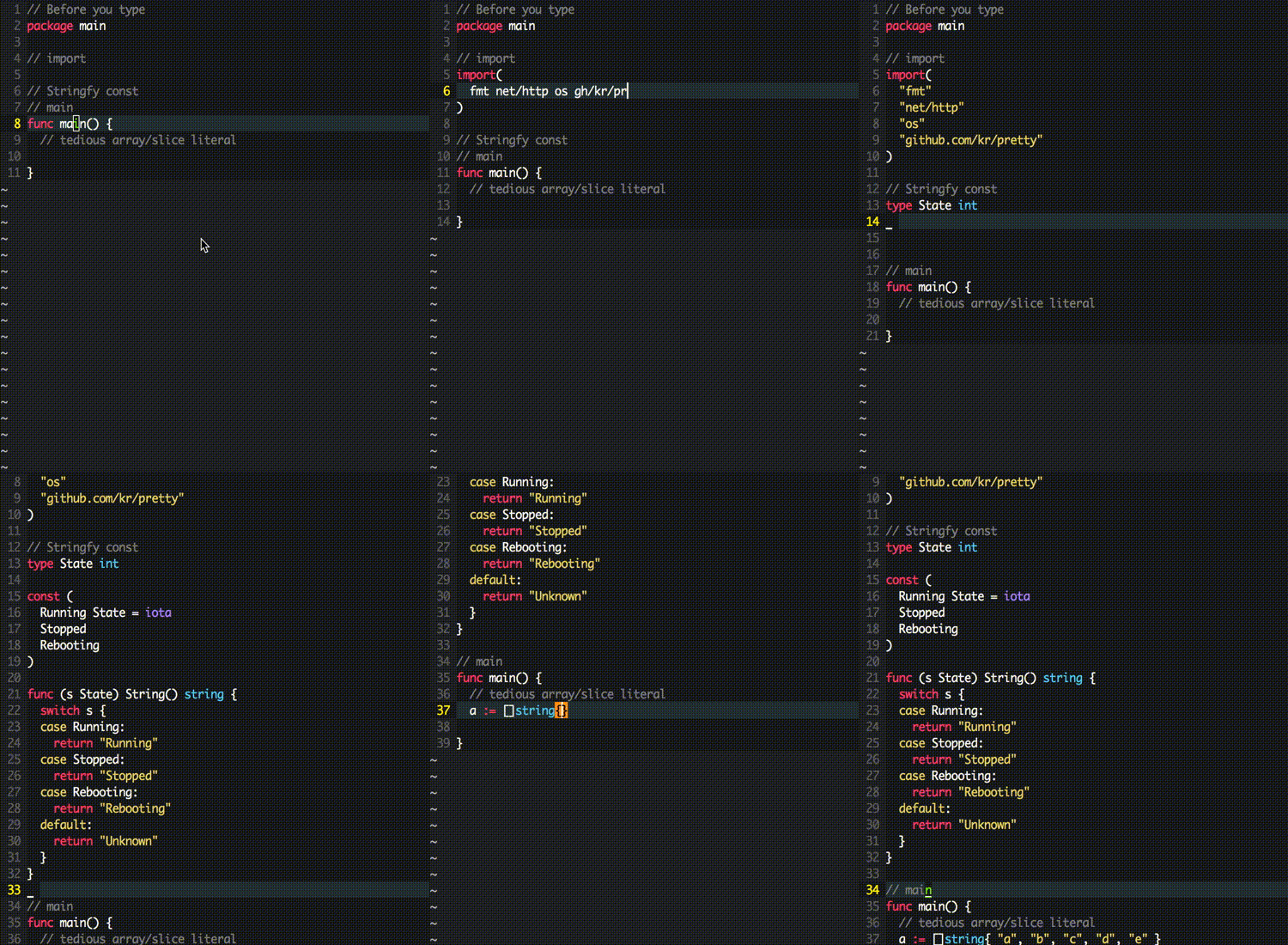
- Auto generate Go's String() methods from const
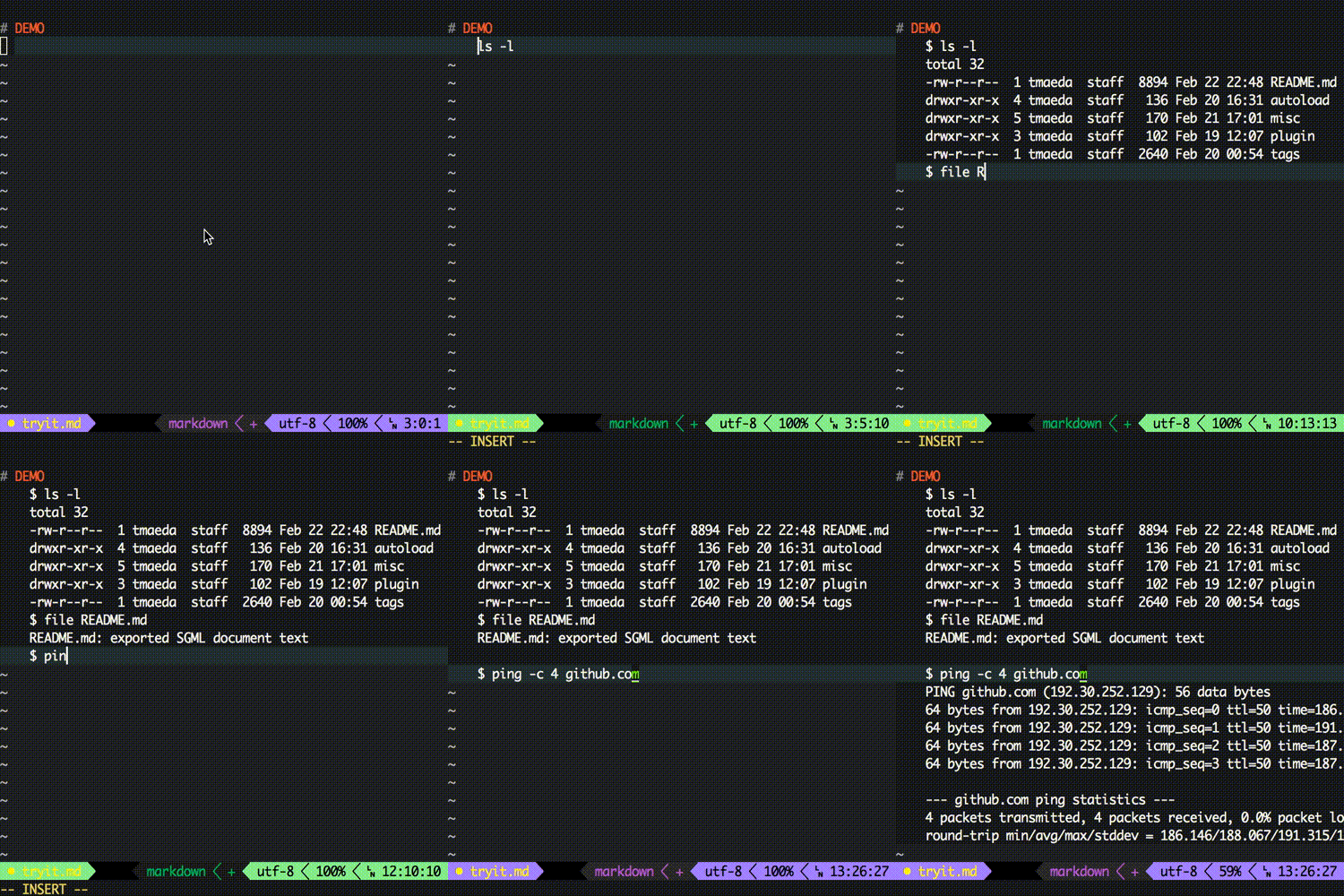
- Auto insert command result.
Requirement
Vim 7.4+
How it works
- select area or simply place cursor where you want to transform.
- content are piped to
STDINof transformer and get result fromSTDOUTof transformer - replace buffer with result.
Config in vimrc
" Mac?
nmap <D-R> <Plug>(transform)
xmap <D-R> <Plug>(transform)
imap <D-R> <Plug>(transform)

" Linux or Win
nmap <M-t> <Plug>(transform)
xmap <M-t> <Plug>(transform)
imap <M-t> <Plug>(transform)
Customize
" all configuration goes into this dictionary
let g:transform = {}

" disable default handler set
let g:transform.options.enable_default_config = 0

" specify where to find transformer script
let g:transform.options.path = "/Users/t9md/my_transformer"

" handler functions for each &filetype
"---------------------------------------
" each handler function take only one argment in this example `e`.
" This `e` is environment vim-transformer use.
" You can call `run()` or `get()` method on `e` to execute transformer.

" `_` is special handler called when other filetype specific handler didn't match(=didn't call `run()`).
function! g:transform._(e)
  call a:e.run("_/stringfy_word.rb")
endfunction

" `go` is handler called when &filetype=go. you can define your own handler based on &filetype.
function! s:route.go(e) "{{{1
  let e = a:e
  let c = e.content
  if c.line_s =~# '\v^const\s*\(' && c.line_e =~# '\v\)\s*'
    call e.run("go/const_stringfy.rb")
  elseif c['line_s-1'] =~# '\v^import\s*\('
    call e.run("go/import.rb")
  endif
endfunction
As you see above, you can configure handler function to choose appropriate transformer based on context. e is environment variable, you can use several methods e provides.
e.run(cmd): take command or list of command, after execute command, immediately finish, never return.e.get(cmd): returnable version ofrun().
You can pass list of commands to run() or get() like following
call e.run([ {'hello': 'echo hello'}, { 'bye': 'echo bye'} ])g:transform is Dictionary with key=&filetype, value=Function.
The magical _ function is like default_route which always be called after &filetype specific function didn't invoke run().
Your configuration will be merged into default_conf by extend(default_conf, user__conf)
Advanced example
See example.vim.
I don't like default transformer set,
Agree, you can disable it.
let g:transform = {}
let g:transform.options = {}
let g:transform.options.enable_default_config = 0
How vim-transform find transformer
If file begin with '/'(ex /bin/ls ) or filename not include '/'(ex some.py, some.rb) then search $PATH.
A. Absolute path ex) /bin/ls
B. Filename not include '/' ex) some.py some.rb
C. Filename include '/' in the middle of filenmae.
for A, B, vim-transform pass command to system() as-is, means use $PATH.
for C, vim-transform search like this.
- user's transformer_ directory
- system default transformer directory
You can set user's transformer directories with comma sepalated list of directory.
let g:transform.options.path = "/Users/t9md/transformer,/Users/work/myfriend/transformer"NOTE: As explained in C. you need '/' in flie name.
" filename include '/' try search from transformer dir
call e.run("go/const_stringfy.rb")

" since filename not include '/' not trying to search from from $PATH.
call e.run("const_stringfy.rb")
Want to change routing based on filename
Google translate only if file name include translate.md
if e.buffer.filename =~# 'translate.md'
  call e.run('google_translate.py')
endif
I don't need filetype spefic function, want to controll in one place.
You can, if you disable default handler and didn't define filtype specific handler, all transform request fall into _ handler.
let g:transform = {}
let g:transform.options = {}
let g:transform.options.enable_default_config = 0

" you can use get filetype via env.buffer.filetype
function! g:transform._(e)
  let e = a:e
  let c = e.content

  if e.buffer.filetype ==# 'go'
    if c.line_s =~# '\v^const\s*\(' && c.line_e =~# '\v\)\s*'
      call e.run("go/const_stringfy.rb")
    elseif c['line_s-1'] =~# '\v^import\s*\('
      call e.run("go/import.rb")
    endif
  endif

  call e.run("_/stringfy_word.rb")
endfunction
What is the e argument passed to g:transform[&ft](e) function?
This is environment vim-transform use.
You can see its value by
" requre vim-prettyprint to use PP()
" 1 = line_start, 10 = line_end, n = normal mode(use v for visual)
:echo PP(transform#environment#new(1, 10, 'n'))
example output of environment
{
  'buffer': {
    'bufnr': 4,
    'filename': 'tryit.vim',
    'filetype': 'vim',
    'line_e': 5,
    'line_e+1': 6,
    'line_s': 1,
    'line_s-1': 0
  },
  'content': {
    'all': [
      'echo PP(transform#environment#new(1, 5, ''n''))',
      '',
      '',
      '',
      ''
    ],
    'len': 5,
    'line_e': '',
    'line_e+1': '',
    'line_s':
      'echo PP(transform#environment#new(1, 5, ''n''))',
    'line_s-1': '',
    'update': function('971')
  },
  'get': function('251'),
  'mode': 'n',
  'new': function('249'),
  'path': {
    'dir_base':
      '/Users/t9md/.vim/bundle/vim-transform/autoload/transform',
    'dir_transformer':
      '/Users/t9md/.vim/bundle/vim-transform/autoload/transform/transformer'
  },
  'run': function('250'),
  'set_buffer': function('254'),
  'set_content': function('253'),
  'set_path': function('252')
}
I don't want write any Vimscript, want to completely handle my faviorite language.
OK, you don't like routing logic written in Vimscript.
If so, let Vim delegate all request to your favorite handler.
- in Vim side, all request is forwarded to handler.rb
- handler.rb have responsible both request routing and response(=transformation).
envinformatino is available as JSON object within external handler!
So you can write routing logic like below(authogh this is rough example handler, hope improve by your side).
Transformer.register do
  if FILE_TYPE == 'go'
    if $env['content']['line_s-1'] =~ /^import\s*\(/
      get /./ do |req|
        puts TF::Go::Import.run(req)
      end
    end

    get /^const\s*\(.*\)$/m do |req|
      puts TF::Go::ConstStringfy.run(req)
    end
  end
end
Check example ruby_handler for more detail.
once Ideally => now MUST
Keep transformer script itself independent from editor, mean sharable between several editors.
TODO?
0%currently input is always treated as linewise, support charwise to transform partial area within single line1%good default config and tranformer set?0%Unite transformer?0%inlucde standard Ruby/CoffeeScript/Go/Lua/Python handler. and enable user choose favorite handler from configuration.
DONE
100%Pass list of command torun(),get(), and execute by choice.100%command line arguments(or parameters) to transformer?
=> user's preference, shoud work.100%support directly excutable transformer( except windows ).100%determine appropreate run command like 'ruby', 'python', 'go run' from extention of each transfomer?
'ext => runner' table is not mature.100%choose appropriate set of transformer from&filetype=> call appropriate handler function based on &ft.100%support arbitrary directory for user's transformer100%chosing appropriate transformer is hard, better todo_what_I_meanbehavior by invoking controller and controller choose appropriate transformer from context(language and passed string).50%make:Transformaccept arg for directly specify transformer
=> need doc =>:Transform 'v|n' TRANSFORMER. v = visual, n = normal100%Make multiple tranformer chainable so that we can stringfy then surround byimport(and).
=> You can use pipe|in xNIX OS but need to exutable except first comand.
=> introduce get(), returnable/chainable verion of run().
DONT( THINK / CARE / DO )
- Whats' defference in advanced snipett plugin?(maybe this is way simple).
- CofferScript will be great helper as transformer for its simple syntax to JavaScript syntax(some of which is legal in other language). => nothing to do, user's preference.
- Template engine like erb is better in most case? => you can by your own transformer.
- Transformer Specification? when first arg is 'check', it shoud return 1 or 0 which is used by controller to determine appropreate transformer. => STDIN > STDOUT that's all. KISS.