Ⅰ. 插件描述
adds font icons (glyphs ★☘☢) to programming languages, libraries, and general web developer filetypes for vim plugins such as: NERDTree, vim-airline, and lightline.vimⅡ. 基本信息
|
Ⅲ. 安装方法
使用Vundle管理器安装
在你的.vimrc下添加:Plugin 'cj/vim-webdevicons-say-im-great':source %
:PluginInstall对于Vundle版本 < 0.10.2,请用上面的Bundle替换Plugin。
使用NeoBundle管理器安装
在你的.vimrc下添加:NeoBundle 'cj/vim-webdevicons-say-im-great':source %
:NeoBundleInstall使用VimPlug管理器安装
在你的.vimrc下添加:Plug 'cj/vim-webdevicons-say-im-great':source %
:PlugInstall使用Pathogen管理器安装
在终端中运行以下命令:cd ~/.vim/bundle
git clone https://github.com/cj/vim-webdeviconsⅣ. 文档说明
vim-webdevicons



Adds filetype glyphs (icons) to other vim plugins such as [NERDTree], [vim-airline], and [lightline.vim].
» Vote for upcoming features or suggest new ones

<!---
Start temporary poll section
-->
| Current open polls: Vote for upcoming features or suggest new ones: | vote |
|---|---|
| » Rename project: vim-webdevicons to vim-devicons? | ☑ |
| » support ctrlp.vim? | ☑ |
| » support unite.vim? | ☑ |
| » Something else? (Open an issue) | ☑ |
<!---
End temporary poll section
-->
Table of Contents
Quick Setup (TL;DR)
- Install the plugin per your usual method (» More details... «)
Download and install a patched font (or patch your own):
- [nerd-filetype-glyphs-fonts-patcher] (» More details... «)
Set font (» More details... «)
- If using vim: Set your terminal emulator font
- If using gvim: Set
guifontin yourvimrc
- If using gvim: Set
Usage
After installing the patched font and setting the vim font just open [NERDTree]
or look at airline (statusline or tabline).
- NOTE: if you don't
guifontset and are not running gvim you will need to set the terminal font. - NOTE: for [NERDTree] support, you must configure vim to load NERDTree before vim-webdevicons loads.
- NOTE: for [vim-airline] support, you must configure vim to load vim-airline before vim-webdevicons loads.
- NOTE: for better [nerdtree-git-plugin] support, you should configure vim to load nerdtree-git-plugin before vim-webdevicons loads.
Font Configuration
Encoding must be set to UTF-8 for the glyphs to show
set encoding=utf8- The ONLY other configuration needed should be setting the font vim uses to a
patched font.
Already patched fonts and the font patcher script are provided at:
[nerd-filetype-glyphs-fonts-patcher]
It works without configuration ONLY when used with a patched font provided in
the separate repository above. Install the font and add it to your vimrc orgvimrc:
Linux
set guifont=<FONT_NAME> <FONT_SIZE>OS X and Windows
set guifont=<FONT_NAME>:h<FONT_SIZE>e.g.
Linux
set guifont=Droid\ Sans\ Mono\ for\ Powerline\ Plus\ Nerd\ File\ Types\ 11OS X and Windows
set guifont=Droid\ Sans\ Mono\ for\ Powerline\ Plus\ Nerd\ File\ Types:h11Font Installation
You basically have to put any font you would like to use into the ~/.fonts folder. For example:
cd ~/.fonts && curl -fLo DroidSansMonoForPowerlinePlusNerdFileTypes.otf https://raw.githubusercontent.com/ryanoasis/nerd-filetype-glyphs-fonts-patcher/master/patched-fonts/Droid%20Sans%20Mono%20for%20Powerline%20Plus%20Nerd%20File%20Types.otfYou can find more fonts under my patched fonts repo.
Screenshots
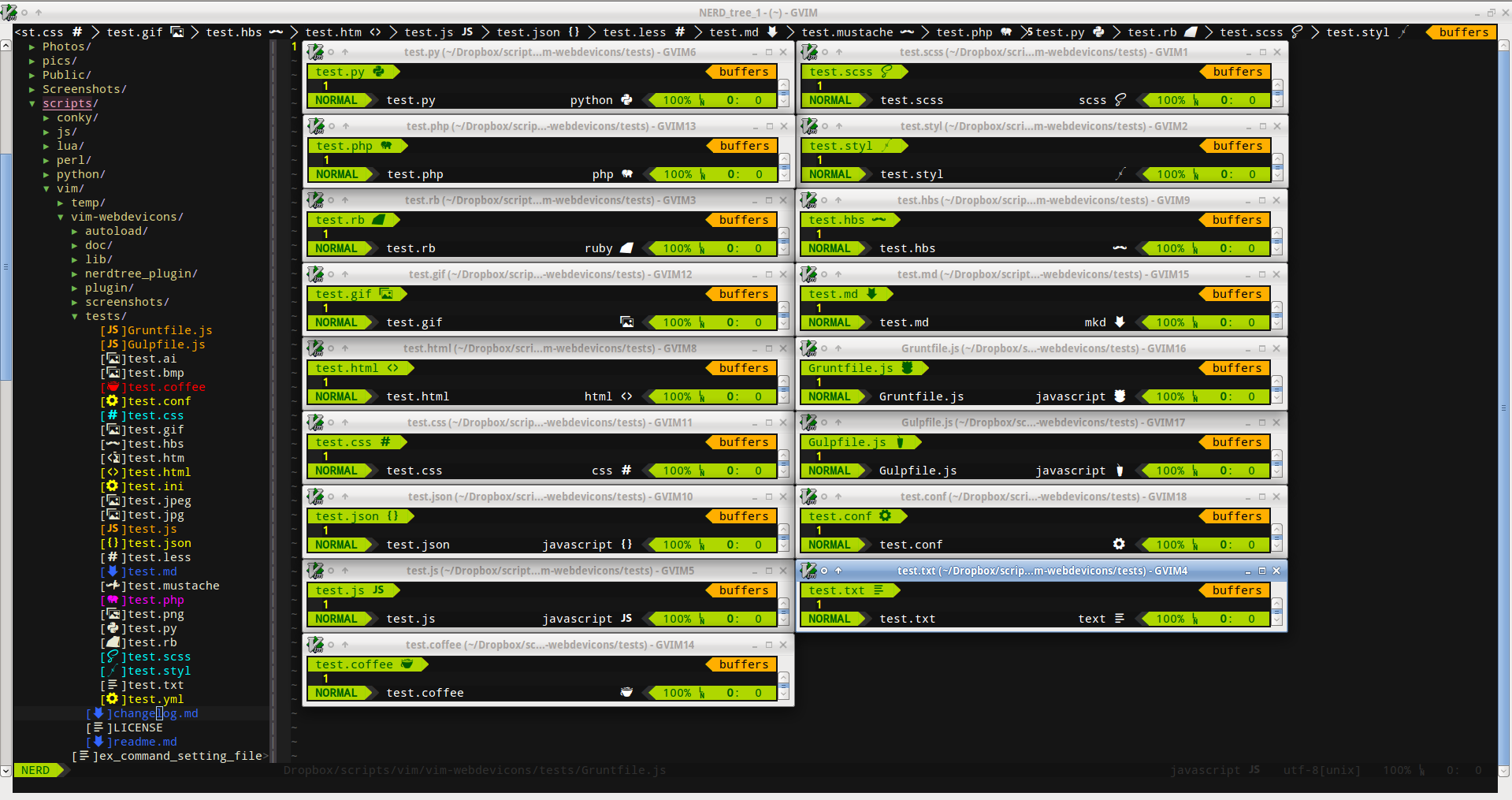
[NERDTree]
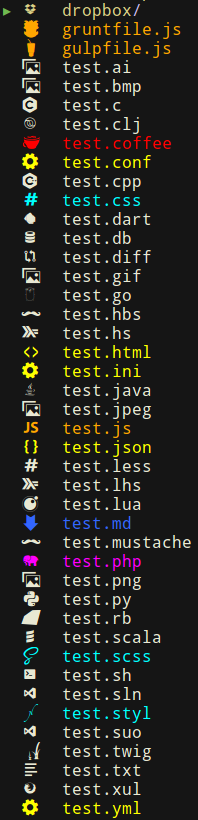
[vim-airline]
| section | preview |
|---|---|
| statusline |  |
| tabline |  |
| tabline |  |
| fileformats symbols | 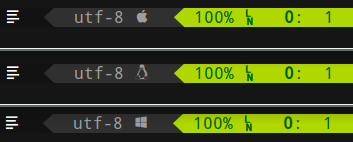 |
Different patched fonts example
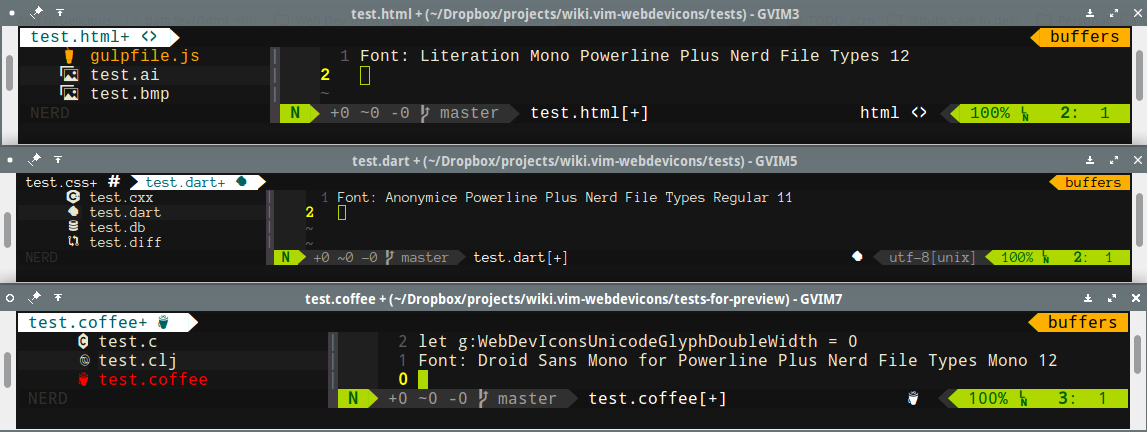
lightline.vim

[nerdtree-git-plugin]

Various Terminal Emulators
- gnome terminal

- Urxvt terminal

Windows

Mac OS X
Help wanted: https://github.com/ryanoasis/vim-webdevicons/issues/32
Glyph set test file

Features
show developer file type glyphs from a font in various vim plugins, currently supports:
- [NERDTree]
- vim-airline (statusline and tabline)
lightline.vim (statusline)
- see: lightline for setup
- Adds a global config map of characters to file extensions (or entire filenames)
customizable and extendable filetype detections
- ability to override predefined dictionary variable
- if you are unhappy with the default glyph used you can choose your own
supports a range of file type extensions by default:
styl, scss, htm, html, css, less, md, json, js, rb, php, py, pyc, pyd, pyo, coffee, mustache, hbs, conf, ini, yml, jpg, jpeg, bmp, png, gif, ai, twig, cpp, c++, cc, cp, cxx, cpp, c, hs, lhs, lua, sh, diff, clj, dart, db, go, scala, sln, suo, xul
supports full filename matches, by default:
gruntfile.coffee, gruntfile.js, gruntfile.ls, gulpfile.coffee, gulpfile.js, gulpfile.ls, dropbox
font patcher ([nerd-filetype-glyphs-fonts-patcher])
- requires: python2, python-fontforge package
- example usage
./font-patcher unpatched-sample-fonts/Droid Sans Mono for Powerline.otf
Extra Configuration
by default you should not NEED to configure anything to get the basics working
- NOTE: You NEED to use one of the patched font provided or patch your own ([nerd-filetype-glyphs-fonts-patcher]) unless you want to configure the filetype to glyph mappings yourself for your current font
- these options can be defined in your
vimrcorgvimrc - the following options are provided however for overriding
enable/disable loading the plugin (default 1)
g:webdevicons_enable = 1
enable/disable adding the flags to NERDTree (default 1)
let g:webdevicons_enable_nerdtree = 1enable/disable adding to vim-airline's tabline (default 1)
g:webdevicons_enable_airline_tabline = 1
enable/disable adding to vim-airline's statusline (default 1)
g:webdevicons_enable_airline_statusline = 1
turn on/off file node glyph decorations (not particularly useful)
g:WebDevIconsUnicodeDecorateFileNodes = 1
whether or not font is using double-width glyphs (default 1, set to 0 for single character width glyphs)
- note: does not actually switch the font or try to use the correct font, just adds a space to account for a double width glyph, you have to set the correct double width glyph font in your terminal or
guifont
- note: does not actually switch the font or try to use the correct font, just adds a space to account for a double width glyph, you have to set the correct double width glyph font in your terminal or
g:WebDevIconsUnicodeGlyphDoubleWidth = 1
- whether or not to show the nerdtree brackets around flags (default 1)
let g:webdevicons_conceal_nerdtree_brackets = 1- the amount of space to use after the glyph character (default ' ')
let g:WebDevIconsNerdTreeAfterGlyphPadding = ' 'character mappings
ƛis used as an example below, substitute for the glyph you actually want to usechange the default character when no match found
g:WebDevIconsUnicodeDecorateFileNodesDefaultSymbol = 'ƛ'
enable folder/directory glyph flag (disabled by default with 0)
g:WebDevIconsUnicodeDecorateFolderNodes = 1
enable custom folder/directory glyph exact matching (enabled by default when g:WebDevIconsUnicodeDecorateFolderNodes is set to 1)
WebDevIconsUnicodeDecorateFolderNodesExactMatches = 1
change the default folder/directory glyph/icon
g:WebDevIconsUnicodeDecorateFolderNodeDefaultSymbol = 'ƛ'
change the default dictionary mappings for file extension matches
- g:WebDevIconsUnicodeDecorateFileNodesExtensionSymbols = {} " needed
g:WebDevIconsUnicodeDecorateFileNodesExtensionSymbols['js'] = 'ƛ'
change the default dictionary mappings for exact file node matches
- g:WebDevIconsUnicodeDecorateFileNodesExactSymbols = {} " needed
g:WebDevIconsUnicodeDecorateFileNodesExactSymbols['MyReallyCoolFile.okay'] = 'ƛ'
add or override individual additional filetypes
- g:WebDevIconsUnicodeDecorateFileNodesExtensionSymbols = {} " needed
g:WebDevIconsUnicodeDecorateFileNodesExtensionSymbols['myext'] = 'ƛ'
Installation
This plugin follows the standard runtime path structure, and as such it can be installed with a variety of plugin managers:
git clone https://github.com/ryanoasis/vim-webdevicons ~/.vim/bundle/vim-webdevicons
Add to vimrc:
NeoBundle 'ryanoasis/vim-webdevicons'And install it:
:so ~/.vimrc
:NeoBundleInstall
Add to vimrc:
Plugin 'ryanoasis/vim-webdevicons'And install it:
:so ~/.vimrc
:PluginInstall`
manual
- copy all of the files into your
~/.vimdirectory
- copy all of the files into your
Lightline
To add the appropriate icon to lightline, call the function WebDevIconsGetFileTypeSymbol() and/or WebDevIconsGetFileFormatSymbol() in your .vimrc. For example, you could set your sections to:
let g:lightline = {
      \ 'component_function': {
      \   'filetype': 'MyFiletype',
      \   'fileformat': 'MyFileformat',
      \ }
      \ }

function! MyFiletype()
  return winwidth(0) > 70 ? (strlen(&filetype) ? &filetype . ' ' . WebDevIconsGetFileTypeSymbol() : 'no ft') : ''
endfunction

function! MyFileformat()
  return winwidth(0) > 70 ? (&fileformat . ' ' . WebDevIconsGetFileFormatSymbol()) : ''
endfunction
Todo
- [ ] more filetypes to support
- [x]
make sure it works properly and does not conflict with [nerdtree-git-plugin] - [ ] customize filetype icon colors
- [ ] more customization options in general
- [ ] more specific FAQ and Troubleshooting help
FAQ / Troubleshooting
I don't want to use any of the fonts provided, I want to use font ABC
- try the font patcher: [nerd-filetype-glyphs-fonts-patcher]
- see font configuration above for more details
It isn't working
- Are you using the patched font provided in the separate repo ([nerd-filetype-glyphs-fonts-patcher]) or are you patching your own?
- NOTE: if running vim and no font set it will default to the terminal font that is set
check what the vim/gvim font is set to, from ex mode:
:set guifont?check if the plugin is loaded (should give '1'), from ex mode:
:echo loaded_webdeviconscheck if the plugin is enabled (should give '1'), from ex mode:
:echo g:webdevicons_enablecheck if the plugin is enabled for NERDTree (should give '1'), from ex mode:
- this should NOT need to be set under normal circumstances
:echo g:webdevicons_enable_nerdtreecheck if you are able to see the characters, from ex mode:
:echo g:WebDevIconsUnicodeDecorateFileNodesDefaultSymbolif all this looks correct you may try this to see if any files show flags
- last resort, see if you can even set the default symbol and have it display anywhere (NERDTree, vim-airline's statusline, vim-airlines's tabline), from ex mode:
:let g:WebDevIconsUnicodeDecorateFileNodesDefaultSymbol='x'
How did you get color matching based on file type in nerdtree?
my current settings are from: https://github.com/scrooloose/nerdtree/issues/201#issuecomment-9954740
" NERDTress File highlighting
function! NERDTreeHighlightFile(extension, fg, bg, guifg, guibg)
 exec 'autocmd FileType nerdtree highlight ' . a:extension .' ctermbg='. a:bg .' ctermfg='. a:fg .' guibg='. a:guibg .' guifg='. a:guifg
 exec 'autocmd FileType nerdtree syn match ' . a:extension .' #^\s\+.*'. a:extension .'$#'
endfunction

call NERDTreeHighlightFile('jade', 'green', 'none', 'green', '#151515')
call NERDTreeHighlightFile('ini', 'yellow', 'none', 'yellow', '#151515')
call NERDTreeHighlightFile('md', 'blue', 'none', '#3366FF', '#151515')
call NERDTreeHighlightFile('yml', 'yellow', 'none', 'yellow', '#151515')
call NERDTreeHighlightFile('config', 'yellow', 'none', 'yellow', '#151515')
call NERDTreeHighlightFile('conf', 'yellow', 'none', 'yellow', '#151515')
call NERDTreeHighlightFile('json', 'yellow', 'none', 'yellow', '#151515')
call NERDTreeHighlightFile('html', 'yellow', 'none', 'yellow', '#151515')
call NERDTreeHighlightFile('styl', 'cyan', 'none', 'cyan', '#151515')
call NERDTreeHighlightFile('css', 'cyan', 'none', 'cyan', '#151515')
call NERDTreeHighlightFile('coffee', 'Red', 'none', 'red', '#151515')
call NERDTreeHighlightFile('js', 'Red', 'none', '#ffa500', '#151515')
call NERDTreeHighlightFile('php', 'Magenta', 'none', '#ff00ff', '#151515')
Note: If the colors still are not highlighting, try invoking such as:
autocmd VimEnter * call NERDTreeHighlightFile('jade', 'green', 'none', 'green', '#151515')per: https://github.com/ryanoasis/vim-webdevicons/issues/49#issuecomment-101753558
Contributing
Best ways to contribute
- Star it on GitHub - if you use it and like it please at least star it :)
- Promote
- Open issues/tickets
- Submit fixes and/or improvements with Pull Requests
Promotion
Like the project? Please support to ensure continued development going forward:
Source code
Contributions and pull requests are welcome.
No real formal process has been setup - just stick to general good conventions
for now.
Rationale
After seeing the awesome theme for Atom (seti-ui) and the awesome plugins work done for NERDTree and vim-airline and wanting something like this for Vim I decided to create my first plugin.
Inspiration and special thanks
- [vim-airline]
- [nerdtree]
- [nerdtree-git-plugin]
- seti-ui
- devicons by Theodore Vorillas
- benatespina development.svg.icons
- Steve Losh

Also thanks to the many contributors:
License
See LICENSE
<!---
Link References
-->