Ⅰ. 插件描述
VimFlowy: The Simplest Outliner for VIM.Ⅱ. 基本信息
|
Ⅲ. 安装方法
使用Vundle管理器安装
在你的.vimrc下添加:Plugin 'rogerkeays/vimflowy':source %
:PluginInstall对于Vundle版本 < 0.10.2,请用上面的Bundle替换Plugin。
使用NeoBundle管理器安装
在你的.vimrc下添加:NeoBundle 'rogerkeays/vimflowy':source %
:NeoBundleInstall使用VimPlug管理器安装
在你的.vimrc下添加:Plug 'rogerkeays/vimflowy':source %
:PlugInstall使用Pathogen管理器安装
在终端中运行以下命令:cd ~/.vim/bundle
git clone https://github.com/rogerkeays/vimflowyⅣ. 文档说明
# VimFlowy: The Simplest Outliner for VIM
VimFlowy is the simplest outliner for vim. It uses vim's existing code
folding capabilities with some simple configuration. The result is a fast,
powerful outliner using your favourite text editor.
Install VimFlowy by saving this file to $HOME/.vim/ftdetect/vimflowy.vim
on unix, or $HOME/vimfiles/ftdetect/vimflowy.vim on Windows.
Save your outliner files with a .out extension for VimFlowy to be
- Otherwise, use :set filetype=vimflowy from within vim.
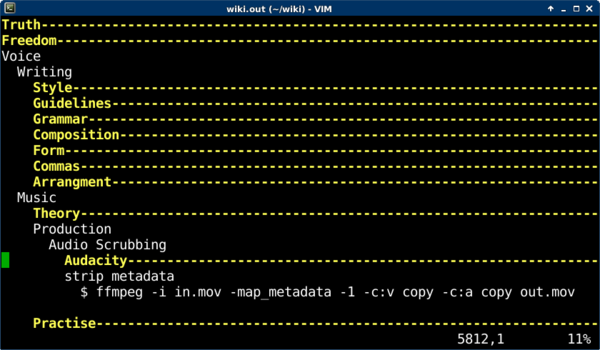
The outliner uses an indentation level of 2 white spaces to create
new levels. You can use vim's default code folding shortcuts to move
throughout your outline, or just use <TAB> to open and close levels.
The most frequent shortcut keys you will use are:
TAB open or close the current fold
zx close all other folds
dd to delete a fold (when it is closed)
[p to paste it at the current indent level (use with dd to move outlines)
Use :help fold-commands in vim for additional shorcuts.
The fold function consumes blank lines. If you need to separate one
fold from another, use a single dot or a dash on a line by itself.
For updates, go to https://rogerkeays.com/vimflowy