Ⅰ. 插件描述
:muscle: Power Assert in Vim scriptⅡ. 基本信息
|
Ⅲ. 安装方法
使用Vundle管理器安装
在你的.vimrc下添加:Plugin 'haya14busa/vital-power-assert':source %
:PluginInstall对于Vundle版本 < 0.10.2,请用上面的Bundle替换Plugin。
使用NeoBundle管理器安装
在你的.vimrc下添加:NeoBundle 'haya14busa/vital-power-assert':source %
:NeoBundleInstall使用VimPlug管理器安装
在你的.vimrc下添加:Plug 'haya14busa/vital-power-assert':source %
:PlugInstall使用Pathogen管理器安装
在终端中运行以下命令:cd ~/.vim/bundle
git clone https://github.com/haya14busa/vital-power-assertⅣ. 文档说明
:muscle: vital-power-assert :muscle:



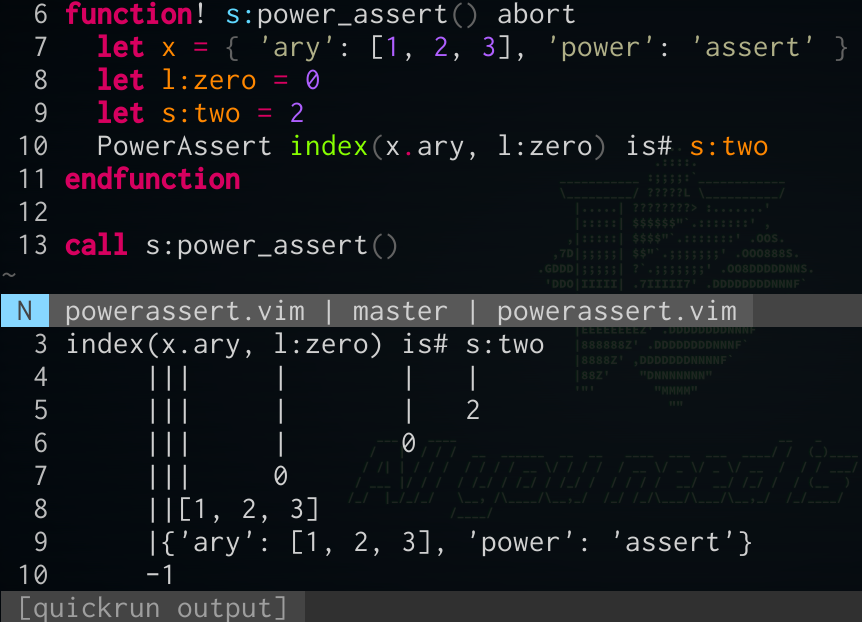
haya14busa/vital-power-assert
provides descriptive assertion messages with assertion function or :command.
let s:V = vital#vital#new()
let s:PowerAssert = s:V.import('Vim.PowerAssert')
let s:assert = s:PowerAssert.assert
execute s:PowerAssert.define('PowerAssert')
function! s:power_assert() abort
  let x = { 'ary': [1, 2, 3], 'power': 'assert' }
  let l:zero = 0
  let s:two = 2
  PowerAssert index(x.ary, l:zero) is# s:two
  " or
  execute s:assert('index(x.ary, l:zero) is# s:two')
endfunction
call s:power_assert()
=>
vital: PowerAssert:
index(x.ary, l:zero) is# s:two
     |||     |       |   |
     |||     |       |   2
     |||     |       0
     |||     0
     ||[1, 2, 3]
     |{'ary': [1, 2, 3], 'power': 'assert'}
     -1
Installation
1. Install |vital.vim|, vital-vimlcompiler, and |vital-power-assert| with your favorite plugin manager.
NeoBundle 'vim-jp/vital.vim'
NeoBundle 'haya14busa/vital-vimlcompiler'
NeoBundle 'haya14busa/vital-power-assert'
NeoBundle 'haya14busa/vital-safe-string'

Plugin 'vim-jp/vital.vim'
Plugin 'haya14busa/vital-vimlcompiler'
Plugin 'haya14busa/vital-power-assert'
Plugin 'haya14busa/vital-safe-string'

Plug 'vim-jp/vital.vim'
Plug 'haya14busa/vital-vimlcompiler'
Plug 'haya14busa/vital-power-assert'
Plug 'haya14busa/vital-safe-string'
2. Embed vital-power-assert into your plugin with |:Vitalize| (assume current directory is the root of your plugin repository).
See |:Vitalize| for more information.
:Vitalize . --name={plugin_name} Vim.PowerAssert3. You can update vital-power-assert with |:Vitalize|.
:Vitalize .4. Please add following lines in your vimrc.
let g:__vital_power_assert_config = {
\   '__debug__': 1
\ }
Usage
You can assert expression with function or command.
Both method support assertion with any scope variable or function like s:var and
they does nothing unless g:__vital_power_assert_config.__debug__ is true.
Function (.assert())
let s:V = vital#vital#new()
let s:PowerAssert = s:V.import('Vim.PowerAssert')
let s:assert = s:PowerAssert.assert
let x = 1
execute s:assert('x == 2')
" =>
"   vital: PowerAssert:
"   x == 2
"   | |
"   | 0
"   1
It execute assertion from given string expression.
If it's true, vital-power-assert does nothing.
If it's false, it throws exception with descriptive graphical message.
If g:__vital_power_assert_config.__debug__ is false (default),
this function does nothing even if assertion will fail, so you can leave
assertion lines in production code if you want.
Command (.define())
let s:V = vital#vital#new()
let s:PowerAssert = s:V.import('Vim.PowerAssert')
execute s:PowerAssert.define('PowerAssert')
let x = 1
PowerAssert x == 2
" =>
"   vital: PowerAssert:
"   x == 2
"   | |
"   | 0
"   1
You can define assertion command with .define() and you that command like .assert().
It's better than .assert() because you don't have to wrap expression with string, but
since it define new command, it annoys your plugin users.
I strongly recommend not to leave assertion command in your plugin.
NOTE: To handle script-local variables, you have to define command in each file (with different name not to overwrite previous one).
I recommend to use the assert command in https://github.com/thinca/vim-themis
Use vital-power-assert in themis
.themisrc
call themis#option('runtimepath', expand('~/.vim/bundle/vital.vim'))
call themis#option('runtimepath', expand('~/.vim/bundle/vital-vimlcompiler'))

let g:__vital_power_assert_config = {
\   '__debug__': 1,
\   '__pseudo_throw__': 0
\ }
test/Example.vimspec
Describe Example
  Before all
    let V = vital#vital#new()
    let PowerAssert = V.import('Vim.PowerAssert')
    execute PowerAssert.define('PowerAssert')
    " or
    let s:assert = PowerAssert.assert
  End

  It throw exception with descriptive graphical message
    let x = { 'ary': [1, 2, 3], 'power': 'assert' }
    let l:zero = 0
    let s:two = 2
    PowerAssert index(x.ary, l:zero) is# s:two
    " or
    execute s:assert('index(x.ary, l:zero) is# s:two')
  End
End
Output
# themis --reporter spec test/Example.vimspec
Example
  [✖] throw exception with descriptive graphical message
      function 114() abort dict  Line:5  (/tmp/va1bids/0)
      vital: PowerAssert:
      index(x.ary, l:zero) is# s:two
           |||     |       |   |
           |||     |       |   2
           |||     |       0
           |||     0
           ||[1, 2, 3]
           |{'ary': [1, 2, 3], 'power': 'assert'}
           -1

tests 1
passes 0
fails 1
Credit
https://github.com/power-assert-js/power-assert
vital-power-assert is inspired by power-assert-js.
https://github.com/ynkdir/vim-vimlparser
Vim script parser written in Vim script which vital-power-assert and vital-vimlcompiler use.
:bird: Author
haya14busa (https://github.com/haya14busa)