Ⅰ. 插件描述
An extension for VS Code which provides support for the OCaml language.Ⅱ. 基本信息
|
Ⅲ. 安装方法
使用Vundle管理器安装
在你的.vimrc下添加:Plugin 'hackwaly/vscode-ocaml':source %
:PluginInstall对于Vundle版本 < 0.10.2,请用上面的Bundle替换Plugin。
使用NeoBundle管理器安装
在你的.vimrc下添加:NeoBundle 'hackwaly/vscode-ocaml':source %
:NeoBundleInstall使用VimPlug管理器安装
在你的.vimrc下添加:Plug 'hackwaly/vscode-ocaml':source %
:PlugInstall使用Pathogen管理器安装
在终端中运行以下命令:cd ~/.vim/bundle
git clone https://github.com/hackwaly/vscode-ocamlⅣ. 文档说明
# If you are seeking for an OCaml debugger vscode extension. Take a look at ocamlearlybird.
Deprecated. Please use this plugin instead.
Features
- Basic syntax highlighting for
*.ml,*.mli,*.mlyand*.mll. ported from textmate - Auto-completion (aka. IntelliSense). powered by ocamlmerlin
- Error check on the fly (aka. Lint). powered by ocamlmerlin
- Show type information on hover. powered by ocamlmerlin
- Peek and goto definition (also provide a symbol list). powered by ocamlmerlin
- Auto indent on your type. powered by ocp-indent
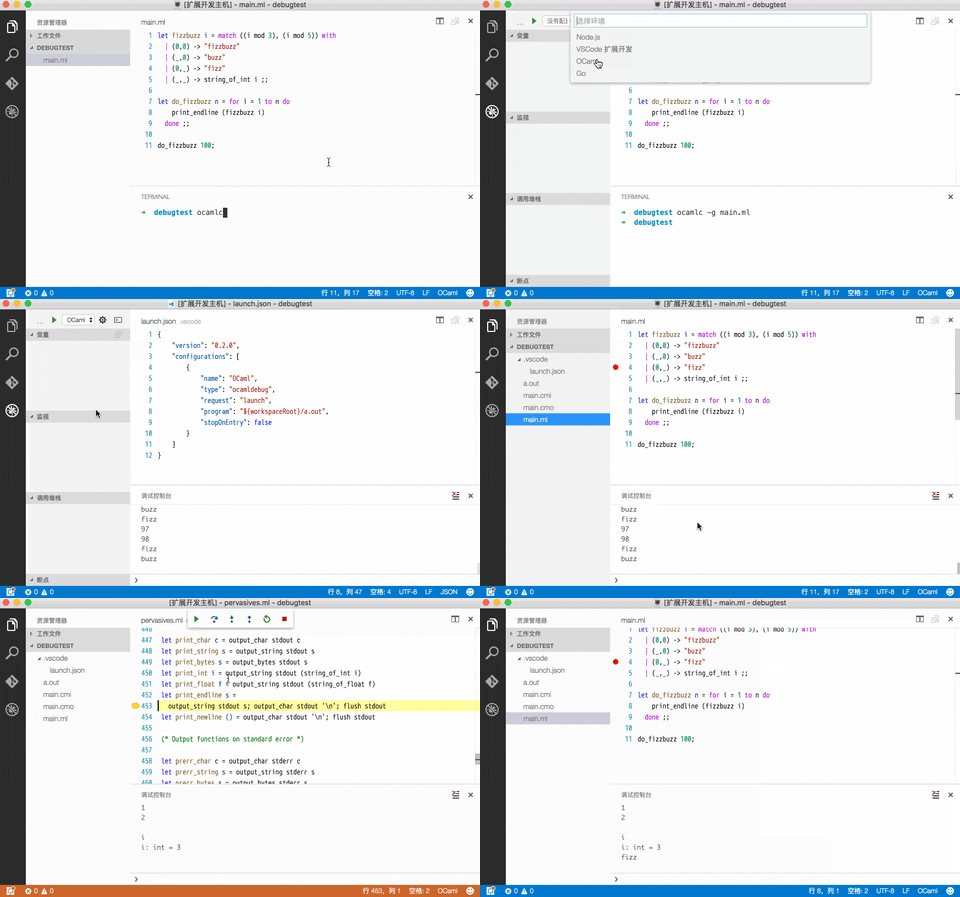
- Debugger integrated. powered by ocamldebug
- UTop integrated. since v0.6.2

Requirements
opam install merlin
opam install ocp-indent
Extension Settings
This extension contributes the following settings:
ocaml.ocpIndentPath: Path to ocp-indent.ocaml.merlinPath: Path to ocamlmerlin.ocaml.replPath.windowsorocaml.replPath.unix: Path to ocaml REPL, eg "ocaml.exe", "utop".ocaml.lintDelay: Time to delay lint when made changes.ocaml.lintOnChange: Do lint when made changes.ocaml.lintOnSave: Do lint when save document.
Tips
1). In VS Code, *.ml is associated to F# by default, You need manually config this in settings.json to make OCaml mode work with *.ml file.
    "files.associations": {
        "*.ml": "ocaml",
        "*.mli": "ocaml"
    }
2). You need build with -bin-annot flag and set build folder in .merlin to get goto definitions works cross files.
3). Did you know vscode-ocaml works perfect with .vscode/tasks.json. Here is an example:
# Makefile
build:
    ocamlbuild -use-ocamlfind main.d.byte
clean:
    ocamlbuild -clean
.PHONY: build clean
// .vscode/tasks.json
{
"version": "0.1.0",
"command": "make",
"showOutput": "always",
"tasks": [{
"taskName": "clean"
}, {
"taskName": "build",
"problemMatcher": "$ocamlc"
}]
}// .vscode/launch.json
{
"version": "0.2.0",
"configurations": [
{
"name": "OCaml",
"type": "ocamldebug",
"request": "launch",
"program": "${workspaceRoot}/main.d.byte",
"stopOnEntry": false,
"preLaunchTask": "build" // Build before launch
}
]
}Known Issues
See https://github.com/hackwaly/vscode-ocaml/issues?q=is%3Aopen+is%3Aissue+label%3Abug
Release Notes
0.6.0
Support launch debug target in Integrated Terminal.
Add a command to switch between module implementation/signature.
Support Find references in file.
UTop integrated.
Add opam switch command.
More Info
0.5.0
Support debug variable paging.
Support highlight occurrences and refactor in file.
More Info
0.4.0
Add Windows debug support.
Add remote debug support.
0.3.0
Add keywords completion.
Add Menhir syntax over OCamlyacc syntax.
0.2.0
Add debugger (ocamldebug) support.
0.1.0
First published version.