Ⅰ. 插件描述
w3m plugin for vimⅡ. 基本信息
|
Ⅲ. 安装方法
使用Vundle管理器安装
在你的.vimrc下添加:Plugin 'yuratomo/w3m-vim':source %
:PluginInstall对于Vundle版本 < 0.10.2,请用上面的Bundle替换Plugin。
使用NeoBundle管理器安装
在你的.vimrc下添加:NeoBundle 'yuratomo/w3m-vim':source %
:NeoBundleInstall使用VimPlug管理器安装
在你的.vimrc下添加:Plug 'yuratomo/w3m-vim':source %
:PlugInstall使用Pathogen管理器安装
在终端中运行以下命令:cd ~/.vim/bundle
git clone https://github.com/yuratomo/w3m.vimⅣ. 文档说明
w3m.vim
Description
w3m.vim is a plugin on vim for w3m that is a console web browser.
Requirements
w3m.vim requires w3m to be installed.
If w3m is not in your $PATH, you can specify its location in
your vimrc file.
let g:w3m#command = 'C:\w3m.exe'
Usage
Open URL:
input :W3m [url or keyword]
Search Mode:
input :W3m search-engine-name keyword

[search-engine-name]
alc              : space alc
android          : Android SDK
as3              : ActionScript 3.0
go               : Go language
google           : Google
java             : JDK6
man              : man
msdn             : MSDN
perl             : PERL
php              : PHP
python           : Python
rfc              : RFC
ruby             : Ruby
wikipedia        : Wikipedia
yahoo            : Yahoo
yahoodict        : Yahoo dictionary
local            : Local HTML file
Open URL At New Tab:
input :W3mTab [url or keyword]
Open URL At Split Window:
input :W3mSplit [url or keyword]
Open URL At Vertical Split Window:
input :W3mVSplit [url or keyword]
Open Local Html File
input :W3m local html-file-path
Close:
input :W3mClose
or
input :bd
Copy URL To Clipboard:
input :W3mCopyUrl
Reload Current Page:
input :W3mReload
Change Url:
input :W3mAddressBar
Show External Browser:
input :W3mShowExtenalBrowser
Syntax Off:
input :W3mSyntaxOff
Syntax On:
input :W3mSyntaxOn
Change User-Agent
input :W3mSetUserAgent (w3m|Chrome|Firefox|IE6|IE7|IE8|IE9|Opera|Android|iOS|KDDI|DoCoMo|SoftBank)
Open from history:
input :W3mHistory
Clear history:
input :W3mHistoryClear
Settings
Highlight:
highlight! link w3mLink      Function
highlight! link w3mLinkHover SpecialKey
highlight! link w3mSubmit    Special
highlight! link w3mInput     String
highlight! link w3mBold      Comment
highlight! link w3mUnderline Underlined
highlight! link w3mHitAHint  Question
highlight! link w3mAnchor    Label
Use Proxy:
let &HTTP_PROXY='http://xxx.xxx/:8080'
Set External Browser:
let g:w3m#external_browser = 'chrome'
Set Home Page:
let g:w3m#homepage = "http://www.google.co.jp/"
Specify Key Of Hit-A-Hint:
let g:w3m#hit_a_hint_key = 'f'
Specify Default Search Engine:
let g:w3m#search_engine =
    \ 'http://search.yahoo.co.jp/search?search.x=1&fr=top_ga1_sa_124&tid=top_ga1_sa_124&ei=' . &encoding . '&aq=&oq=&p='
Disable Default Keymap:
You set as follows if you do not want to use default keymap.
let g:w3m#disable_default_keymap = 1
Disable Vimproc:
You set as follows if you do not want to use vimproc.
let g:w3m#disable_vimproc = 1
Toggle Link Hovering
By default links under the curosr are highlighted. Turn off with one of the following
unlet g:w3m#set_hover_on
let g:w3m#hover_set_on = -1
" a value less than or equal to 0 will turn it off

" set delay time until highlighting
let g:w3m#hover_delay_time = 100
Search Engine Localization:
Search engines are loaded from autoload/w3m/search_engines/YOUR_LOCALE/, and then from the "global" locale
unless a localized search engine of the same name exists. Your locale defaults to v:lang, which vim sets
based on your $LANG environment variable.
To specify a custom locale for loading search engines:
let g:w3m#lang = 'en_US'
Specify path to history file:
let g:w3m#history#save_file = $HOME.'/.vim_w3m_hist'
Default Keymaps
- <CR> Open link under the cursor.
- <S-CR> Open link under the cursor (with new tab).
- <TAB> Move cursor next link.
- <s-TAB> Move cursor previous link.
- <Space> Scroll down.
- <S-Space> Scroll up.
- <BS> Back page.
- <A-LEFT> Back page.
- <A-RIGHT> Forward page.
- = Show href under the cursor.
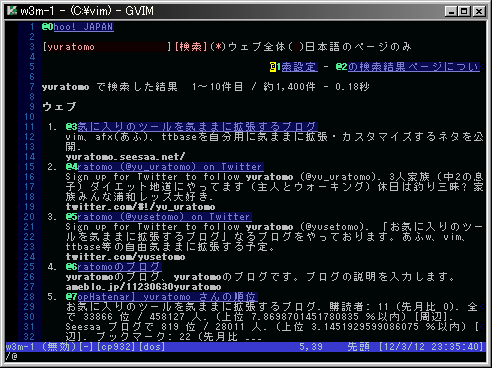
- f Hit-A-Hint.
- s Toggle Syntax On/Off.
- c Toggle Cookie On/Off.
- <M-D> Edit current url.
ScreenShots
Sample Image1
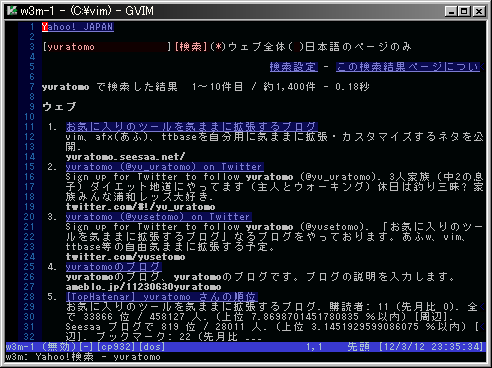
Hit-A-Hint
HISTORY
v1.3.1 by yuratomo
21 fix local href
v1.3.0 by yuratomo
- Support select element.
v1.2.0 by yuratomo
- Add search-engine for local html file.
v1.1.1 by yuratomo
- Fix errors that occur during hover hilighting.
v1.1.0 by yuratomo
- Hover links highlighting. (__thanks dat5h__)
- Fixed default history file (__thanks nise-nabe__)
- Fixed search_engine/rfc.vim
v1.0.0 by yuratomo
- Add :W3mHistory
- Add :W3mHistoryClear
- Add syntax/w3m.vim
- Add w3m#api#getHistoryList() function
- Add w3m#api#openHistory() function
v0.8.3 by yuratomo
- Fixed bug when w3m#EditAddress()
- Add search-engine of vims (www.vim.org/scripts)
- Modify post logic
v0.8.2 by yuratomo
- Add :W3mSplit
- Add search-engine of 2ch
- Should be buffer local commands.
- Fixed bug when check box is pressed.
- Debug and tool function move to another source.
v0.8.1 by yuratomo
- modify search engine name. (java -> jdk)
- modify msdn's page-filter logic.
v0.8.0 by yuratomo
- Anchor Correspondence
- add Anchor-Highlight (w3mAnchor)
v0.7.0 by yuratomo
- Search by specifying search engine (#4)
- Add page-filter function
v0.6.0 by yuratomo
- add W3mSetUserAgent
- add cookie settings.
- w3m#option_use_cookie
- w3m#option_accept_cookie
- w3m#option_accept_bad_cookie
- add w3m#ToggleSyntaxOnOff() (default key is 's')
- add w3m#ToggleUseCookie() (default key is 'c')
- add default keymap : nmap <m-d> <Plug>(w3m-address-bar)
v0.5.2 by yuratomo
- bug fix 1 (nmap without <buffer>)
- bug fix 2 (can not execute hit-a-hint)
v0.5.1 by yuratomo
- corresonds to vimproc
- divided int plugin/w3m.vim and autoload/w3m.vim
- Change the way the map.
v0.5.0 by yuratomo
- neglect needless tag. (speed up analysis time)
v0.4.5 by yuratomo
- add :W3mClose
- add :W3mSyntaxOn / :W3mSyntaxOff
- add g:w3m#hit_a_hint_key
- Solution of the character code by &encoding