Ⅰ. 插件描述
An adjustable contrast color scheme for GUI and 8, 16 or 256 color terminals.Ⅱ. 基本信息
|
Ⅲ. 安装方法
使用Vundle管理器安装
在你的.vimrc下添加:Plugin '/xterm16-vim':source %
:PluginInstall对于Vundle版本 < 0.10.2,请用上面的Bundle替换Plugin。
使用NeoBundle管理器安装
在你的.vimrc下添加:NeoBundle '/xterm16-vim':source %
:NeoBundleInstall使用VimPlug管理器安装
在你的.vimrc下添加:Plug '/xterm16-vim':source %
:PlugInstall使用Pathogen管理器安装
在终端中运行以下命令:cd ~/.vim/bundle
git clone https://github.com/vim-scripts/xterm16.vimⅣ. 文档说明
An adjustable contrast fully customisable color scheme for GUI & 8, 16 or 256 color terminals, designed to minimise eyestrain. The main features are:
- Four color maps:
    'allblue'   : A colormap with most foreground colors blueish (to
              minimize contrast etc.)
    'soft'      : A colormap with foreground colors of similar
              intensities to reduce eyestrain.
    'softlight' : A colormap with a bright background (for web
              hosting etc.)
    'standard'  : A colormap for use on terminals with only 8/16
           colors.
  The first three colormaps will work only on 256 color capable
  terminals or the GUI. The last one will work anywhere.

- Adjustable brightness / contrast. Lets you easily adjust the
  brightness and contrast settings. Extremely useful (for instance)
  when there is a glare on your monitor, or for long late dim light
  dim light late at night :)

- Terminal and GUI support. If you use xterm, rxvt or mrxvt (compiled
  with 256 colors), then the colors on your terminal will be almost
  identical to your GUI colors. On any other terminal emulator, a few
  scripts (included) and parts of this help are designed to help you
  get the colors you want.

- LCD / CRT Monitor support. The color response of LCD and CRT
  monitors is pretty different. This color scheme has an option to
  adjust colors on CRT monitors to give a similar appearance.

- Customizable colors. If you find any color unreadable or ugly, you
  can change it easily. When adjusting the brightness, your custom
  colors will be suitably adjusted too!

- Customizable highlighting groups. If you don't like the highlighting
  of any particular group, you can change it to suit your needs. This
  is useful for instance if you want the cursor to be brighter than
  everything else / etc.
The first screenshot below is also the complete documentation and description.
Screenshots:
http://www.math.cmu.edu/~gautam/per/opensource/xterm16/xterm16-doc.html [Complete documentation and description]
http://www.math.cmu.edu/~gautam/per/opensource/xterm16/xterm16-src.html [HTMLised source]
http://www.math.cmu.edu/~gautam/per/opensource/xterm16/c-source.html [HTMLised C code]
http://www.math.cmu.edu/~gautam/per/opensource/xterm16/timestamp-doc.html [Another VIM help file]
http://www.math.cmu.edu/~gautam/per/opensource/xterm16/email.html [HTMLised email]
http://www.math.cmu.edu/~gautam/per/opensource/xterm16/mrxvt.png [Transparent background in mrxvt]
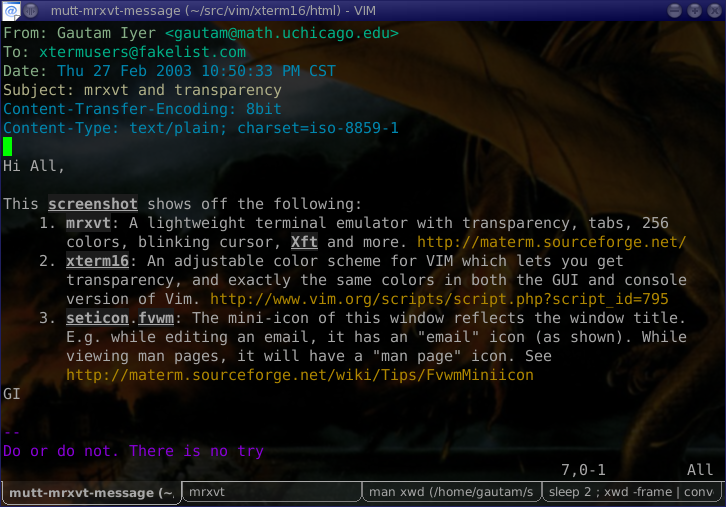
(On javascript enabled 'good' browsers, you should be able to adjust the Brightness, colormap and monitor type in each of the HTMLised screenshots above.)